
ChatGPT Atlas: How the AI Browser Can Save Insurance Agents Hours Every Week
OpenAI's new Atlas browser puts a live AI assistant on every webpage you visit. Here is what that means in practice for insurance agencies doing research-heavy work all day.

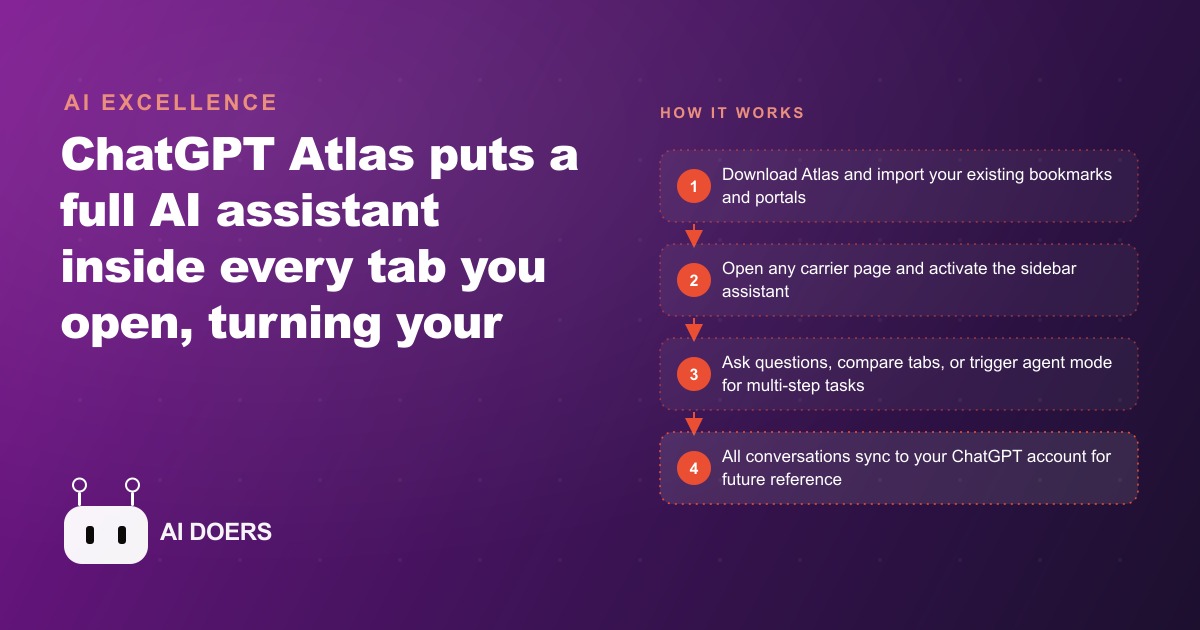
ChatGPT Atlas is a standalone web browser built by OpenAI with AI woven into every layer, and the clearest way to understand what that means is to see what it does that a standard browser simply cannot. I am Madhuranjan Kumar, and below are the eight capabilities that actually change how a research-heavy or content-heavy team works day to day.
1. Page summaries that arrive before you finish reading
Open any webpage, click the Ask ChatGPT button in the sidebar, and hit Summarize. A structured breakdown of the page content appears in seconds. You did not copy a word or paste anything. The browser already knows what is on the page because the AI has direct access to the live content, not a cached version from training data. For anyone whose job involves reading a lot of web pages quickly, this alone changes the pace of a workday.
The summary is not a headline extraction. It is a structured digest that captures the main claims, the supporting evidence, and the key distinctions worth noting. If the page is a policy document, the summary flags the sections that differ from the standard version. If the page is a competitor's pricing page, it pulls out the tier structure and any notable inclusions. The quality is high enough that for most informational reads, you only need to open the full page when the summary raises a question.
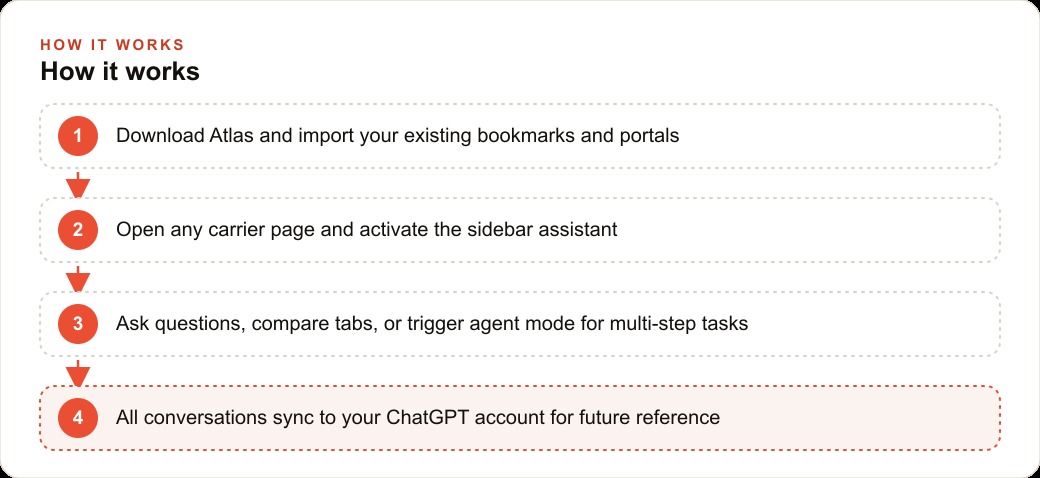
2. A chat window that already knows the content of the tab you are on
Beyond summaries, the sidebar allows full back-and-forth conversation about the page. You can ask follow-up questions, request clarification on a specific section, or ask the AI to explain a technical term used on the page in plain language. This is different from copying text into a separate ChatGPT window because there is no copy-paste step and there is no context loss. The model is reading the live page as you converse.
For insurance or financial services professionals who spend large parts of the day reading policy documents, rate filings, and compliance guidelines, this means being able to ask specific questions about the document in front of you and getting direct answers with clause references. A question like does this policy cover subcontractor injuries becomes a ninety-second lookup rather than a fifteen-minute manual search.
The chat also works on YouTube videos. Open any video in Atlas, activate the sidebar, and ask what was covered at a specific timestamp or request a full topic summary without watching this breakdown. The AI can read the transcript and answer directly, which means long-form content becomes searchable and skimmable without sitting through the whole thing.
3. Side-by-side comparisons that used to take a spreadsheet
Open two pages in separate tabs with similar content: two competing software pricing pages, two carrier policy documents, two product listings. Ask the Atlas sidebar to compare what it knows from both tabs. It returns a structured comparison with the key differences called out clearly. The analysis that previously required opening a separate document, copying text from each tab, and manually building a comparison table now happens in one prompt.
For anyone who regularly compares options, insurance plans, vendor quotes, or software features, the time savings here are substantial. A twenty-minute comparison task becomes a five-minute one. A Google Ads manager reviewing two competitor landing pages for positioning intelligence gets a structural analysis in the time it used to take to read the first one.
4. Agent mode that clicks and fills forms while you watch
With the paid plan, Atlas can take control of the browser. In agent mode, it navigates to pages, clicks buttons, fills out forms, and completes multi-step web tasks while you watch or do something else. This is not a browser extension overlaying AI on top of Chrome; it is a browser built for this from the ground up.
Agent mode is slower than a human doing the same clicks, so it is best suited for tasks you can run in the background while focusing elsewhere. The right use case is high-volume, repetitive web work: entering the same information across multiple portals, checking a list of URLs for specific content, filling out a standard form across multiple vendors. Set it running, do something else, and review the results when it finishes.
5. Browser memory that retrieves research from weeks ago
With browser memory enabled, Atlas can answer questions about your own browsing history. You can ask where you saw a particular document, which site you visited last week about a specific topic, or what the URL was for a page you spent time on three days ago. The browser searches your recent history and surfaces the result.
This is worth considering carefully before enabling, because browser memory is a privacy tradeoff. The feature makes sense for personal research and productivity work where browsing history is entirely your own and contains nothing confidential. It makes less sense for client-facing work where browsing activity might include sensitive materials. The toggle for browser memory is separate from the setting that controls whether your usage contributes to model training, and it is worth setting both intentionally during the initial setup.
6. YouTube videos that answer specific questions in seconds
The Ask YouTube integration means you can get structured answers from any video without watching it. You ask a specific question, the AI reads the transcript, and it returns the answer with the timestamp where it was said. For research, training, and competitor analysis using video content, this collapses the time required to extract information from long-form material.
This has direct applications for any business using video content for learning or for staying current with industry developments. A professional who monitors a few YouTube channels in their field can skim a week's worth of video content in a fraction of the time by asking the sidebar for the key points from each one rather than watching each video fully.
7. Tab cleanup on a voice command
Atlas can manage your tabs on instruction. Tell it to close all the tabs you are done with, remove duplicates, or clear out research sessions you have finished. For anyone who ends the day with thirty open tabs, this is a small but genuine quality-of-life improvement. It is also a signal of the broader direction: the browser as a workspace where you give instructions and the environment responds, rather than a passive container for your clicking.
For teams sharing a browser setup or working in a specific research context, the ability to manage tab state through language rather than clicking is part of the shift toward treating the browser as a controlled environment rather than an open accumulation of windows.
8. Every conversation saved to the same ChatGPT account
Every Atlas conversation is automatically saved to your chatgpt.com account. You can continue a research thread on any other device, share a conversation with a colleague, or return to a specific analysis you ran two weeks ago. There is no separate login, no separate history to manage. The Atlas browsing and research work lives in the same place as your regular ChatGPT conversations.
This continuity is underrated as a professional tool. The research session that started on Atlas on a desktop becomes accessible on a phone or a laptop, and the context from that session is available when you pick up a related conversation later. For teams where multiple people research the same topics, sharing a specific Atlas conversation is as straightforward as sharing a ChatGPT conversation link.
Atlas is available for download at chat.openai.com/atlas for Mac, with Windows and mobile versions coming later. The sidebar, summaries, and tab-based chat work on the free plan. Agent mode requires the Plus or Pro paid plan. For any business where significant work time goes into reading, comparing, and synthesizing information across web pages, the right test is a focused hour with the sidebar on the pages you visit most often. Build from what you find useful there before deciding how much of your workflow to route through it. ## A worked example: one hour with an insurance agency
The practical test for Atlas is to take the five tasks your team does most repetitively in a standard browser and run each one through the Atlas sidebar. For an insurance agency that processes personal lines quotes all day, the test hour looks like this.
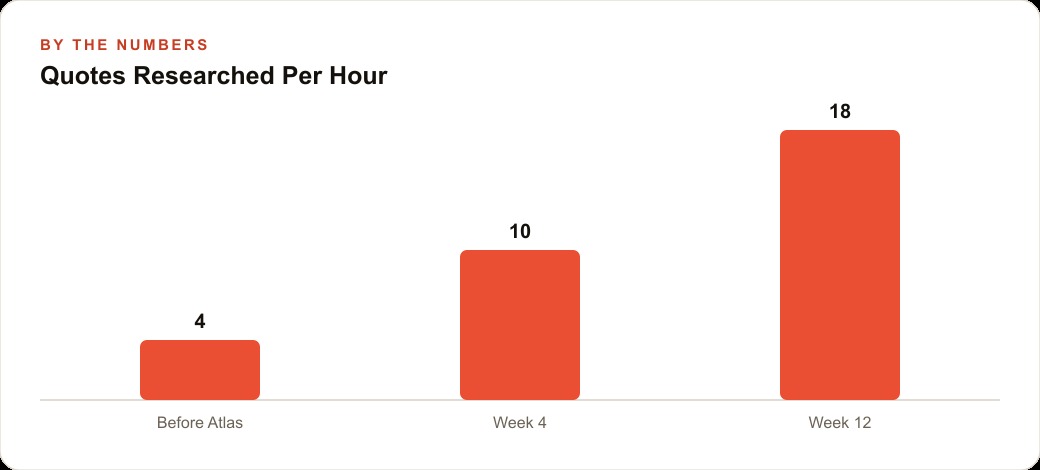
The agency opens the first carrier portal in Atlas and navigates to the rating section. They enter a prospect's details and receive a quote for bundled homeowners and auto. Instead of copying the numbers into a spreadsheet, they open the sidebar and say: summarize this quote including dwelling coverage, personal property limit, deductible, annual premium, and any notable exclusions or endorsements applied. Thirty seconds later, a clean summary appears. They navigate to the second carrier portal, enter the same prospect details, receive the second quote, and ask the sidebar: compare this quote to the one from the previous tab and give me a side-by-side breakdown of coverage limits, deductibles, and annual premium for both, with the differences highlighted. Two minutes for both quotes summarized and compared, rather than the twelve minutes the manual version takes.
The second test is a policy review. A commercial client calls asking whether a specific type of claim is covered under their general liability policy. The agent opens the 48-page policy PDF in Atlas, activates the sidebar, and asks: does this policy cover product liability claims for items manufactured off-premises, and what exclusions apply? The sidebar reads the full document and returns the answer with the relevant clause numbers and page references. Ninety seconds versus fifteen minutes of manual document scanning.
The third test is email drafting. After a weather event, three clients need clear next-steps emails for their claims. The agent opens the carrier's claims procedure page, asks the sidebar to draft a plain-English email explaining those steps for a homeowner filing their first claim, and uses the result with minor edits. Four minutes for three personalized emails versus twenty minutes writing each one from scratch.
Total time in the test hour: roughly eight tasks completed that would have taken three hours manually. Time savings: approximately two hours in one hour of practice. That ratio, not counting the initial learning time to build the habit, is what the steady-state time savings looks like for a team that uses Atlas as their primary browser for research-heavy work. At four agents, each saving two hours per day, the practice recovers 40 hours per week of capacity that currently goes to manual research and drafting. The people-hours equivalent of adding a full-time research staff member at zero additional headcount cost.
The discipline that turns this potential into actual savings is the standard prompt library. Every agency has five to ten research task types that repeat constantly: quote comparisons, coverage questions, claims process explanations, competitive analysis on competing carriers, compliance lookups for new products. Writing a standard prompt for each of these, tested until it reliably produces a useful output format, and saving them somewhere the whole team can access, is the work that converts the tool from occasionally useful to structurally important. Build the prompt library in the first two weeks and the time savings compound from there.
The practice that makes Atlas durable in a team environment is the shared prompt library. When one team member discovers a prompt sequence that reliably produces a useful output for a common task type, that sequence should be documented and made available to everyone. The individual discovery becomes a team standard. Over three months, a team that systematically captures and shares their best prompts builds a workflow advantage that is specific to their task types and their clients. No competitor can replicate that advantage from the outside, because it is built from the accumulated experience of doing the actual work.
The metric worth tracking in the first month of Atlas use is not time saved on individual tasks, which is difficult to measure precisely, but rather task completion rate: the percentage of research tasks that are completed during the session they are started rather than deferred to later. For most businesses, a significant fraction of research tasks get started, produce insufficient progress, and get abandoned or deferred because the manual process hits a friction point. Atlas reduces those friction points enough that tasks that previously got deferred get completed on the first attempt. Completed research drives better decisions faster. That is the business outcome worth measuring, and it becomes visible within four weeks of consistent use.
That is exactly what we do at AI DOERS. Book a private 30-minute call with Madhuranjan Kumar and we will map the fastest path to it for your specific business.
Book your call →
Madhuranjan Kumar
Madhuranjan Kumar brings 20 years of performance-marketing experience and has managed over $200 million in Facebook ad spend for brands across the United States and beyond. His expertise spans the full modern marketing stack: Meta, Google Ads, TikTok, email automation, CRM, and the websites that hold it together. At AI DOERS he turns that track record into lead-generation systems for businesses across every industry.