
ChatGPT Atlas: What an AI Browser That Acts For You Means for Your Business
OpenAI's Atlas browser searches, remembers, and completes tasks across the web on your behalf. Here is how a small team can use that, with a worked example.

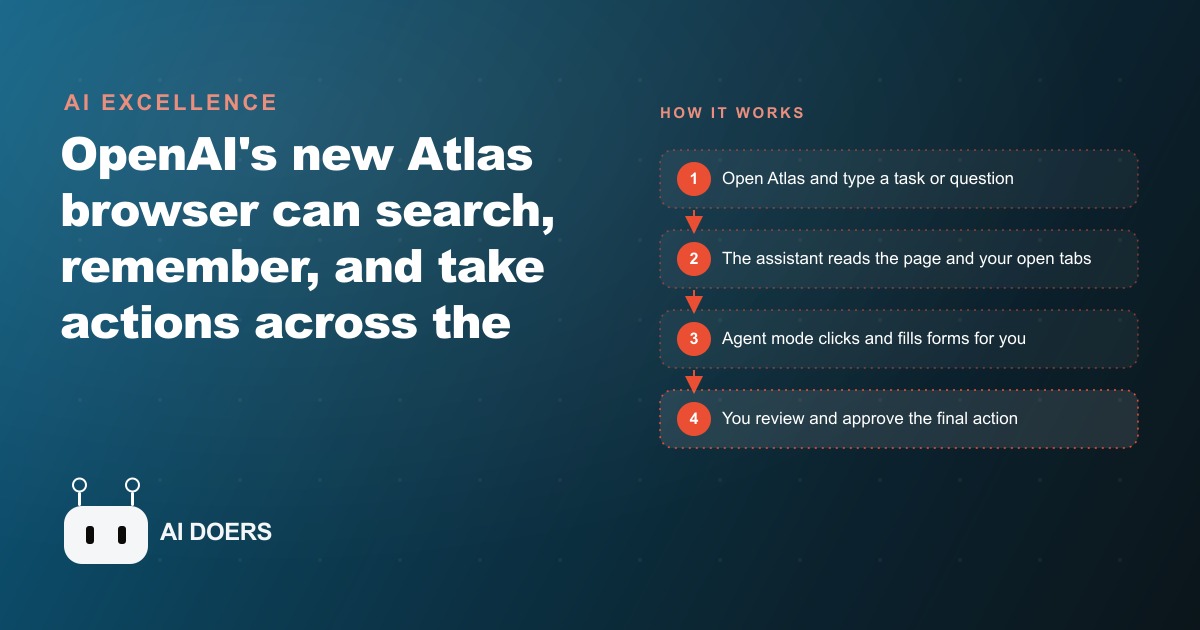
OpenAI released a web browser called ChatGPT Atlas that puts an AI assistant on every page, learns from what you do over time, and can take control of the browser to complete multi-step tasks on your behalf. I am Madhuranjan Kumar, and the practical question is not what the tool can theoretically do. It is how a small team actually deploys it without creating new risks in the process of trying to save time. Here is the path that produces results.
Map the repetitive online work your team does by hand each week
Before the tool goes near any real task, the most valuable hour you can spend is listing the specific browser-based work your team currently does by hand. Not at the level of "research" or "data entry," but at the level of the specific sites visited, the specific fields filled, and the specific outputs produced. An agency team that monitors competitor pricing across five platforms every Wednesday morning. A property manager who pulls maintenance requests from three different vendor portals each Monday. A recruiter who checks five job boards daily and updates a tracker with new postings. These are real, repeatable, describable tasks, and describing them precisely is the prerequisite for delegating them to an agent that performs exactly what is described.
This mapping exercise also identifies the tasks that are not good candidates for agent automation: anything where the definition of "done" is subjective, anything that requires judgment calls the agent cannot be given rules for in advance, and anything where a confident wrong action is more damaging than the time cost of doing it manually. Sorting these into two lists before touching the tool avoids the most common deployment mistake, which is handing the agent something ambiguous and spending more time reviewing and correcting its output than the task would have taken to do directly.
Start with the in-page assistant before touching agent mode
The in-page assistant is the lower-stakes introduction to the tool, and it is the right place to build confidence before using agent mode. The assistant can summarize the page you are currently reading, answer questions about it, extract specific information from it, and improve draft text you are composing inside a web form or email client. None of those capabilities require the agent to take actions on your behalf, which means none of them carry the risk of an unwanted form submission or an unintended click.
A week of using the in-page assistant on your normal browsing tasks tells you how well the tool reads and interprets the specific sites your team visits regularly. Some sites format their content in ways that are easy for the assistant to parse and extract from. Others use layouts that make the content harder to interpret accurately. Knowing which sites in your workflow produce reliable assistant outputs and which require more careful prompting is information that makes the agent mode deployment much smoother, because the agent relies on the same page-reading capability operating autonomously.
For businesses using Atlas as part of a broader Google Ads management workflow, the in-page assistant is immediately useful for reading and summarizing campaign performance pages without manual copy-paste, comparing two ad group structures side by side across separate tabs, and improving the text of ad copy drafts in real time. These are tangible time savings that require no agent autonomy and carry no execution risk.
Write a precise task brief before dispatching the agent
The quality of an agent task is determined before the agent starts. A precise task brief that specifies exactly what sites to visit, what information to collect, what format to deliver it in, and what to do when a page is unavailable produces a reliable, reviewable result. A vague task like "research my competitors" produces an inconsistent result that requires as much correction as if the task had been done manually.
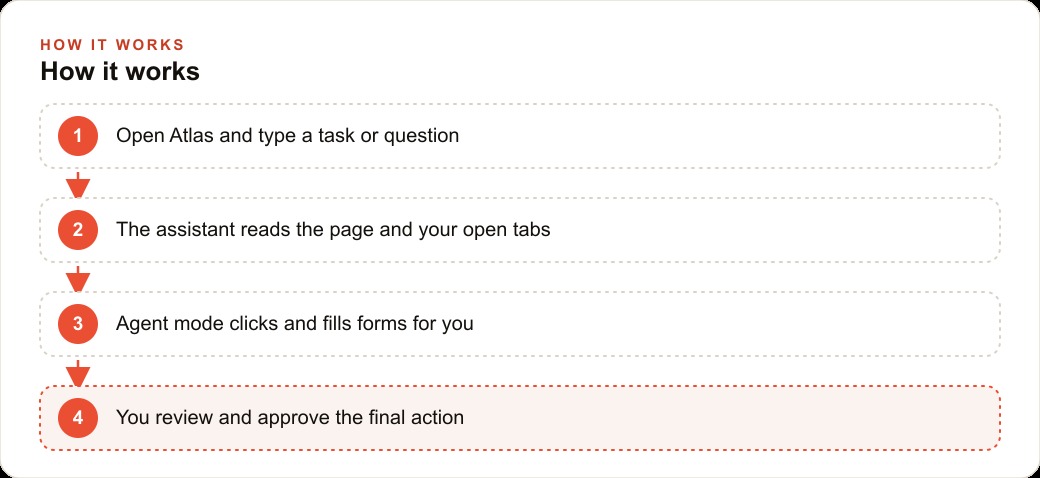
The brief format that works consistently follows this structure: the specific sites in sequence, the specific fields to extract from each, the output format (a table, a document, a list), the action to take if a specific page loads an error, and the explicit instruction not to take any action that modifies data or triggers a purchase without pausing for approval. That last element is not optional. It is the guardrail that keeps an autonomous browser agent from completing a consequential action before a human has reviewed it.
Writing a brief this way takes three to five minutes and removes most of the ambiguity that causes agents to make judgment calls you did not intend to delegate. Three minutes of brief writing is consistently cheaper than fifteen minutes of output correction.
Set firm guardrails on what the agent can complete without approval
Atlas's design includes a pause mechanism at consequential actions: purchases, form submissions with financial implications, and actions that send information outside the current session. The critical decision is to establish which of your specific task categories fall into which bucket before running anything at scale.
Read-only research tasks, tasks that extract and format information without modifying anything, are the right place for unsupervised agent runs after you have validated the output quality over several test sessions. Tasks that submit forms, send communications, or initiate transactions must have an explicit human approval step at the point of action, not as an afterthought review at the end. The difference between reviewing a completed task and approving each action at the point it is taken is significant for risk management. Many agent errors are irreversible once the action completes. A paused agent waiting for approval can be corrected before the error happens.
For a business that uses its CRM and website stack to track every customer interaction, agents that gather data from external sources and would normally require manual entry into the CRM are among the clearest use cases. The agent gathers, a human reviews, and the CRM entry happens after review rather than directly from the agent. That workflow captures the time savings of agent data gathering while maintaining the human quality check before anything enters the system of record.
Build the habit on one workflow before expanding
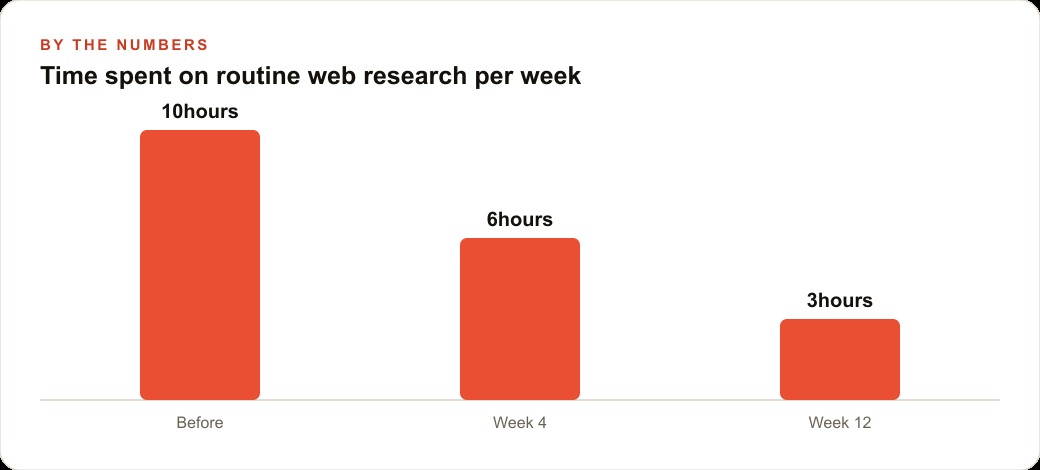
The businesses that get the most value from Atlas are not the ones that try to automate everything in the first week. They are the ones that pick one repetitive browser workflow, run the agent on that workflow for a month, measure the actual time savings versus the oversight time required, and use that data to decide which workflow to add next.
Starting with one workflow builds the team's intuition for what constitutes a well-written task brief, what the appropriate oversight level is for different task types, and what the realistic time savings look like versus the theoretical ones. That intuition is what enables confident expansion to more complex tasks without a proportional increase in oversight burden.
For a real estate agency where agents spend significant time gathering property details, comparable sales, and neighborhood data from multiple platforms before each client meeting, the illustrative math on one automated workflow looks like this: if gathering comparable sales currently takes thirty minutes per property and a properly configured agent task reduces that to five minutes of agent run time plus ten minutes of review, the reclaimed time per property is fifteen minutes. Over ten properties per week, that is two and a half hours per agent per week. Over a working year, that is over a hundred and twenty hours per agent, recovered from a single workflow automation and available for client meetings, relationship building, or listing presentations that directly drive commission.
The expansion from one workflow to three or four happens naturally once the team has reliable outputs from the first. Each new workflow starts with the same mapping and brief-writing process, benefits from the team's accumulated understanding of what makes agent tasks reliable, and produces compounding time savings that grow as the suite of automated workflows expands. The businesses that build this habit carefully and methodically will have a meaningful efficiency advantage over those that either avoid the tool entirely or use it carelessly and spend more time correcting mistakes than the automation saves.
That is exactly what we do at AI DOERS. Book a private 30-minute call with Madhuranjan Kumar and we will map the fastest path to it for your specific business.
Book your call →
Madhuranjan Kumar
Madhuranjan Kumar brings 20 years of performance-marketing experience and has managed over $200 million in Facebook ad spend for brands across the United States and beyond. His expertise spans the full modern marketing stack: Meta, Google Ads, TikTok, email automation, CRM, and the websites that hold it together. At AI DOERS he turns that track record into lead-generation systems for businesses across every industry.