
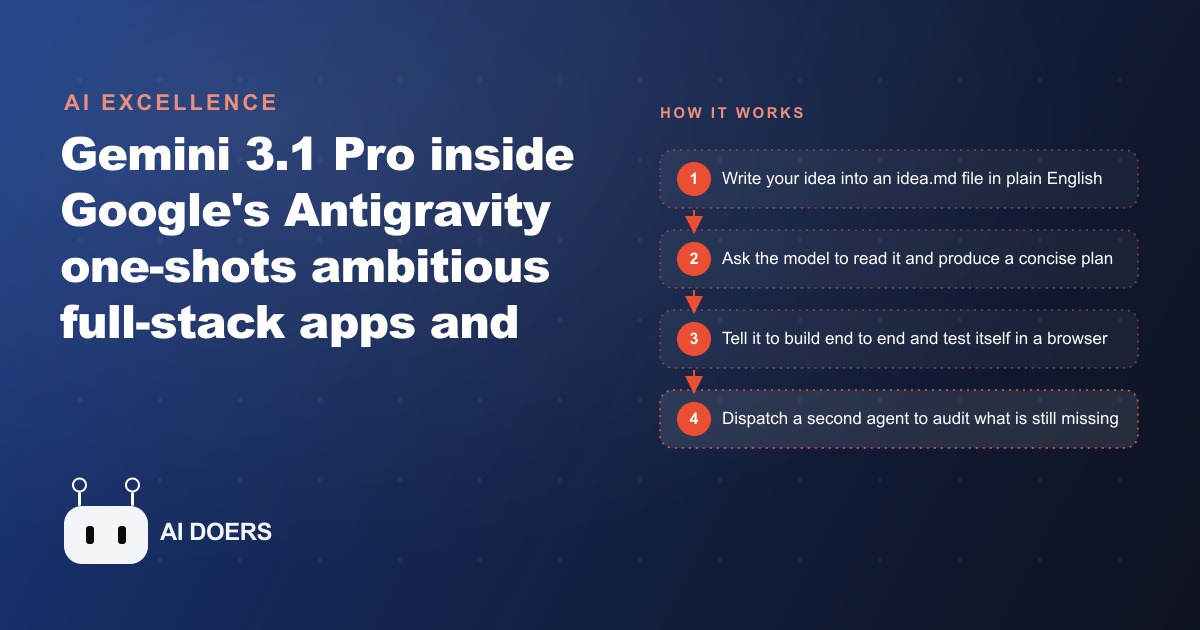
Can Gemini 3.1 Pro in Antigravity Really Build a Full App From One Prompt?
Close to it. Inside Google's Antigravity IDE, Gemini 3.1 Pro plans and builds a live data dashboard from two plain-English prompts, then opens a browser to test and debug itself. For a small business, that means real internal tools without a dev team.

The viral demo is real. The lesson everyone is taking from it is wrong.
Yes, Gemini 3.1 Pro inside Google's Antigravity really can plan and build a live data dashboard from two plain-English prompts, then open a browser and test itself. I have watched it, the benchmarks back the hype, and it is genuinely impressive. And yet the conclusion racing across the internet, that AI now builds whole apps from a single prompt and developers are obsolete, is the wrong thing to walk away with. I am Madhuranjan Kumar, and I want to argue the opposite: the useful lesson from this demo is not "one prompt builds an app," it is "match the model to the job and beware the lock-in," because the fine print quietly undercuts the fantasy.
Let me stake the position plainly. The demo is a real capability jump. But if a small business owner watches it and concludes they can fire up any AI and one-shot a production app, they will lose a weekend to false starts. The reality is narrower, more specific, and honestly more useful once you accept it.
Benchmarks are not the reason to care
The benchmark numbers are the part of the story that gets quoted and the part that matters least to your business. Gemini 3.1 Pro scores 77 percent on ARC-AGI 2 abstract reasoning, 94 percent on GPQA Diamond science questions, and 85 percent on the Browse Comp agentic search test, sitting ahead of Opus and GPT-5.2 on all three. Impressive, and almost irrelevant to whether it can build the small internal tool you actually need. Abstract reasoning scores do not tell you whether the model will wire up a working quote form.
The reason to care is more grounded: the model is genuinely strong at front-end and design work, and it landed number one on a design leaderboard for SVG output by a wide margin, credited to Google's multimodal training data from search, video, and Android. That is the practical edge. Not that it can reason like a scientist, but that it makes things that look good and lay out cleanly, which is exactly what a non-technical owner cannot do alone. Judge the tool by the artifact, not the leaderboard.
The autonomy is the actual news
Here is where I will concede the demo is a real leap, because the autonomy is the part worth being excited about. The agent does not just spit out code and stop. It opens a browser on its own, navigates to a local address, and verifies that the running app actually works, with a visual cue signaling when it is driving the browser itself. When the 3D globe in the demo looked wrong, the agent ran commands to download proper textures and remapped the sphere until it looked right. It debugged its own output without being told exactly how.
On top of that, Antigravity has an agent manager that lets you dispatch a second agent to audit what is still missing while the first one keeps building. That is a meaningful workflow change. Instead of babysitting one thread and manually checking every result, you supervise a small team of agents. The honest headline is not "AI writes code," we have had that for a while. It is "AI now tests and corrects its own code and coordinates with a second agent," which moves the human from typist to supervisor. That is the real story the benchmark chatter buries.
The caveat the hype conveniently skips
Now the part that breaks the fantasy, and the reason my contrarian take holds. Gemini 3.1 Pro was tuned for Antigravity, and it underperforms elsewhere. Drop it into other agentic tools and it has been seen to crash and spiral. This is not a universal super-model you can point at any project. It is a model that shines in one specific home Google built for it. That is lock-in, and pretending it is not is how people end up frustrated.
The same demo makes the case that you should not be loyal to any single model either. The people building these tools are blunt about it: one model is rated best for general agent work, another for deep technical coding, and Gemini for front-end and one-shot builds. In other words, even the enthusiasts are telling you to switch tools by task. So the popular takeaway, "just use this one and build anything," contradicts the advice of the very people demonstrating it. The right mental model is a small toolbox, not a single hammer.
What this really means for a small business
Strip away the hype and the actual opportunity is smaller and better than "replace your developers." It is this: any business that always wanted a custom internal tool but could never justify hiring a developer can now build the small, specific things that make daily operations smoother. A booking tracker, a quote calculator, a lead intake form that feeds a clean weekly view. You are not launching the next software company. You are spinning up utilities that used to require a contractor and a two-week wait.
And because Gemini is strongest at front-end and design, it fits a very particular need: making the interface look professional. That is precisely the part a non-technical owner cannot fake. The backend logic of a simple tool is often trivial. The reason owners never built these tools was that they looked amateurish and were painful to wire together. That specific barrier is what just dropped, and it is worth more to a small business than any benchmark headline.
A worked example: a roofing quote tool, honestly scoped
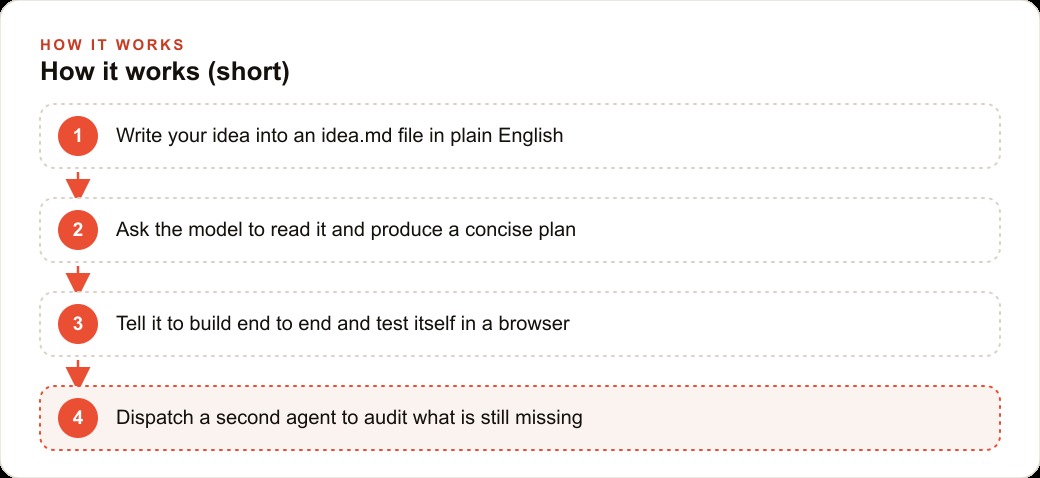
Take a roofing company that keeps losing leads because its website has nothing but a bland contact form. Instead of paying a monthly fee for a generic quote-tool subscription, the owner builds their own. The idea gets written into a plain-English file: a simple web app where a homeowner enters roof size, material, and address, gets a rough estimate range, and submits their contact details, which then land on a clean internal dashboard showing the week's incoming requests sorted by urgency. Then two instructions do the work, read the file and produce a plan, then build it end to end and test it in a browser.
When the dashboard came out plain, the owner said so, and the agent iterated on its own styling until the layout read clearly on a phone in a truck. A second agent, dispatched through the agent manager, checked whether the storm-season follow-up reminders and the export button were actually wired in. Here is the honest part, the part the hype skips: this took several rounds, not one prompt, and it worked because the project was small and specific. The owner did not ask for a whole CRM. They asked for one tool that does one job.
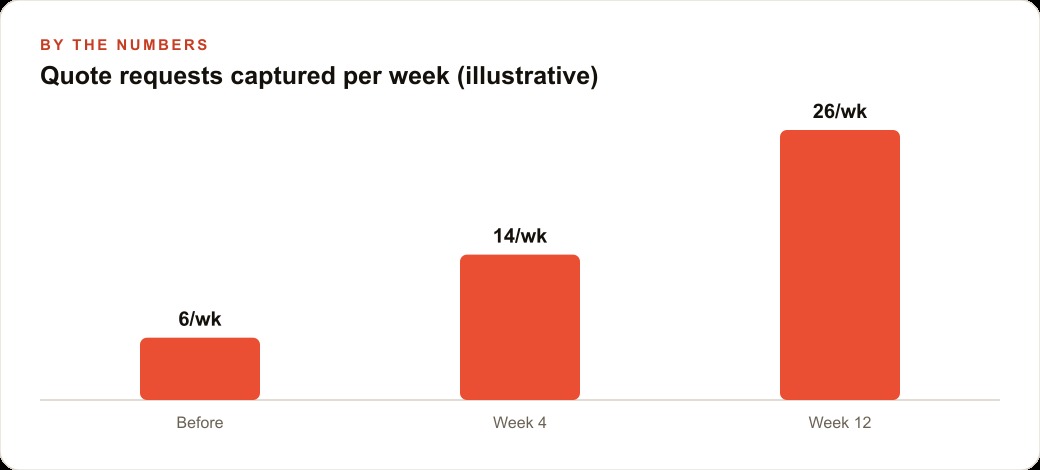
The payoff, framed as illustrative, is real. A static contact page might capture a handful of quote requests a week. A live estimate tool that gives homeowners an instant range tends to capture more, because people engage with a number far more than with a blank form, and the count can climb from a few a week toward a couple dozen over a few months as it gets shared and refined. Those captured requests flow into the CRM and website stack where automated follow-up handles the next several touches, so a lead does not go cold before anyone calls. The same tool becomes a landing destination worth pointing Google Ads traffic at, because now the click has somewhere useful to go, and the content around it supports SEO and organic search instead of a dead-end form. The tool is not the whole business. It is one leak sealed, cheaply, with an interface that finally looks the part.
The lock-in question you should ask before you commit
If there is one question that separates people who get value from this demo from people who get burned by it, it is this: what happens to my work if I need to leave this specific tool? The uncomfortable fact the hype glosses over is that Gemini 3.1 Pro was tuned for Antigravity and stumbles elsewhere, which means the magic you saw is partly a property of the environment, not just the model. That is not a reason to avoid it. It is a reason to go in with your eyes open about where the leverage actually lives.
My contrarian position depends on this point, so let me make it concrete. When you build a small tool inside a tightly integrated agent environment, you are getting two things bundled together: the model's raw capability and the environment's orchestration, the self-testing browser, the agent manager, the smooth loop. Those are genuinely valuable, but they are also the source of the lock-in. If the model underperforms outside that home, then your workflow, your habits, and your expectations get shaped around one vendor's ecosystem. For a hobby project that is fine. For a tool your business comes to rely on, it is a risk worth pricing in from the start.
The way to hold both truths at once is to keep the output portable even when the process is not. A quote calculator, a lead intake form, a simple dashboard, these are ultimately just code and data. As long as you can export what the agent builds and understand roughly how it works, you are renting the convenience of the environment without becoming a hostage to it. The trap is letting the tool become so magical that you stop being able to explain or move your own tool. The founders demonstrating these systems are themselves blunt that no single model wins everything, which is the strongest possible argument against betting your whole operation on one.
This is also why the "match the model to the task" advice is not a throwaway line, it is the core defense against lock-in. The moment you accept that one model is best for front-end and one-shot builds, another for general agent work, and another for deep technical coding, you have already given up on the fantasy of a single tool that does it all, and you have adopted the healthier posture of a small, swappable toolbox. That posture keeps you flexible when the leaderboard changes next quarter, which it will. So use Gemini in Antigravity for exactly what it is best at, front-end polish and quick internal tools, enjoy the autonomy, and keep enough understanding of the result that switching later is an inconvenience rather than a catastrophe. That is how you take the real capability without swallowing the hype whole.
The position, restated
The demo is impressive and the model is real. But the lesson is not "AI builds apps from one prompt, so nobody needs to think." The lesson is narrower and truer: the autonomy is the genuine leap, the front-end quality is the genuine edge, the tool lock-in is the genuine catch, and the winning move is to switch models by task and keep your first projects small and specific. Believe the capability, distrust the fantasy.
A hands-on owner can learn this in a few evenings. But if you would rather have the tool scoped, built, tested, and handed to you working, so you skip the false starts and get straight to capturing leads, that is exactly the kind of project a specialist can deliver fast. The point of arguing against the hype is not to talk you out of the tool. It is to make sure you use it for what it is actually great at, and do not waste a weekend on what it is not.
The demo will keep circulating, and the hype will keep flattening it into a slogan about AI replacing developers. Resist that. The accurate reading is more valuable precisely because it is more modest: a real leap in autonomy, a genuine edge in front-end quality, a real catch in tool lock-in, and a clear winning move in keeping your first projects small and swappable. Believe the capability you can actually see, price in the caveat the hype skips, and you will get a working tool out of it instead of a lost weekend chasing a fantasy the people building these systems do not even claim.
That is exactly what we do at AI DOERS. Book a private 30-minute call with Madhuranjan Kumar and we will map the fastest path to it for your specific business.
Book your call →
Madhuranjan Kumar
Madhuranjan Kumar brings 20 years of performance-marketing experience and has managed over $200 million in Facebook ad spend for brands across the United States and beyond. His expertise spans the full modern marketing stack: Meta, Google Ads, TikTok, email automation, CRM, and the websites that hold it together. At AI DOERS he turns that track record into lead-generation systems for businesses across every industry.