
How to Build Your Own AI Assistant Without Writing a Line of Code
A visual workflow builder lets you stitch an input, a language model, a cleanup step, and your own example emails into a working AI assistant. Here is what each piece does and how I would set it up for a real business.

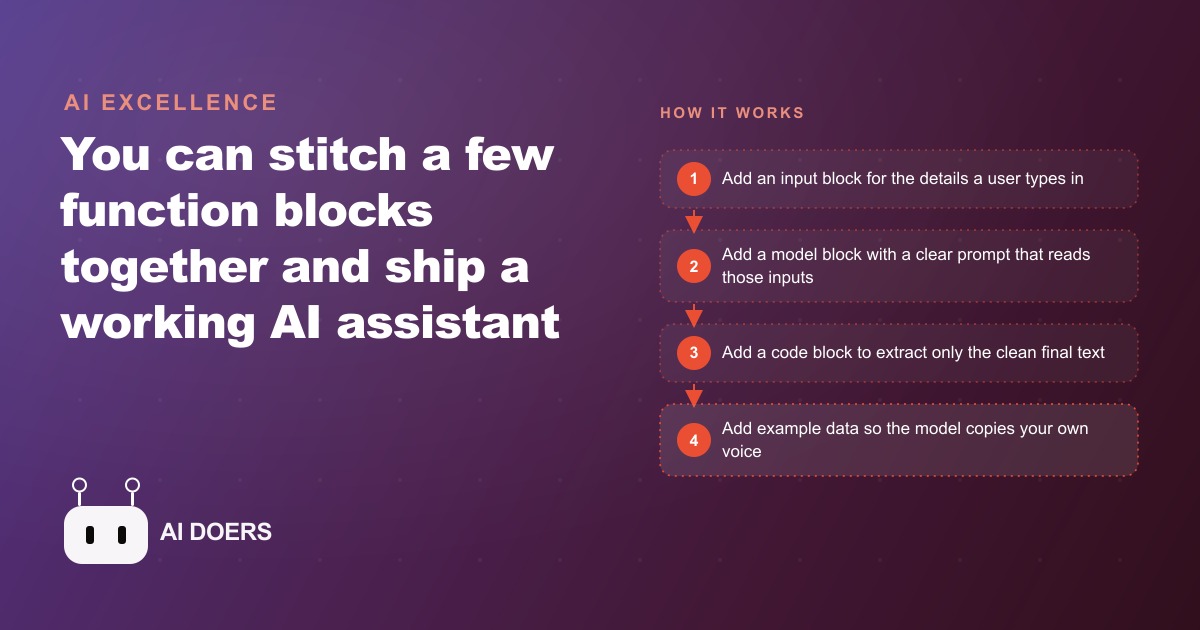
Eighteen minutes. That is how long it took to write one quote email. Not to diagnose the job, not to measure the pipe run, not to price the materials: just to take those facts and turn them into a professional message a customer would actually respond to. For a plumbing company running twelve quotes in a typical week, that is three and a half hours every Tuesday afternoon spent on a task that was essentially identical each time with different customer names and job details swapped in.
The starting problem: 18 minutes per quote email was consuming every Tuesday
The problem was not that the emails were hard to write. They were formulaic: introduce the findings from the site visit, describe the proposed fix, state the price, explain what was included, and close with a clear call to book. The difficulty was that formulaic does not mean fast when you are writing from scratch each time. Opening a blank document, recalling the details from the morning's visit, finding the right balance of technical and plain language for this particular customer, checking the price against the materials list, and formatting the message so it looked professional: each step was small and none of them was difficult, but together they consumed 18 minutes every single time.
Across 12 quotes per week, that was 216 minutes, or 3 hours and 36 minutes, spent on email drafting alone. At the fully loaded cost of the admin role handling this work, approximately 35 dollars per hour, the weekly cost in staff time was 126 dollars. Annualized, that is 6,552 dollars spent producing the same email structure 624 times with the names changed. It was not waste in any dramatic sense. It was the slow, invisible kind: no single email cost very much, but the accumulation over a year was significant.
The owner's instinct was not to automate. The instinct was that professional service emails needed to sound personal, and that a template would come across as generic and undermine the relationship the company had built with repeat customers. That instinct was correct about templates. It turned out to be wrong about what was now possible with a language model that could be trained on the company's own best examples.
The first two blocks: an input form and a prompt that reads it
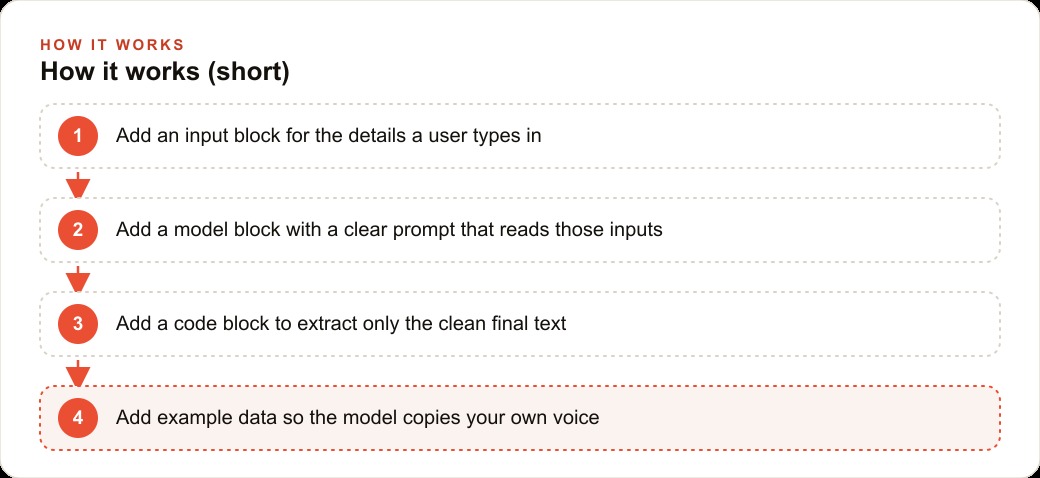
The build started with two components inside a visual workflow builder that required no code to configure. An input block defined what needed to be entered: the customer's name, the address, the type of job, the problem found on site, the proposed solution, the total price, and any relevant notes about what was included or excluded. These were the same pieces of information the office was already capturing in the job management system after every visit. The workflow did not require collecting anything new or changing how jobs were tracked.
The model block took those inputs and ran them through a prompt written to capture the company's quoting style: warm but direct, technical enough to show competence without requiring the customer to understand the plumbing terminology, and ending with a clear single call to action. The inputs were slotted into the prompt with simple placeholders, so when the form was filled out, the customer's name, the specific job details, and the exact price landed in exactly the right position in the instruction the model received.
The first test output landed close enough to the company's actual voice that the owner recognized it. Not perfect. The model added a few phrases that felt slightly stiff and one closing line that was more formal than the company typically writes. But the structure was right, the facts were accurate, and the message would have been sendable with 60 seconds of light editing. That was already a meaningful improvement from the starting point of a blank document and 18 minutes.
Why the raw output needed a cleanup step and what the code block changed
The model block's raw output included more than just the email. It included the model's own framing text at the top, a brief acknowledgment of what the prompt had asked for, and occasionally a closing summary that described what had been written rather than serving as the email's own closing. None of that belonged in a message going directly to a customer, and leaving it in would require manual removal every time, which would cut into the time savings.
A code block solved this cleanly. It contained a small piece of logic that extracted only the portion of the output between the email's opening salutation and the closing sign-off, and trimmed any leading or trailing whitespace. The person filling out the form saw a clean, ready-to-review email without any of the surrounding model commentary visible.
The code block also standardized formatting. The model sometimes used different indent styles or varied line break patterns depending on how the job notes were phrased in the input. The cleanup step normalized these into a consistent format that matched the company's other written communications, so every output looked like it came from the same person rather than varying in presentation based on the day's input phrasing.
The moment the tool started sounding like the company
The significant change came when a data block was added holding six past quote emails chosen specifically because they had all led to same-day bookings. Not the average emails, not a representative sample: the best ones. The ones where the customer responded within an hour, asked almost no clarifying questions, and booked without any negotiation on price.
The model studied those examples and its output shifted noticeably within the first few test runs. The phrase patterns changed to match what had worked. The level of technical detail in the problem description landed at exactly the level the company's best past emails had used, enough to demonstrate competence without overwhelming a customer who just wanted to know if the fix was reasonable and when it could happen. The way the solution was framed changed to lead with the benefit to the customer rather than the technical method used to achieve it.
The owner read one output and said it sounded like the company. That was the moment the tool crossed from being useful to being trusted for production use. Once the output sounds like you, the review step changes from rewriting to approving, and the time from blank form to sent email dropped to under two minutes, with the remaining time spent on a quick read-through rather than active editing.
Thirty days in: what actually changed and by how much
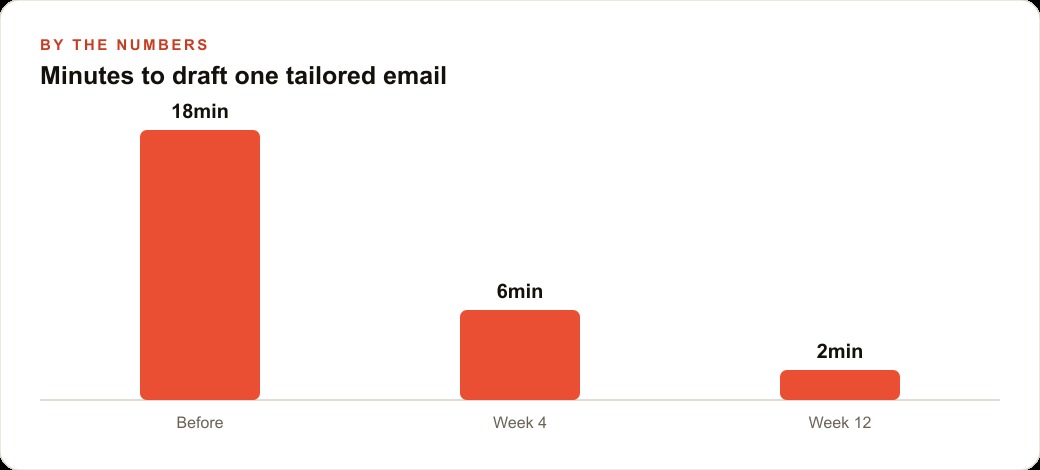
After 30 days of consistent use, the numbers were clear and the record was complete. Before the tool: 18 minutes per quote email, 12 quotes per week, 216 minutes total per week. After: 2 minutes per email for review and send, 24 minutes per week total. Time saved per week: 3 hours and 12 minutes.
At the fully loaded 35 dollars per hour for the admin role, that is 112 dollars per week saved in direct labor cost. Annualized: 5,824 dollars. The tool cost ranged from free at modest usage volumes to low double digits per month at the company's quoting frequency, making the net annual saving approximately 5,700 dollars.
The direct saving was real and measurable. What was harder to quantify but equally real was the consistency effect. Every quote now went out within 20 minutes of the form being submitted, regardless of how busy the office was or whether the admin was simultaneously handling a call or a supplier question. Before the tool, busy days meant quotes going out late, sometimes the following morning, which reduced the booking rate because competitors who responded faster captured customers who were comparing multiple quotes at the same time.
The other measurable change was in the quality floor. On high-pressure days, manual writing under time pressure produces rushed emails that lack the warmth and clarity of the best version of the message. The tool produces the same quality every time regardless of the day, which meant the company's worst-day emails were now as professional as its best-day emails. That floor raised the average impression every customer received, which is the kind of consistency that builds reputation over time.
The booking rate on quotes also improved, though this is harder to isolate cleanly because other variables changed during the same period. The working hypothesis, based on comparing the response rate of AI-assisted quotes sent within 20 minutes to the historical response rate of manually written quotes sent late in the day or the following morning, is that speed of response was a larger factor in booking conversion than anyone had previously tracked. Customers comparing two or three plumbers tend to book the first professional response they get. Consistent same-day quoting changed when the company appeared in that comparison window.
What the owner built next once quoting was handled
With quoting handled, the same builder was used for two additional communication workflows within the following month. The first was a three-day follow-up email for quotes that had not received a response. The input block pulled the original quote details and added a field for any new information gathered from a follow-up call or a re-inspection. The model drafted a warm check-in that referenced the specific job situation and asked if the customer had any questions or concerns. The code block cleaned the output to the same standard as the quote emails. The same two-minute review-and-send workflow applied.
The second was an after-job feedback request. After a job closed in the management system, the office submitted the customer's details and a brief note about the work completed into a second form. The model drafted a short thank-you message noting the specific work done and asking for a Google review with a direct link. The company's Google review count increased meaningfully over the following six weeks, which improved its local search visibility and contributed to inbound inquiries that did not require any advertising spend.
The pattern that emerged was not a single automation but a communication stack, each workflow handling a different stage of the customer relationship, each taking two minutes instead of fifteen to twenty. Quoting, following up on open quotes, and requesting reviews after completed jobs: three workflows that had collectively consumed eight to ten hours of the admin role's week now consumed under 30 minutes. The role shifted from writing emails to managing customer relationships and handling the situations that genuinely required human judgment.
The admin role's experience of the work changed as well. Before the tool, the volume of manual email writing was one of the most tedious parts of the job, the kind of work that fills time without feeling productive because each email is slightly different but follows the same pattern. After the tool, that repetitive cognitive load disappeared. The role became more genuinely varied, handling the situations that needed a real person rather than spending most of the day on structured writing that a trained model could handle reliably.
There is also a compounding effect worth naming explicitly. Once the quoting and follow-up workflows are running and collecting their own results, the example data set can be updated as new top-performing emails emerge. Every quote email that leads to a same-day booking is a candidate to join the reference set, so the tool continuously improves its output toward the patterns that actually win work in this specific market and for this specific company. A generic template cannot do that because it never learns. This workflow does.
The technical setup is genuinely fast: the input block, model block, and code block together take an afternoon to configure and test. The example data set takes another hour or two to select and format. After that, the system runs without any ongoing maintenance beyond occasionally adding strong-performing emails to the reference set as they emerge.
Madhuranjan Kumar builds exactly these kinds of systems for service businesses, starting with the one communication workflow that costs the most time and working outward from there. The work that matters is identifying which emails to start with and writing the example set that teaches the tool your company's actual voice.
That is exactly what we do at AI DOERS. Book a private 30-minute call with Madhuranjan Kumar and we will map the fastest path to it for your specific business.
Book your call →
Madhuranjan Kumar
Madhuranjan Kumar brings 20 years of performance-marketing experience and has managed over $200 million in Facebook ad spend for brands across the United States and beyond. His expertise spans the full modern marketing stack: Meta, Google Ads, TikTok, email automation, CRM, and the websites that hold it together. At AI DOERS he turns that track record into lead-generation systems for businesses across every industry.