
How to Build a Working App With No Code Using AI
You can now describe an app in plain English and have AI build it, sign-in and all. Here is how the pieces fit, with a salon booking tool as a worked example.

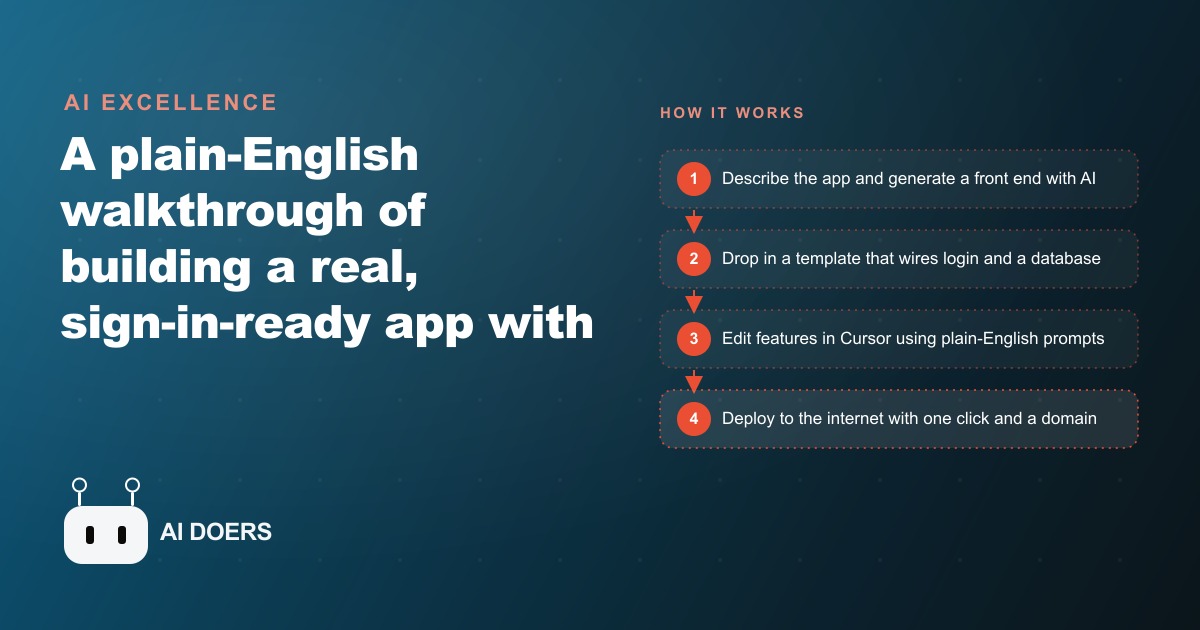
Building software used to require months of planning, a dedicated team of engineers, and a budget that most small business owners could not justify for a first version. That reality is shifting in a concrete and testable way. Madhuranjan Kumar has spent considerable time working through where this shift is real and where it remains hype, and the honest conclusion after working through it across multiple projects is this: with the right combination of four tools, a non-technical founder can build a sign-in-ready, database-connected web app in a single focused afternoon. Not a mockup. Not a demo with placeholder buttons. A working product that real users can log into, interact with, and rely on.
This playbook walks through the complete process using one concrete example: a salon booking app where clients sign in with Google, view the available services, choose an open time slot, book it, and see their appointment history. No prior coding knowledge is assumed. What the process requires is the ability to describe what you want in plain English, and the discipline to stay focused on one outcome at a time rather than trying to build the complete product before anything works.
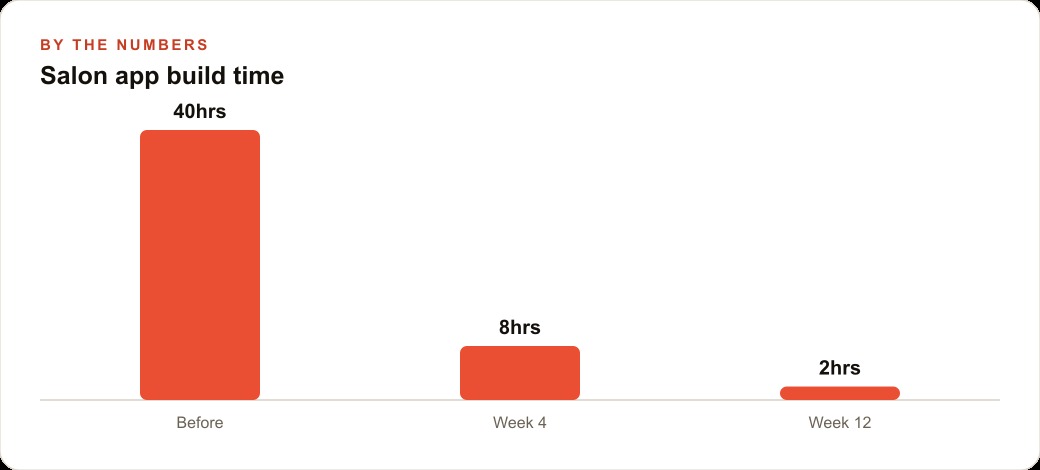
Before the stages, the cost context is worth stating precisely. Building this same app with a traditional developer, accounting for scoping conversations, design revisions, and back-and-forth on requirements, typically represents 40 to 80 hours of billable work. At standard freelance rates that is $800 to $2,000 at the low end and often considerably more. With the stack described here, a focused non-technical founder can build a functional first version in a single afternoon. The main costs are your time and free or entry-level subscriptions to a few tools.
Describe the Core Screen Before You Open Any Tool
The most important stage of this entire process takes place in a plain text document and has nothing to do with software. Before opening v0, before cloning a template, before launching Cursor, write down the one screen that defines whether your app works.
Not the settings page. Not the onboarding sequence. Not the admin dashboard. The single screen the user opens most often.
For the salon example, that screen is the booking page. On the left, a list of the services the salon offers. On the right, a calendar showing which days have open time slots. Clicking a slot shows a Confirm button. Below the calendar, a section showing the client's upcoming and past bookings.
Write this in plain language, as if explaining it to someone who has never used a mobile app before. "When the client signs in, they see a list of services: haircut, blowout, and color treatment. Clicking a service brings up a calendar. Days with open slots are highlighted. Clicking an open slot shows a Confirm button. After confirming, that slot disappears from the calendar and shows up under the client's upcoming appointments." That level of description is enough to get a usable UI from v0 on the first attempt.
Also write down two or three things the app cannot get wrong. For a booking app: two clients should never be able to book the same slot, and a client should never see another client's booking history. Write these down explicitly. They are your acceptance criteria, and you will test against them before sharing the app with anyone.
The reason this step matters so much is that every AI tool you use in the stages that follow responds directly to the specificity of what you give it. A vague prompt produces a generic output you will spend time correcting. A precise description of one screen produces something useful on the first attempt. The work done here is recovered ten times over in every subsequent stage.
Get a Real UI From v0 in Under Thirty Minutes
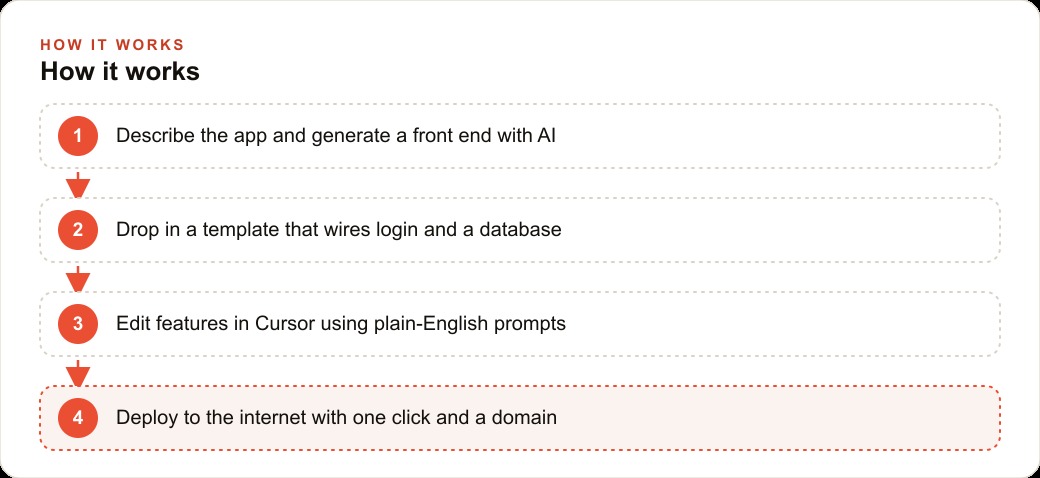
v0 is made by Vercel. It takes a text description and generates a rendered React component. The output is actual runnable code, not a wireframe that requires rebuilding from scratch. It is free to start.
Paste the description you wrote in the previous stage into v0. Do not add extra detail or ask for multiple variations at once. Ask for the one screen. Within seconds you will see a live rendered preview on the right and the generated code on the left.
Look at the preview first. Check that the layout matches what you described. The services list should be clearly visible. The calendar should be readable and easy to scan. The confirmation action should be the most prominent interactive element on the page. If anything is off, correct it with a single precise sentence. "Move the services list above the calendar on mobile view." That kind of specific, single-change instruction works reliably in v0.
Once the layout is correct, stop refining it. Do not spend time adjusting colors, tweaking font sizes, or adding decorative elements. The goal at this stage is a working component structure with the elements arranged in the right hierarchy. You can adjust the visual details later, after the functionality is working and you have confirmed that users can complete the core flow.
One thing to understand clearly about v0 output: it generates front-end code. It draws the screen and handles visual interactions. It does not connect to a database, manage user sessions, or save any data anywhere. If you click Confirm in the v0 preview, nothing gets stored. The page refreshes and the state resets. Making the app actually remember things is the job of the next stage.
The Template Handles the Database Wiring You Would Otherwise Spend Days On
There are publicly available starter templates that combine Firebase with a Next.js front end and are pre-wired. That phrase is the important one: pre-wired. The plumbing for Google Sign-In, session management, and database reads and writes is already built before you add a single piece of business logic. This pre-built foundation is what makes the entire stack accessible to someone without an engineering background.
Firebase handles two things for this project. First, authentication: it supports Google Sign-In natively, so clients can log in with an existing Google account rather than creating a new password they will forget. No custom login page to build. No password reset flow to design. Second, the database: Firebase uses Firestore, a structure where data is stored as documents inside named collections. For the booking app, a collection called "bookings" where each document represents one appointment, containing the user's ID, the service name, the date and time, and the booking status.
Find a Firebase plus Next.js starter template from the public repositories on GitHub and clone it to a local folder. The template will include a configuration file that expects a handful of values from your Firebase project: an API key, a project ID, and several related identifiers. All of these come from the Firebase console, which is free to create and navigate. Copy them into the configuration file.
At this point, without writing any custom logic, the project can create and manage user accounts, sign people in with Google, and read from and write to a database. The difficult parts, authentication flows, session tokens, database security rules, are already handled by the template. This is the foundation the booking app sits on.
Merge the UI components you got from v0 into this template. This means copying the booking page component into the template's pages folder, importing it, and adding a route to it. The template's layout wraps around it automatically. The visual layer from v0 now sits on top of the working infrastructure from the template. At this point the app can render the UI and the user can log in, but clicking Confirm still does not save anything. That is what the next stage addresses.
How to Prompt Cursor So It Connects the Pieces Without Rewriting Everything
Cursor is a code editor with Claude built in. You write instructions in plain English and it edits files in your project. The critical skill here is being specific about which file you are modifying and what exact outcome you want from the change.
A common mistake at this stage is writing prompts that are too broad. "Make the booking feature work" is not something Cursor can act on reliably. "In the BookingPage component, when the user clicks Confirm, write a new document to the Firebase bookings collection with these fields: the current user's ID from the active session, the service name from the selected service, the date and time from the selected slot, and a status value of confirmed" is a prompt that produces exactly the code you need.
A few patterns consistently improve Cursor's reliability at this stage. Opening the specific file you want to modify before writing the instruction gives Cursor the clearest possible starting context. When you want two parts of the app to communicate with each other, describe both sides of the connection rather than describing only one side and expecting Cursor to infer the other. "In the BookingHistory component, read all documents from the bookings collection where the userID field matches the current authenticated user's ID, and display them sorted by date with the most recent booking first" is a complete description that produces a complete implementation.
For the salon booking app, three Cursor prompts complete the core functionality. First: when the user clicks Confirm on a selected slot, write that booking as a new document in the Firestore bookings collection. Second: when the BookingHistory section loads, read the current user's bookings from Firestore and display them. Third: when a slot is successfully booked, mark it as unavailable so other users do not see it as open.
Write and test each prompt separately before moving to the next. After the first prompt, go through the booking flow and confirm in Firebase that the booking document appears. After the second, reload the page and confirm that the BookingHistory section shows the correct appointment. After the third, open two browser windows with two different accounts and try to book the same slot from both simultaneously, then verify the second booking is correctly blocked. This sequence catches errors when they are still simple to fix.
Stop Adding Features Until Real Users Have Tried What You Built
After the fourth stage the app is functional. A client can sign in, see available slots, book one, and see it in their history. The temptation at this point is immediate and strong: add email confirmations when a booking is made, add a cancellation button, build a staff-side calendar where the salon can manage all appointments, create a waitlist for fully booked days.
Resist all of it for now.
The value of the first version is not features. It is learning. It is finding out whether the core thing works in real conditions: on real devices with different screen sizes, on mobile networks with variable speeds, for users who approach the interface differently than you imagined. Every feature added before that learning is work spent on assumptions rather than on what users actually need.
For the salon booking app, the minimum that proves the concept is: sign in, view available slots, book one, see it in the history. That is the question you need answered before anything else. If the answer is yes, users can do that without confusion or errors, then you have a foundation worth building on. If the answer is no, the users get confused by the calendar, the slots do not load reliably, or the history does not update immediately, then those are the things to fix, not the new features.
Add cancellation after the first group of real bookings, when you know how frequently clients actually need to cancel and what they expect that experience to look like. Add staff-side management after you understand how the salon owner is currently using the data. Every feature decision made after real usage is a better decision than the same one made before any real usage.
Deploy With One Click and Put the Link in Front of Real People
Vercel connects to a GitHub repository and publishes your app automatically. Push your project to GitHub, connect the repository to Vercel, select the deployment branch, and the app builds and goes live. Every subsequent push triggers a rebuild and a live update. You receive a public URL immediately. Adding a custom domain is straightforward when you are ready for it.
Before sharing the link, test the full booking flow on a phone. The majority of clients using the salon app will access it on mobile, not desktop. Check that the calendar is easy to tap with a thumb, that the Confirm button is reachable without zooming, and that the booking history loads within a reasonable time on a mobile connection.
Then run the two acceptance criteria you wrote in the first stage. Try to book the same slot from two different accounts and verify that the second attempt is rejected. Confirm that a user's history view shows only their own bookings and not those of other clients. If both pass, the app is ready to share.
The total build time for a focused practitioner running through this process for the first time, from writing the first description to having a live URL, is an afternoon. The bottleneck is almost never the technology. It is the clarity of the description in stage one. The more precisely you can describe the one core screen before opening any tool, the more reliably every subsequent stage produces what you actually need rather than a generic approximation of it.
What This Stack Cannot Do and Why That Does Not Matter for the First Version
No-code AI does not replace engineering judgment. What it replaces is the labor of writing code that follows known, well-documented patterns: connecting a database, wiring up authentication, rendering a list from a data source. Those patterns are now automated. The judgment required to design the right architecture for a complex system at scale, handle edge cases under unusual load, or build something that has no prior model still requires experience and cannot be automated away with a text prompt.
For most small business apps, however, complexity at scale is not the initial constraint. The constraint is time and money. A booking system that works reliably for a salon managing thirty clients per week does not need to be architected for ten million concurrent users. It needs to work, to be understandable by someone without an engineering background, and to be shippable before the window of opportunity closes.
This stack meets those requirements directly. The tools are available now, the costs are manageable from the start, and the process is learnable in a single focused effort. What happens after shipping the first version is a straightforward loop: put it in front of real users, watch what they do and what confuses them, pick the single most impactful change, make it using the same process, deploy, and repeat. The speed of this loop is a genuine competitive advantage. A small team iterating weekly can outpace a competitor with a larger budget but a slower feedback cycle.
Madhuranjan Kumar has applied this approach to several different types of small business tools. The consistent finding across all of them: the first version is always less complex than the founder assumed it needed to be, and the features that users actually value are almost always different from the ones that seemed most important before the first real user tried it.
That is exactly what we do at AI DOERS. Book a private 30-minute call with Madhuranjan Kumar and we will map the fastest path to it for your specific business.
Book your call →
Madhuranjan Kumar
Madhuranjan Kumar brings 20 years of performance-marketing experience and has managed over $200 million in Facebook ad spend for brands across the United States and beyond. His expertise spans the full modern marketing stack: Meta, Google Ads, TikTok, email automation, CRM, and the websites that hold it together. At AI DOERS he turns that track record into lead-generation systems for businesses across every industry.