
How to Build a Website From One Sentence Using Free Open-Source AI
A free, open-source AI model can now turn a single plain-English sentence into a working web page. Here is how any local business can put it to work.

A working web page used to require a developer, a brief, a round of revisions, and at minimum several days. In 2026, a free open-source AI model turns a plain-English description into a live draft in seconds, and the refinements happen through a conversation that any non-technical owner can run on their own. This is not a tool for developers who want to move faster. It is a tool for business owners who have never opened a code editor and would prefer to keep it that way.
I am Madhuranjan Kumar, and rather than explain the feature in the abstract I want to walk through one complete example. The business is a photography studio. The occasion is a holiday mini-session promotion with a hard deadline. The outcome is a working page, live on the internet, built without a developer and without any technical background. Walk through this with me, because the specific detail matters more than the summary.
The brief: a seasonal promotion with no developer and a two-week window
The studio runs family mini-sessions twice a year, spring and holiday. Each season is a separate promotion with different pricing, different session lengths, and different styling. The owner had been relying on a web developer to build a simple landing page for each promotion, which worked when the timeline was relaxed. For the upcoming holiday sessions, the booking window was two weeks away and the developer was unavailable. The promotion needed to go live within days.
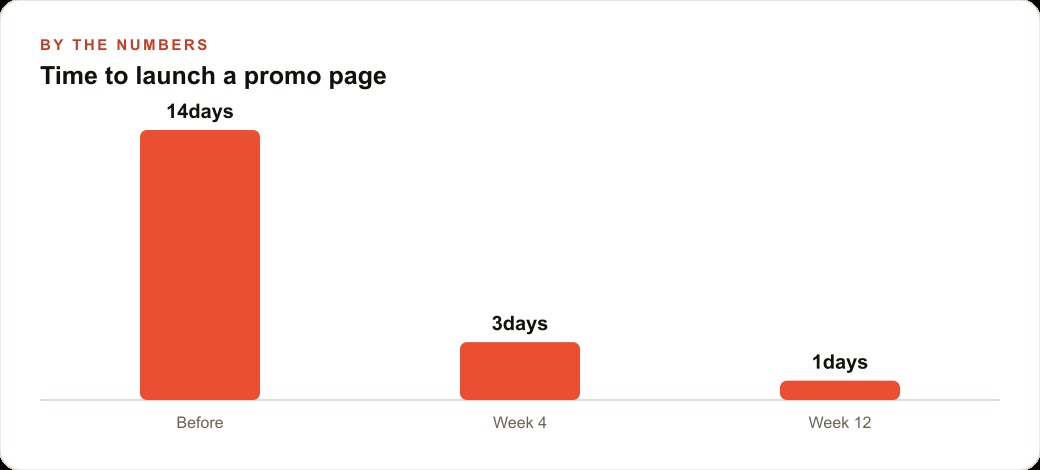
The owner's previous approach was to draft the promotion in an email, send it to the developer with notes about what the page should look like, wait for a draft, review it, request changes, wait again, and then pay for the revision time. That loop typically took 5 to 7 business days. With a two-week booking window, a 7-day development loop leaves only 7 days of promotional time, which is barely enough to generate meaningful bookings even if advertising starts immediately.
The functional requirements for the page were straightforward. A clear headline announcing the promotion. A list of available dates and times. A short pricing block. A small gallery of sample photos from previous sessions to show prospective clients what the output looks like. A section answering the most common questions about session length, number of poses, and turnaround time. A call-to-action button or form to book a spot or reach out. Nothing technically complex. A page a competent developer could build in an afternoon.
The constraint was that the owner had never built a web page, did not know HTML or CSS, and was not interested in learning. The page needed to look professional enough that a potential client clicking through from an Instagram post would not leave immediately. That bar is not low for a photography studio whose brand depends on visual quality signals. A page that looks like a draft is worse than no page at all for a business in the aesthetics category.
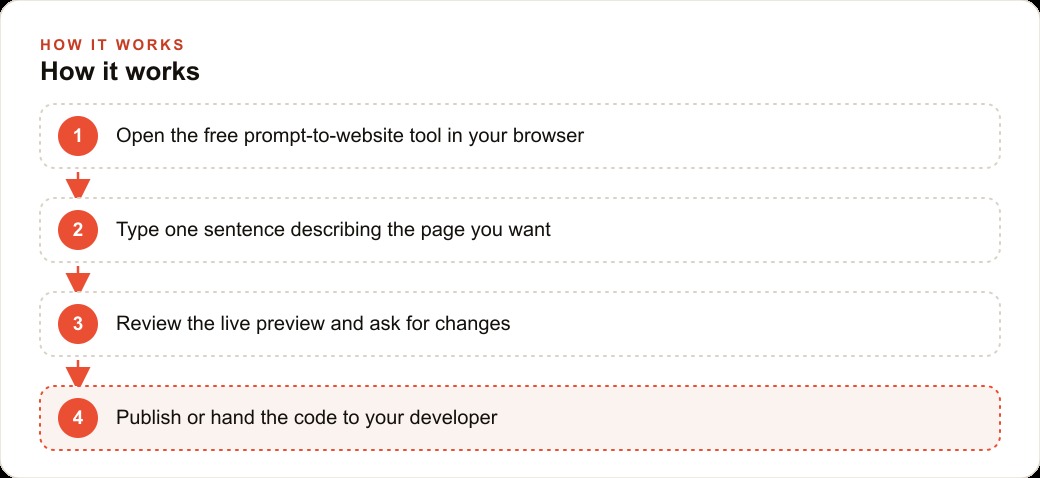
What changed the calculation was a free browser tool built on an open-source AI model. No installation, no subscription, no developer on call. You open it in a browser, describe what you want, and the model builds it. The owner had heard about it and decided to try it with the understanding that if the result was unusable, she had lost only an afternoon rather than a week of developer lead time.
The first prompt and what came back in seconds
The owner sat down and typed the following into the tool: build a clean landing page for holiday family mini-sessions at a photography studio. Include a headline, a list of session dates in December, a pricing block showing a 30-minute session at 275 dollars with 10 edited images, a gallery area for 4 photos, a FAQ section with 3 questions about session length and turnaround time, and a contact button at the bottom.
That prompt is 71 words and took about three minutes to write. The model returned a full page in under 30 seconds.
What came back was a complete HTML page with a clean layout, a navigation-free structure appropriate for a landing page, a placeholder headline, a table with four December dates and time slots, a pricing block with the exact figure from the prompt, four placeholder image blocks arranged in a grid, three FAQ accordions with placeholder questions and short placeholder answers, and a contact button styled clearly at the bottom. The page had a light background, serif typography that suited a photography studio's aesthetic, and spacing that looked considered rather than default.
The owner's reaction was that it looked more professional than she expected from a first draft and less polished than the developer's finished pages, which was an accurate assessment. The placeholder content was obviously placeholder: the FAQ answers were generic, the gallery showed gray boxes, and the headline lacked the specific seasonal warmth that makes a promotion feel like a real event. But the structure was right, the sections were in the right order, and nothing was broken.
The critical observation at this stage is that the first prompt produced a foundation worth building on rather than a result that needed to be abandoned and restarted. That outcome is directly related to how specific the prompt was. The owner had included the exact price, the exact session length, the exact number of edited images, and the exact sections she wanted. The model did not have to guess at any of those parameters. When a prompt is specific, the model works with stated facts rather than inferred assumptions, and the first draft is correspondingly more accurate.
The 30 seconds between submitting the prompt and seeing a complete page preview is the part that most people find difficult to accept in the abstract. It has to be experienced to become real. The owner later said the experience felt like briefing a designer and coming back an hour later to find a complete draft, except the hour had compressed to under a minute. That sense of possibility is what motivated her to continue with the refinements rather than closing the tab.
Three follow-ups that made the draft usable
The first follow-up addressed the gallery. The owner uploaded four photographs from a previous holiday session to her desktop and typed: replace the gray placeholder image boxes with my actual photos. The images are named holiday-1.jpg through holiday-4.jpg and I will host them at my website URL. The model updated the image source references to the paths the owner specified. She dropped the images into the correct location relative to the HTML file, opened the page in a browser, and the gallery displayed her actual work.
This step matters because the difference between a gray placeholder gallery and a real photography gallery is the difference between a page that reads as a rough draft and a page that reads as a real studio's promotional material. The images do not need to be embedded in the AI conversation. They need the page to reference the right file locations, and the model handles that correctly when the paths are stated clearly in the prompt.
The second follow-up addressed the FAQ section. The three placeholder questions were generic and did not match what clients actually ask before booking. The owner typed: replace the three FAQ questions with these real questions and answers. How long is a session? 30 minutes, enough time for 3 to 4 pose setups. When do I receive my gallery? Within 2 weeks of your session. Can I extend my session if I want more time? Sessions cannot be extended on the same day but a follow-up session can be booked at the standard rate. The model updated all three accordions with the exact text from the prompt and preserved the accordion styling without any additional instruction.
The third follow-up addressed the headline and copy tone. The placeholder headline was neutral. The owner wanted something warmer and more specific to the holiday season. She typed: change the headline to Your Family's Holiday Moment, Preserved and add a two-sentence subheadline that explains this is a limited booking window with sessions available only through December 20th. The model updated the headline and added a subheadline that read: Book your 30-minute family session before spots close on December 20th. Limited dates available, each designed to capture the warmth and ease of the holiday season. The owner adjusted two words and the copy was ready.
Three follow-ups. One gallery, one FAQ, one headline. The first two were technical changes the model executed correctly on the first attempt because they were specific. The third was a tonal change where the owner reviewed the output and made two small edits herself. That ratio, roughly two technically correct first attempts per one requiring a light review, held across the entire build.
The total time from opening the tool to having a page the owner considered ready to publish was 47 minutes, including the time spent writing prompts, uploading images to her desktop, and reading through the FAQ copy. She noted that writing the FAQ replacement prompt took longer than any other step because she had to decide what her three real questions were. That decision time is not a flaw in the process. It is the work that used to happen during developer back-and-forth, now surfaced and completed in a single focused session.
Publishing the page and what it produced
The owner's website runs on a platform that allows custom pages. She pasted the HTML code from the tool into the custom page editor, uploaded her four images to the media library, updated the image source paths to match the media library URLs, and published the page. The process took 20 minutes, most of which was the image upload time.
She shared the URL on Instagram in a single post with one of the gallery images as the accompanying photo, captioned with the session details and a direct link to the page. The post went up on a Tuesday morning. By Thursday evening she had 7 inquiries through the contact form, 4 of which included the client's preferred dates and a direct confirmation of interest. By the end of the two-week booking window, 11 of the 16 available session slots had been filled.
For context, the previous holiday season she had promoted through an email to her list only, with no dedicated landing page, and filled 7 slots. The page produced roughly 57 percent more bookings from a social-only promotion that did not include any paid advertising. The owner attributed the difference partly to the page's existence as a standalone, shareable URL that felt like a real booking destination, and partly to the fact that the FAQ section answered the questions clients were otherwise sending back through direct messages before deciding to book. Fewer friction points before the booking decision meant more bookings.
In a subsequent season, the owner added a small paid promotion through her existing Meta ads account, targeting parents within 25 miles of her studio during the two weeks before the booking window opened. Traffic to the landing page increased materially and session slots filled in the first week. The page served as the ad's destination, and because it loaded fast and answered every common question directly, the bounce rate from the paid traffic was low enough to keep her cost per booking within the range that made the ad spend worthwhile.
The owner has since built three more pages using the same method, one for a spring mini-session, one for a newborn session offering she wanted to test, and one for a gift card promotion in November. Each took between 40 and 60 minutes including the follow-ups and publishing step. Each subsequent build was faster than the previous one because she had developed better habits for writing specific first prompts. The pages integrate with her CRM and website stack, so each new inquiry from the contact form routes into her existing booking workflow without any additional setup. The tool is free, the AI model is open source, and the afternoon she spent learning the workflow has since been applied four times at under an hour each.
What this walk-through demonstrates is not that free AI eliminates the need for business judgment or creative decisions. The owner's choices about pricing, session length, FAQ content, and headline tone were all hers. What the tool eliminated was the technical bottleneck between those decisions and a published page. The brief was clear, the prompts were specific, the follow-ups were focused, and the result was live on the internet in under two hours. For any business owner with a promotion coming up and no developer available on that timeline, the math on spending an afternoon with this tool is worth doing. If the page fails, you spent an afternoon. If it works, you have a reusable workflow you will use again.
That is exactly what we do at AI DOERS. Book a private 30-minute call with Madhuranjan Kumar and we will map the fastest path to it for your specific business.
Book your call →
Madhuranjan Kumar
Madhuranjan Kumar brings 20 years of performance-marketing experience and has managed over $200 million in Facebook ad spend for brands across the United States and beyond. His expertise spans the full modern marketing stack: Meta, Google Ads, TikTok, email automation, CRM, and the websites that hold it together. At AI DOERS he turns that track record into lead-generation systems for businesses across every industry.