
Build And Launch A Landing Page With AI Prompts In Minutes
Starting from a template, pasting a screenshot, and giving a few plain-English prompts, an AI coding tool can build a clean landing page, generate its assets, and deploy it to your own domain in minutes without any coding.

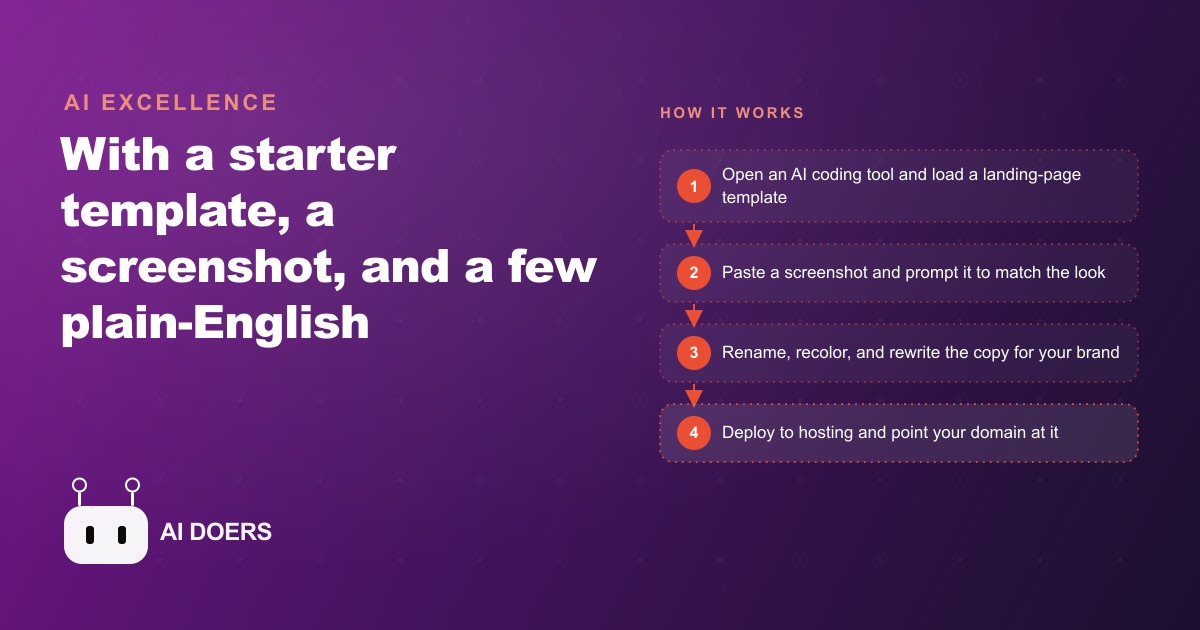
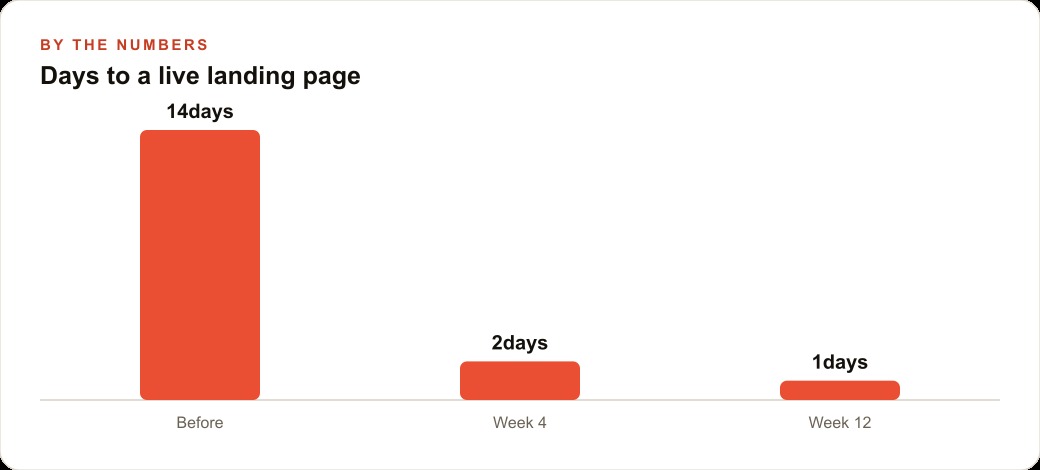
The last time a dental practice needed a dedicated page for a teeth whitening promotion, the wait was 14 days. The freelancer charged $500. By the time the page went live, the promotional window had narrowed. The practice ran the campaign anyway, got modest results, and filed the whole episode under "marketing is slow and expensive."
That story is not unusual. It describes almost every small business that has ever tried to run a campaign around a single offer. The bottleneck is never the idea. The bottleneck is always the page.
I, Madhuranjan Kumar, want to walk you through what it now looks like when you build a landing page with AI prompts. Not in theory. In the specific mechanical terms of what happens at each step: the template, the screenshot, the error loop, the deployment, and the DNS record that finally ties the domain to the live page. Each of these pieces has a logic to it, and understanding the logic is what separates the people who get stuck from the people who ship in an afternoon.
The template is not a shortcut, it is the architecture
There is a common misunderstanding about starting from a template. People assume a template is a shortcut for beginners, a way to avoid doing real work. It is actually the opposite. A template is an architecture decision.
A landing page has a structure. There is a hero section that carries the headline and the primary call to action. There is a proof section that shows testimonials or credentials. There is a features section that explains the offer. There is a secondary call to action at the bottom. This structure exists because years of conversion testing have confirmed it works. When you start from a template, you are not taking the easy route. You are skipping the phase where someone has to make those structural decisions from scratch and argue about them for a week.
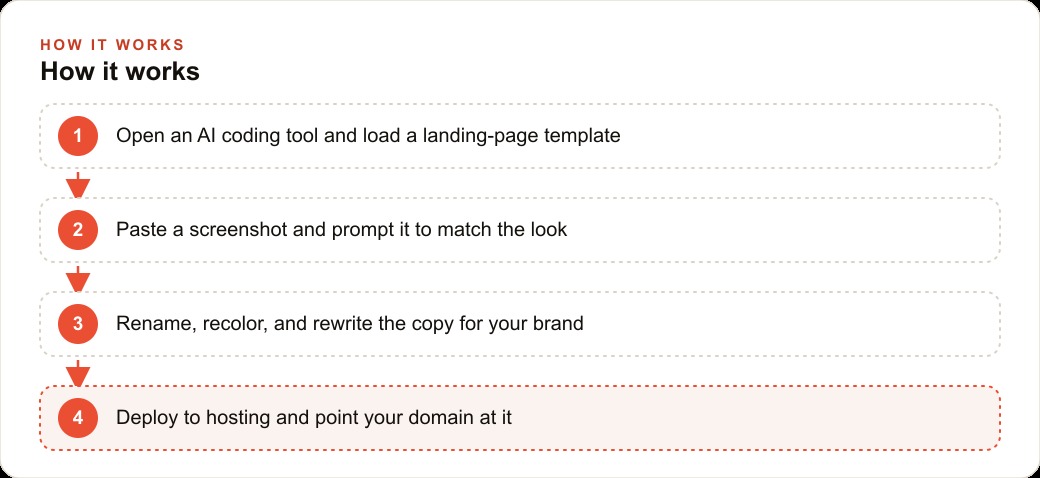
When you open an AI coding tool and load a landing page template, the bones are already in place. The HTML structure is there. The CSS framework is there. The section order is there. The AI's job from that point is to dress those bones in your brand, not to decide how many sections the page should have or where the call to action should sit. That distinction matters enormously for speed. Structural decisions are the slow part of any build. When the structure is already settled, you are only customizing.
This is also why you should not start from a blank screen. Starting blank means the AI has to make every decision at once: structure, style, copy, assets, layout. Starting from a template means the AI only has to make the surface decisions, which it can do in seconds. The template is not the lazy choice. It is the intelligent one. It imports a set of proven decisions so that you and the AI can focus on the one thing that actually belongs to your business: the offer and the words that describe it.
When the practice in our example started, the template brought a five-section layout with it: hero, social proof bar, benefit list, testimonials, and a closing call to action. That structure was already correct for a healthcare conversion page. The AI did not have to figure it out. It only had to fill it in.
Why a screenshot outperforms a 500-word design brief
Here is a practical reality that most people discover the hard way. When you describe a visual design in words, you lose something. You say "clean and minimal with a white background and a blue call to action button." The AI reads that and produces something that fits the description but looks nothing like what you pictured. This is not a failure of the AI. It is a failure of the medium. Visual design does not translate cleanly into language.
A screenshot solves this completely. You find a landing page or a website section that has the visual tone you want. You take a screenshot. You paste it into the AI coding tool and say: match this layout. The AI reads the image, identifies the spacing, the color relationships, the typographic hierarchy, and the proportions of each section, and produces code that captures those qualities. The screenshot carries more design information in one image than a paragraph of description ever could.
This is not just a convenience. It is a fundamentally different kind of brief. A 500-word design brief is an approximation, filtered through language. A screenshot is a direct specification. When you use a screenshot as your brief, you cut the number of revision cycles significantly because you and the AI are looking at the same target from the start.
There are two practical rules here. First, the screenshot does not have to be from your industry. You are not looking for a page that sells what you sell. You are looking for a page that has the visual density, the spacing, and the overall tone you want. A software product page with clean white sections and a single-color palette can be the right reference image for a healthcare practice. What you are borrowing is the layout logic, not the content.
Second, you do not have to match the screenshot exactly. You give the AI the image and then you describe the deviations: change the primary color to this blue, use this font instead of that one, replace the hero image with a photo of the practice exterior. The AI starts from the structure the screenshot defines and applies your modifications on top. You get a page that has professional proportions from the screenshot and your brand identity from the follow-up prompts.
The practice found a clean healthcare landing page from a different service entirely. It had the right section density and the right level of whitespace. That image became the design brief. The AI matched it in the first pass. Two follow-up prompts adjusted the color and the headline typography. The visual work was done in under 30 minutes.
The error paste loop: why broken builds are a feature not a bug
Almost everyone who builds with AI coding tools for the first time hits a build error and feels a spike of panic. The page does not render. There is a red error message in the console. Something is broken. The natural reaction is to assume the process has failed.
It has not. The error is a message, and the AI knows how to read it.
Here is the loop, described plainly. You run a build and it throws an error. You copy the full error message. You paste it back into the AI and say: fix this. The AI reads the error, identifies the file and the line, understands the cause, and writes the corrected code. In most cases, the build runs cleanly on the next attempt.
What is happening is that the AI is using the error as feedback. The error message contains specific information about what went wrong: the file name, the line number, the type of error. That information is actually quite precise, more precise than any vague description of a problem. When you paste the error back, you are giving the AI exactly what it needs to diagnose and repair.
The reason this matters is that it changes your relationship to errors entirely. In traditional development, a build error means you need to understand the underlying code well enough to trace through it and find the problem yourself. That requires expertise that most business owners do not have and should not need to develop. In the AI prompt workflow, a build error is just the next prompt. You do not need to understand why it failed. You only need to pass the failure message forward. The expertise lives in the AI, not in you.
This loop also scales. If a first repair introduces a second error, you paste that one too. Each iteration narrows the problem. Complex errors rarely survive more than two or three loops. The process is not elegant, but it is reliable, and reliability is what you need when you are trying to ship a page in an afternoon rather than in a two-week sprint.
The practice hit one build error during the whitening page build. A CSS import was referencing a file that did not exist in the template. The error message said exactly that. The practice owner pasted the message back. The AI removed the broken import and rewrote the relevant styles inline. The next build ran cleanly. The entire repair took four minutes.
From local preview to live URL: what deployment actually involves
At some point your page looks right in the local preview. The layout is clean, the copy is correct, the call to action is visible. The natural question is: how does this become something the public can see?
Deployment is the step that moves the page from your local machine to a server on the internet. In the AI prompt workflow, this is usually handled by a hosting service that accepts a push from the AI coding tool directly. You give a prompt like: deploy this to Vercel. The tool takes your project files, authenticates with the hosting service, and pushes them to a server. The hosting service builds the page on its end and gives you a public URL, usually something like your-project-name.vercel.app.
That URL is live. Anyone with the link can see the page. At this point you have moved from local to public in a matter of minutes, with no manual file transfer, no FTP client, and no server configuration.
There are a few things worth understanding about this step. First, deployment is not the same as going live on your domain. The public URL you get from the hosting service is a temporary address. It works, but it has the hosting service's name in it. That is fine for testing and for sharing a preview with someone who needs to approve it, but it is not the address you will use in your ad campaigns.
Second, some AI coding tools can handle deployment in a single prompt. Others require you to configure the connection to your hosting account first. This is usually a one-time setup. Once the tool is connected to your hosting account, future deployments are a single instruction and the process becomes faster each time you repeat it.
Third, the page that deploys is exactly the page you see in local preview. There is no gap between what you built and what the public sees. This is one of the advantages of the static build approach that most of these tools use. There is no database to migrate, no server-side configuration to match. The files go up and the page is live.
The build time for the practice's whitening page, counting template loading, screenshot-based layout prompting, copy revision, one error loop, and deployment, was just under four hours. A freelancer's equivalent invoice would have been $500 and a 14-day wait. The page went live that afternoon.
Domain DNS: the one step that trips most first-timers
The public URL from the hosting service has the hosting company's name in it. What you actually want is for the page to live at your own domain, the address your business already owns. Connecting the two requires DNS records.
DNS stands for Domain Name System. It is the directory that the internet uses to translate domain names into server addresses. When you type a domain name into a browser, DNS tells the browser which server to go find. When you want your domain to point at the page on your hosting service, you are telling DNS to update that directory entry.
Most hosting services give you two DNS records to add. The first is usually a CNAME record or an A record. A CNAME record points your domain name to the hosting service's infrastructure by name. An A record points your domain name to a specific IP address. Which type you use depends on the hosting service, but the hosting service tells you exactly which type to use and exactly what value to enter. You go into your domain registrar, the company where you bought the domain, find the DNS management section, and add the records the hosting service specifies.
The second record is usually a verification or routing record that tells the hosting service which project to serve when a request comes in on your domain. This is also provided by the hosting service, and you enter it exactly as given.
After you add the records, there is a propagation wait. DNS changes spread across the internet, and this can take anywhere from a few minutes to a few hours, though in practice it is usually under an hour for most domain registrars. During this time the page is still live on its temporary hosting URL, so nothing is inaccessible while you wait.
Once propagation is complete, your domain resolves to the page you built. Anyone who types your domain into a browser sees your landing page. The address is clean. The page is yours.
The reason DNS trips first-timers is that it involves a step in a different system, the domain registrar's dashboard, that feels disconnected from the build itself. You have been working entirely in the AI coding tool, the page is done, and suddenly you are in an unfamiliar interface adding record types with names like CNAME and TXT. It feels like it should be technically complex. The actual entries are short strings of text. If the hosting service gives you the records and you copy them precisely, the step works without any additional configuration. The wait is the only part that is outside your control.
The practice added its DNS records in approximately ten minutes. The domain pointed to the live whitening page within the hour.
Speed as the real product: what 5-minute pages unlock for small businesses
The working assumption of most small business marketing is that campaigns are expensive to set up and slow to change. You pick an offer, you build a page, you run the campaign, and you live with the results for a quarter because changing anything requires the same two-week build cycle you just survived. This forces conservatism. You run the offers you are most confident about, not the ones you want to test. You do not experiment because experiments are too slow to be worth running.
AI-built pages change the underlying economics of that decision. When a page takes an afternoon instead of two weeks and costs nothing in freelance fees instead of $500, the calculus on experimentation shifts completely. You can test a new offer tonight instead of next month. You can build a separate page for each campaign instead of cramming everything into one general page and hoping it converts across all your traffic.
Consider what this means for a business running Facebook and Instagram ads or Google Ads. Every one of those campaigns sends traffic to a landing page. In the old model, you ran one page for all your paid traffic because building a second page was a two-week project. In the new model, you can run a different page for each campaign segment: one for the whitening promotion, one for new-patient onboarding, one for the free consultation offer. Each one is built in an afternoon. Each one is specific enough to convert the exact visitor who clicked the specific ad that sent them there. That specificity drives lower cost per lead and higher conversion rates. The AI-built page makes it practical to do something that has always been theoretically correct but logistically impossible for a small operation.
There is also a compounding effect that most people do not anticipate when they start. The first page teaches you what works for your audience and what does not. The second page incorporates those lessons. By the fourth or fifth page, you have a pattern, a template of your own derived from real results, and each new page comes together faster and converts better than the one before it. This learning loop only exists when you can run enough experiments to generate meaningful data. Slow, expensive builds kill the loop before it starts. Fast builds keep it running.
The dental practice built its teeth whitening page in four hours. It ran a focused paid campaign to that specific page. The result was measurable new patient inquiries tied to that offer, not to the homepage, not to a general brand search, but to a page built around exactly what those patients were looking for at the moment they clicked the ad. The practice then built a second page for a new-patient exam promotion the following week. The second build took two hours, because the process was familiar by then and the template was already calibrated to the practice's style.
The landing page itself is not the product. The speed is. When you can build a focused page in an afternoon instead of waiting two weeks, you stop treating marketing as a series of large, risky bets and start treating it as a series of small, fast experiments. The offers that work get more budget. The offers that do not get replaced overnight rather than written off for a quarter. That ability to move quickly is what separates businesses that grow from their marketing from businesses that merely spend on it.
That is exactly what we do at AI DOERS. Book a private 30-minute call with Madhuranjan Kumar and we will map the fastest path to it for your specific business.
Book your call →
Madhuranjan Kumar
Madhuranjan Kumar brings 20 years of performance-marketing experience and has managed over $200 million in Facebook ad spend for brands across the United States and beyond. His expertise spans the full modern marketing stack: Meta, Google Ads, TikTok, email automation, CRM, and the websites that hold it together. At AI DOERS he turns that track record into lead-generation systems for businesses across every industry.