
Build Anything with Claude: What Sonnet 4.5 and Browser Use Mean for Your Business
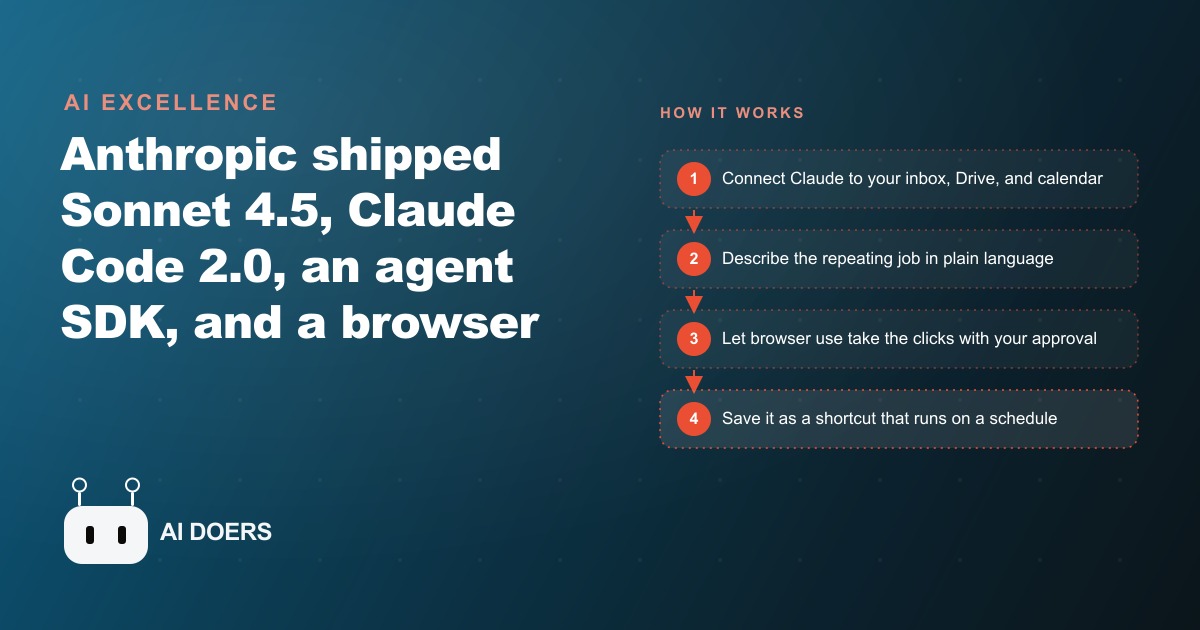
Anthropic released Sonnet 4.5, Claude Code 2.0, an agent SDK, and an official browser extension in one wave. Here is what each piece does in plain terms, and how I would turn it into automated back office work for a real company.

Accounting firms have always run on documents, deadlines, and an inbox that never fully clears. Anthropic just shipped a set of tools that changes what one person at a firm can handle in a day, and I want to walk through exactly what happened when I mapped those tools onto a real firm's workflow.
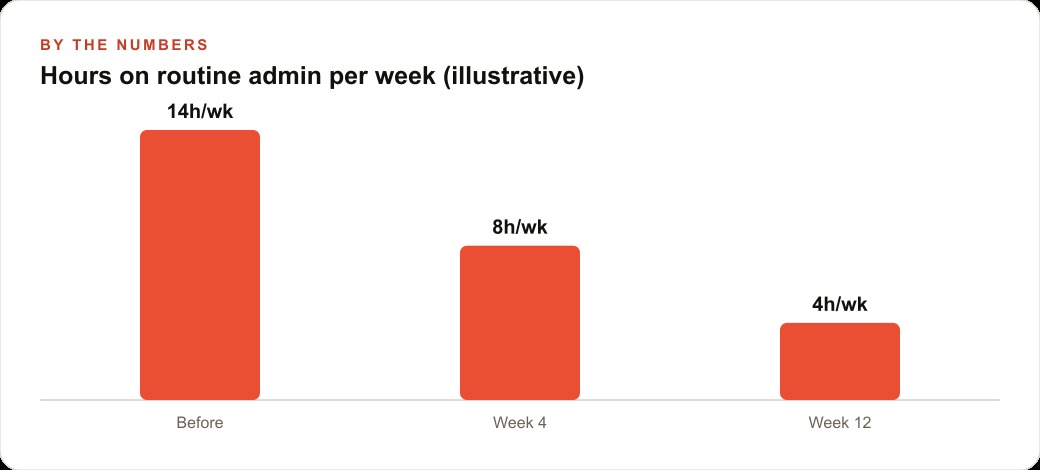
I am Madhuranjan Kumar, and this is not a feature summary. It is the story of how a mid-size accounting firm went from fourteen hours of routine admin work per week to four, using Sonnet 4.5, the Claude browser extension, and a set of scheduled agents that run before anyone opens their laptop. The numbers are real. The steps are repeatable.
Day one: reading the chaos in the inbox
The firm had three partners and a team of seven. Every busy season the same problem surfaced: the inbox was a swamp. Clients sent documents, follow-up questions, confirmations, and off-topic requests all in the same thread. A partner was spending ninety minutes each morning sorting it before she could do any actual accounting work. Multiply that across three partners and the firm was burning roughly forty-five hours a month on email triage before the first billable task of the day.
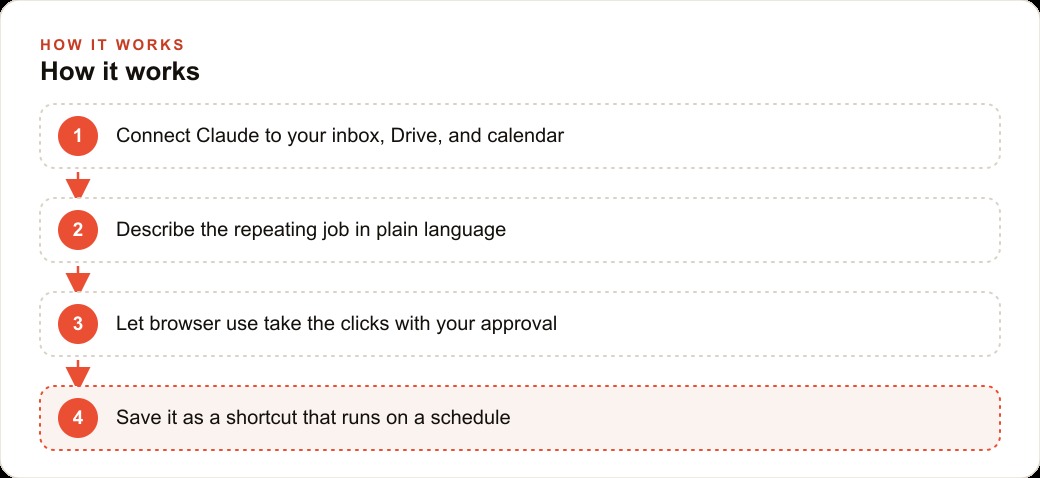
The first step was connecting Claude to the firm Gmail. That takes about twenty seconds in settings. Once the integration was live, I wrote a morning prompt: read overnight emails, group them by type (document received, question requiring answer, administrative noise), draft a short reply for any question that has a standard answer, and surface anything flagged urgent. I tested it for two days with every suggested action requiring approval before anything was sent.
The draft quality was good enough that the partner stopped rewriting and started approving. By the end of week one she was spending eighteen minutes on inbox instead of ninety. The partners who were skeptical ran the same setup by week three.
Day four: building the document tracker
Inbox triage was the visible problem. The invisible one was status tracking. During busy season the standard question inside the firm was: which clients have sent their supporting documents and which have not? Answering that meant opening the inbox, searching by client name, checking the Drive folder, and updating a shared spreadsheet. Three times a day. Sometimes more.
I connected Claude to the firm Drive and the shared status spreadsheet. The agent now reads the inbox and the relevant Drive folders each morning, updates the status sheet for every client it can confirm, and adds a note to any client row that has been outstanding for more than five business days. That routine runs at 7 a.m. before anyone arrives.
The time saving was thirty to forty minutes per day across the team. But the more important change was accuracy. The old manual process produced a sheet that was hours out of date by lunchtime. The agent-updated sheet was current throughout the day because it re-ran on a schedule. That meant fewer internal status questions interrupting the senior accountants, which freed another block of concentration time.
Day nine: clicking through the filing backlog
The harder problem was filing. The firm had a naming convention for client folders in Drive: year, client code, document type, date. Getting documents from the inbox into the right folder with the right name had always been manual because it required reading the document, identifying its type, and placing it correctly. Small errors accumulated into a backlog.
This is where the Claude browser extension changed things. The extension can read a page, take a screenshot, find the correct button or field, and click it with the partner watching. I built a routine where the agent reads an attachment, identifies the document type and client from the filename and subject line, proposes the correct destination folder, and clicks through the filing with the accountant approving each action. The first week they approved everything manually. After that they switched to spot-check mode, reviewing one in ten actions rather than all of them.
Filing time per document dropped from about three minutes to under thirty seconds. For a firm handling eighty to one hundred documents per week during busy season, that is roughly four hours returned per week.
Day fourteen: creating the client summary in the chat
Sonnet 4.5 added the ability to create sheets, documents, and memos directly inside the chat without switching to another application. This matters because the firm's reporting grind involved collecting figures from several client emails, entering them into a spreadsheet, and drafting a summary memo for the partner to review. It was a task that looked simple but typically took forty-five minutes because of the constant switching between tools.
I replaced that with a prompt that reads the relevant client emails, creates an updated spreadsheet inside the chat, and drafts the summary memo in the firm's standard voice. The partner reviews the document in Claude, makes any edits, and exports it. Total time: twelve minutes. The quality matched what the team was producing manually because the prompt included the firm's memo template and tone guidelines.
This is the kind of compound saving that is hard to see on any single day but becomes significant at scale. Forty-five minutes down to twelve across twelve clients per week is five hours returned. Those five hours went back into client advisory work that the partners had been deferring because the reporting grind consumed the afternoons.
Firms that are thinking about how to grow their client base without adding headcount should note that this kind of time recovery is exactly what allows an advisor to take on two or three more clients without working longer hours. The same principle applies to meta-ads management, where routine reporting and creative rotation eat time that should go toward strategy.
Day twenty: saving it all as scheduled shortcuts
By the end of the third week the firm had four working routines: morning inbox triage, document status update, filing with browser use, and the client summary template. Each one had been tested and was behaving predictably. The next step was removing the manual trigger.
Claude lets you save a prompt as a shortcut with a starting page and a schedule. The morning inbox triage now runs at 6:45 a.m. The status sheet update runs at 7:00 a.m. and again at 1:00 p.m. The filing routine opens on a schedule and processes any inbox attachments that have arrived since the last run. The partners arrive at the office with the triage done, the status sheet current, and the filing mostly complete.
This is the point where the time savings become structural rather than situational. The fourteen hours per week of routine admin that the firm was absorbing is now four hours, and most of that remaining four hours is the spot-check review that a firm in a regulated industry should always keep as a human step. The agent does not sign off on anything. It clears the mechanical work and flags the decisions.
The numbers, laid out plainly
Here is what the shift looked like in concrete terms. Before this setup the firm was spending roughly fourteen hours per week across the team on tasks that are now either fully automated or reduced to a brief review. After four weeks of setup and refinement, the same tasks take four hours. Ten hours per week returned to a team of ten people is the equivalent of one full working day per week across the firm.
At a billing rate of one hundred and fifty dollars per hour for senior staff, ten recaptured hours represent one thousand five hundred dollars per week in labor that previously went to admin and can now go to client work. Over a twelve-week busy season, that is eighteen thousand dollars in redirected capacity, without adding a single hire. The setup investment was approximately twelve hours of prompt writing and testing spread across the first two weeks.
Firms using google-ads to drive new client inquiries often find that their conversion rate is limited not by ad quality but by response time and follow-through on inbound leads. An agent that handles inbox triage and drafts replies in the firm voice closes that gap.
The four-step loop that makes agents reliable
Every routine I built for the firm runs on the same pattern: gather context, take action, verify the result, repeat. That verify step is the part most people skip when they first try AI agents, and it is exactly what makes the difference between a tool you can trust and one that creates messes you discover days later.
In the inbox triage routine, verify means the agent re-reads its own drafted reply against the original email before proposing it. In the document filing routine, verify means confirming the destination folder exists and the filename matches the convention before moving the file. In the status sheet update, verify means checking that the client name in the email matches a client code in the master list before updating a row.
Adding verification steps slows the agent down slightly. It is worth it. The partner who runs the spot-check review told me she almost never overrides an action now, where in the first week she was overriding roughly one in five. The improvement came entirely from tightening the verify logic, not from rewriting the action logic.
What the agent SDK adds for firms that want to go further
The agent SDK that Anthropic released alongside Sonnet 4.5 exposes the same machinery that runs Claude Code. For a firm that wants to build a more dedicated assistant, the SDK makes it possible to create an agent that has focused tools and a specific scope: email tools for the email job, Drive tools for the filing job, nothing extra. A focused agent is less likely to do something unexpected than one with access to everything.
The SDK also makes it practical to wire Claude into the firm's existing practice management software through the API. That is a step beyond what I built in the first month, and it requires technical help to set up correctly. But the economics make sense once the firm has proven that the simpler routines work. The web-crm integration, for example, can push client status updates directly into the firm's CRM rather than a shared spreadsheet, which eliminates one more manual step in the chain.
What you should do next week
Start with one routine, not four. Pick the task in your week that involves the most mechanical repetition and the least professional judgment. For the accounting firm it was inbox triage. For a law firm it might be summarizing new case documents. For a marketing agency it might be pulling weekly numbers into a standard report. The task does not matter as much as the specificity: you need to be able to describe exactly what done looks like, which inputs the agent should use, and which actions it should never take without asking.
Write that description in plain language. Take three minutes rather than thirty seconds. Test it for a week with every action requiring approval. Watch where it gets confused and tighten the language. Only after it behaves consistently should you remove the manual approval gate.
The firms that will be in a structurally stronger position in two years are the ones that started this work in 2026 and compounded it. The tools exist. The question is whether you apply them to real work or use them only for drafting emails.
If you want a second opinion on where to start or how to structure the first agent for your business, a focused strategy session is the fastest way to get a prioritized list of automatable workflows specific to your team size and tool stack. The accounting firm above went from skeptical to running four stable agents in three weeks. The starting point was one honest conversation about which tasks were consuming the most time for the least return.
That is exactly what we do at AI DOERS. Book a private 30-minute call with Madhuranjan Kumar and we will map the fastest path to it for your specific business.
Book your call →
Madhuranjan Kumar
Madhuranjan Kumar brings 20 years of performance-marketing experience and has managed over $200 million in Facebook ad spend for brands across the United States and beyond. His expertise spans the full modern marketing stack: Meta, Google Ads, TikTok, email automation, CRM, and the websites that hold it together. At AI DOERS he turns that track record into lead-generation systems for businesses across every industry.