
Build and Deploy Your Own AI App End to End, Without a Dev Team
Building a working app with AI is the easy part now. The skill that puts you ahead is deploying it cheaply on your own server so it can reach real customers. Here is the full path, applied to a real local business.

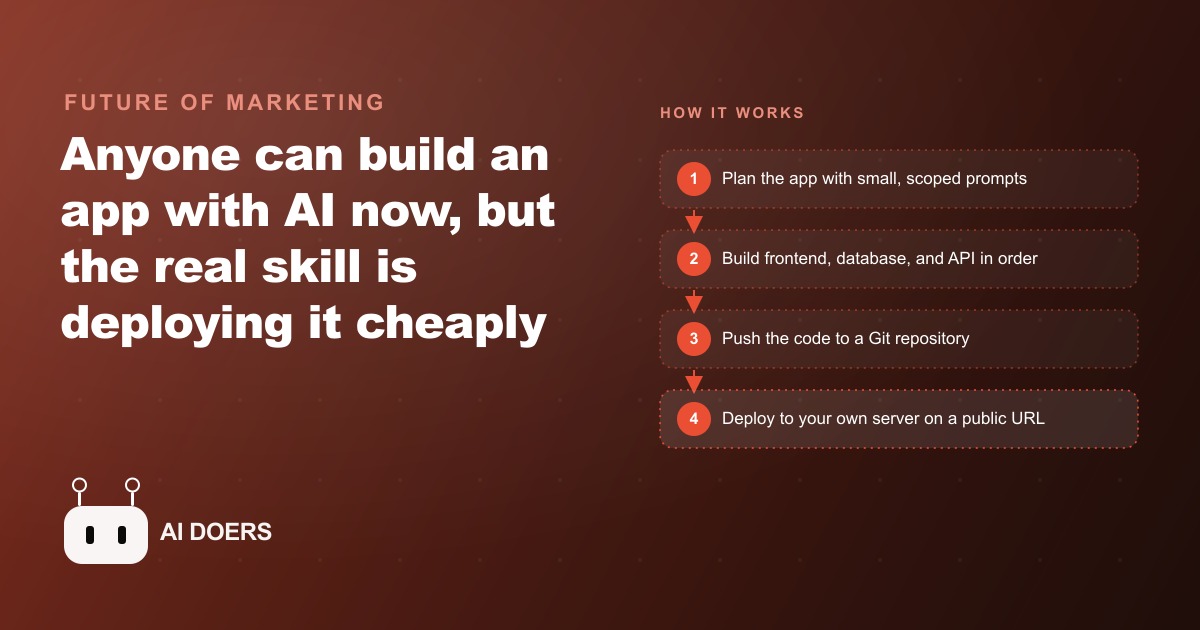
More than eight out of ten small business owners who have an idea for a custom app never get it past a local demo on their own laptop. The gap between "it works on my machine" and "it runs on a real URL" has quietly become the main wall in software development for non-technical founders. I am Madhuranjan Kumar, and the method I want to describe here closes that gap using an AI coding agent plus a self-hosted server, for a monthly cost that fits any small operation.
The build phase is no longer where most people get stuck
Writing code used to be the hard part. A business owner without a development background faced a genuine technical wall when they wanted to build a custom tool. They needed to either learn to program, which takes months, or hire a developer, which costs thousands of dollars and weeks of back-and-forth. An AI coding agent removes that wall almost entirely. You describe what you want in plain English, the agent writes the code, and you review what it produces. The code is not always perfect on the first pass, but it is functional code that covers the core of what a business app needs.
The wall has moved. The part that stops people today is not writing the code. It is everything that happens after: getting the app onto a server, connecting a real database, configuring a domain, and handling the inevitable moment when something breaks on a live system. A developer takes all of that for granted because they have done it dozens of times. A first-time builder looks at a server log full of error messages and has no framework for making sense of what went wrong. That moment is where most people give up, not at the coding stage.
Understanding how to deploy and maintain a small app yourself changes the economics of what you can build. You stop depending on a developer for every change and every fix. The business owns the tool, controls its costs, and can extend it without going back to a contractor.
For business owners who are building their organic presence at the same time, the same AI workflow that builds your app can support your SEO content strategy by generating pages and technical assets that compound over time alongside the application.
Small, scoped prompts keep the agent focused and the codebase from ballooning
The single most important technique in the build phase is breaking the project into small, sequential prompts instead of writing one giant instruction and hoping the agent figures out the details. A prompt that says "build me a complete quote and scheduling app for a landscaping business with a customer portal, a job calendar, a team management interface, and automated email confirmations" will produce a codebase that is almost impossible to review, debug, or extend. The agent will make dozens of decisions on your behalf, and many of them will be wrong in ways you will not catch until something breaks in production.
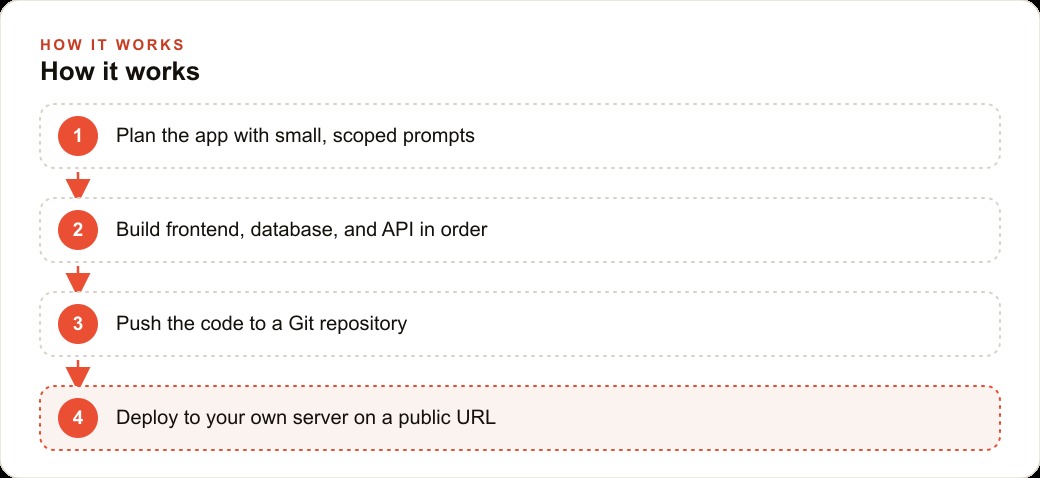
The pattern that works is phase-by-phase. The first prompt sets up the project structure and writes a readme describing exactly what the app does and what features it includes. Nothing else is built in this phase. You read the readme, confirm that the agent understood the scope correctly, and move on. The second prompt builds the frontend using placeholder data: the pages render and the navigation works, but no real data is involved yet. The third prompt adds the database schema and seeds it with test records. The fourth wires the API routes so user actions in the frontend actually save and retrieve from the database.
Each phase is short enough to review in ten minutes or less. If the second phase produces a layout that looks wrong, fixing it is simple because the database does not exist yet and there are no tangled dependencies. If you built everything at once and something looks wrong, tracing the problem means understanding a hundred interconnected files.
Scope discipline also prevents a failure mode specific to AI agents: feature drift. An agent given a vague or large scope will add things you never asked for. It will build user role management, export buttons, notification preferences, and audit logs because those are reasonable things a finished app might have. Tell the agent exactly what the current phase includes and that nothing beyond that scope should be added, and the build stays clean, predictable, and reviewable.
The tech stack decision you must make before the first prompt
Before writing a single prompt, the technology choice must be made, and the rule is to pick the option that appears most often in the world. Popular, widely used frameworks have enormous communities, years of documentation, and constant community-maintained examples of how to solve common problems. Less popular or newer frameworks may be technically interesting, but they are thin in the AI agent's training data, which means the agent is more likely to guess, produce outdated patterns, or fail silently on edge cases.
The practical effect of a popular stack is that the AI agent writes more confident and more accurate code. It has seen that framework used thousands of times in its training and recognizes the common patterns. It can tell you what an error means, suggest the right fix, and give you current documentation references. A niche framework produces agents that write code which looks plausible but may not work, and when errors appear, the agent may not recognize them.
The boring choice is the right choice. It also pays off past the build phase. When you need to hire someone to help extend the app later, developers who know popular stacks are easy to find. When you get stuck and search for solutions online, the answer already exists somewhere because thousands of other developers have had the same problem. When you need to upgrade the app a year later, the framework has current documentation and the agent can help you again.
Picking the stack also means deciding it before writing even the first setup prompt. Changing the stack halfway through a build is more painful than starting over, because the agent has already made dozens of decisions anchored to the original choice, and unwinding them is tedious and error-prone.
Self-hosting versus serverless: why predictable cost matters for small operations
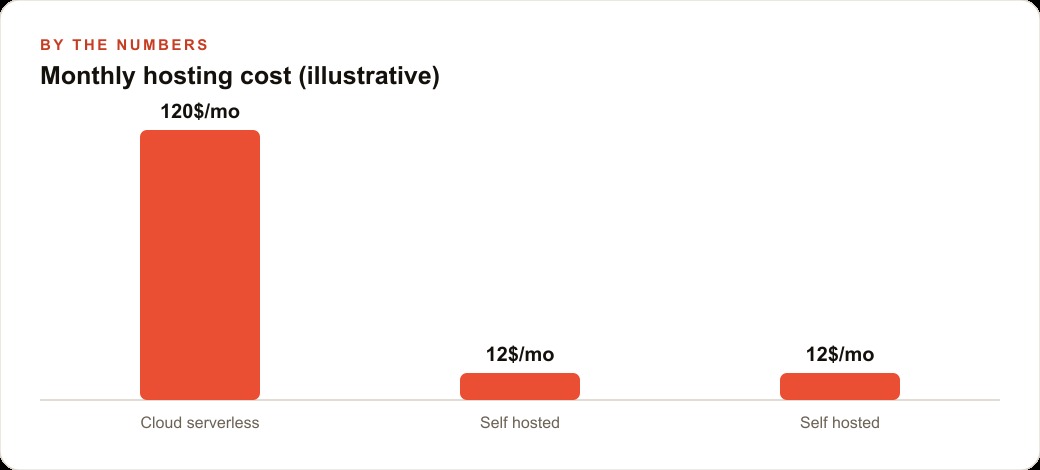
Serverless hosting platforms present themselves as the simple option: push code, it runs, you pay for what you use. For very small or irregular workloads the cost can be near zero. But for an app with consistent daily use, background jobs, and database queries, serverless pricing is difficult to predict because the meter runs on every function call, every second of execution, and every read from the database. A business that runs its scheduling app every working day can face monthly bills that vary by a factor of five or ten depending on activity, with no ceiling unless one is explicitly configured.
A virtual private server is a small rented computer in a data center. The cost is a fixed monthly amount regardless of how much the app runs. A basic server that handles the needs of a typical small business app costs between ten and twenty dollars per month. The landscaping company in the worked example below ran its quote and scheduling app on a twelve-dollar-per-month server. During a busy week when the team handled forty quote requests and dozens of schedule updates, the hosting cost was still twelve dollars. During a slow month, it was still twelve dollars. There were no surprises at billing time.
The contrast in an illustrative comparison: a similar workload on a pay-per-use serverless platform, with daily form submissions, a background job sending confirmation emails, and regular dashboard queries, would realistically cost between sixty and one hundred and twenty dollars per month depending on the specific pricing model and the volume of requests. That same workload on a twelve-dollar VPS costs twelve dollars regardless. For a small operation running lean, that difference across a year is meaningful.
For business owners running Meta ads to drive traffic to the app, the hosting cost needs to be predictable so the total cost per acquired lead can be calculated with confidence. A variable bill that swings based on traffic makes that calculation impossible and can distort how you read the performance of paid campaigns.
The other advantage of a VPS is ownership. The app lives on infrastructure you control. The database is yours. The logs are yours. You can back up the data directly, move the app to a different server if prices rise, and access everything without going through a third-party support process.
What an open-source deployment panel removes from your plate
Self-hosting used to mean writing web server configuration files, managing SSL certificate renewals, and running process management tools by hand. Those tasks require genuine server administration knowledge that most business owners do not have and should not need to acquire. An open-source deployment panel removes that requirement by providing a web interface that handles the administrative layer between your code and the server.
The workflow becomes simple. You push your code to a Git repository. You connect that repository to the deployment panel through a form. When you push a change, the panel pulls the new code, rebuilds the app, and restarts it automatically. The database is added as a service within the same panel. The connection string is generated by the panel and pasted into the app as an environment variable. The domain is connected through a DNS settings form. The SSL certificate is managed automatically. The panel handles the web server configuration, the certificate renewal, and the process management behind the interface so you never need to touch those files directly.
This creates a viable path for a business owner who understands what they want to build and can follow a deployment process step by step, but who does not want to become a server administrator. The conceptual understanding still matters: knowing what an environment variable is, what a database connection string does, and what it means when a deployment log shows a build failure. But the implementation details are abstracted away by the panel.
Using the AI agent to explain unfamiliar options as they appear in the panel interface is exactly the right approach. Asking "what does this configuration field control and what value should it have for my database" and getting a clear answer in plain English builds transferable knowledge that applies to every future deployment.
Debugging is not failure: it is the core repeatable skill of AI-assisted development
Every app deployed for the first time will encounter errors. This is not a problem with the agent, with the code, or with the deployment panel. It is the normal condition of taking software from a controlled development environment to a real server with its own configuration, its own environment variables, and its own constraints. The correct response is a calm, repeatable process: gather the right information, give it to the agent, apply the fix, and check again.
The information that matters is the error message, the stack trace if there is one, the recent lines of the deployment log, and a clear description of what you expected to happen versus what actually happened. When all of that goes into the agent together, the agent can almost always identify the category of problem and tell you exactly what to change. The most common deployment errors fall into a small set of categories: a missing environment variable, a port configuration mismatch, a database connection that was not established correctly, or a dependency that was not installed in the server environment. Each one has a specific fix that the agent knows.
The skill being developed through these debugging cycles is not specific to any individual error. It is the general skill of reading what an error is actually telling you, gathering the context that matters, and working through a fix methodically. That process transfers to every future problem the app encounters, and every time it is used it becomes faster. An owner who has debugged three deployment errors can work through a fourth in a fraction of the time it took to work through the first.
For business owners who have a web CRM built into their custom app, this skill also means they can extend the system themselves over time: adding a new field to the lead form, changing how follow-up reminders trigger, or connecting a new data source without calling a contractor for every small change.
The landscaping company: from scattered texts to a self-hosted scheduling app
The landscaping company had a simple problem. Quote requests came in through a mix of texts, phone calls, and a general-purpose contact form that buried everything in an undifferentiated inbox. The crew schedule lived in a group chat thread that was easy to miss and impossible to search. The owner wanted a simple internal tool: a public form for homeowners to submit quote requests, a dashboard to see and manage those requests organized by job type and neighborhood, and a calendar view showing the crew's jobs for the week.
The build followed the scoped-prompt pattern across four phases. Phase one was a project readme and folder structure only. Phase two built the frontend with placeholder data: three pages, the public form, the owner dashboard, and the schedule calendar. Phase three added the database schema with tables for requests and jobs, seeded with test records. Phase four wired the API routes so a form submission saved to the database and appeared on the dashboard in real time. Each phase was reviewed and confirmed before the next one started.
The tech stack was a popular, well-documented web framework paired with a mainstream relational database. The agent knew both thoroughly and the code it produced was readable and clean.
Deployment went to a twelve-dollar-per-month VPS through the open-source panel. The repository was connected, the database was added as a service, and the domain was pointed at the server. Two errors appeared in the deployment log. The first was a missing environment variable for the database connection string. The agent read the log output, named the missing variable, and provided the exact format the connection string needed. One paste into the panel's environment settings, one redeploy, and the database connected. The second error was a port mismatch: the app expected to receive traffic on a port the panel was not forwarding. One number to change in the panel settings. Both issues resolved within an hour of the first deployment attempt.
The app has been running for several months at twelve dollars per month. An equivalent off-the-shelf field service software subscription for a small landscaping operation would cost between forty and eighty dollars per month for features the business does not need, in a workflow shaped around other types of companies rather than this one. The custom app costs less, fits exactly, and the owner changed it once already without outside help: a fifth prompt added an email notification that fires when a new quote request comes in. Ten minutes to deploy. No new monthly fee.
That is exactly what we do at AI DOERS. Book a private 30-minute call with Madhuranjan Kumar and we will map the fastest path to it for your specific business.
Book your call →
Madhuranjan Kumar
Madhuranjan Kumar brings 20 years of performance-marketing experience and has managed over $200 million in Facebook ad spend for brands across the United States and beyond. His expertise spans the full modern marketing stack: Meta, Google Ads, TikTok, email automation, CRM, and the websites that hold it together. At AI DOERS he turns that track record into lead-generation systems for businesses across every industry.