
How to Build a Block-Based AI Writing App in Cursor With Zero Coding
A step by step look at building an AI writing and research tool in Cursor without code. Includes a worked example for an e-commerce store that needs content fast.

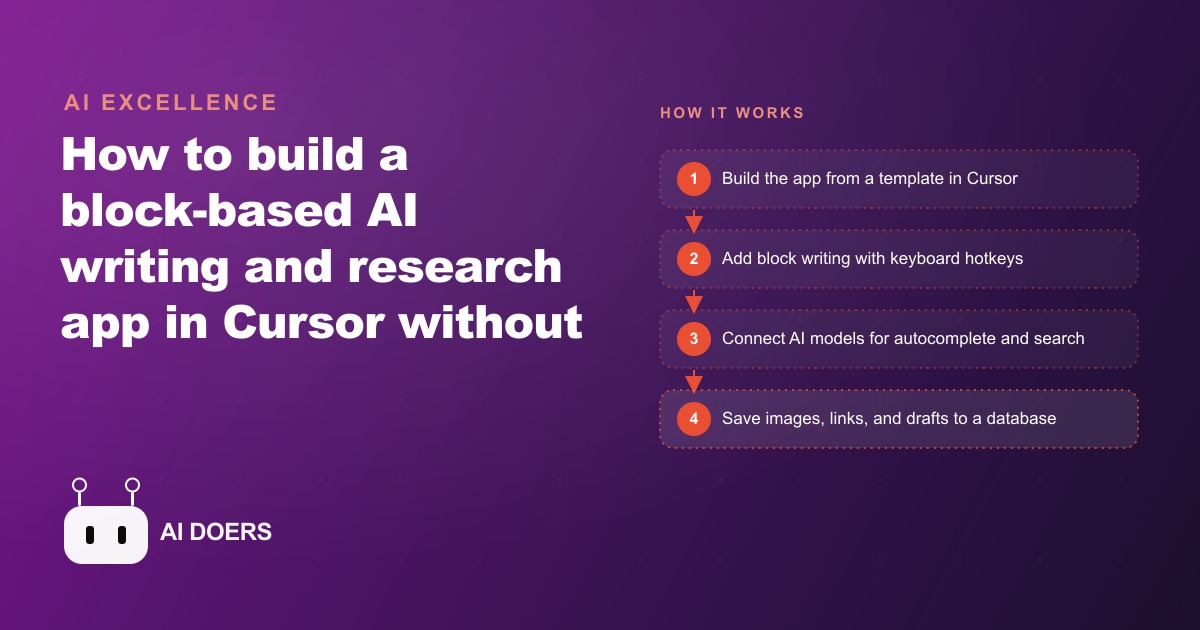
Most writers do not lose time writing. They lose it switching between a document, a browser tab for images, a separate note for sources, and a chat window for the next sentence. I am Madhuranjan Kumar, and I built a block-based AI writing and research app entirely in Cursor, without writing a single line of code myself, because I wanted all of that in one place. What I ended up with is a tool with eight distinct features, each closing a specific gap that bleeds time and concentration out of a content session.
1. Sentence-Level Block Architecture That Keeps Research Attached to Its Writing
The foundation is the block. Every sentence lives in its own discrete unit rather than in a continuous field of paragraphs. Expand a block and you see the image attached to that sentence, the source link that backs the claim in that sentence, and a note to your future self or a teammate. The sentence and everything that belongs to it travel as one object.
This changes the editorial experience in ways that are hard to appreciate until you try it. When a finished document arrives with every claim attached to its source and every visual already paired to the line that references it, editing is a different job. The editor does not cross-reference a footnote list or hunt a shared folder for the right image. Every piece of context is exactly where the writing that needs it lives.
For teams producing SEO content at volume, the block structure turns a document into a reusable asset rather than a disposable draft. A well-sourced block from a past piece can move into a new article without re-researching the web. If your business runs an active /seo-content program, that library compounds over time: every strong block written today is a content unit available for tomorrow's piece, tomorrow's social post, or tomorrow's email.
The block model also makes structural editing clean. Move a block and its image and source move with it. Reorganize ten blocks and the document restructures in seconds with no orphaned assets and no broken references. That alone makes a document easier to revise at a late stage than anything written in a standard long-form editor.
For small teams producing content across formats, the block also provides a natural unit for delegation. Assign a block to a researcher and a block to a writer; the assembled document arrives structured and attributed without a project-management layer on top.
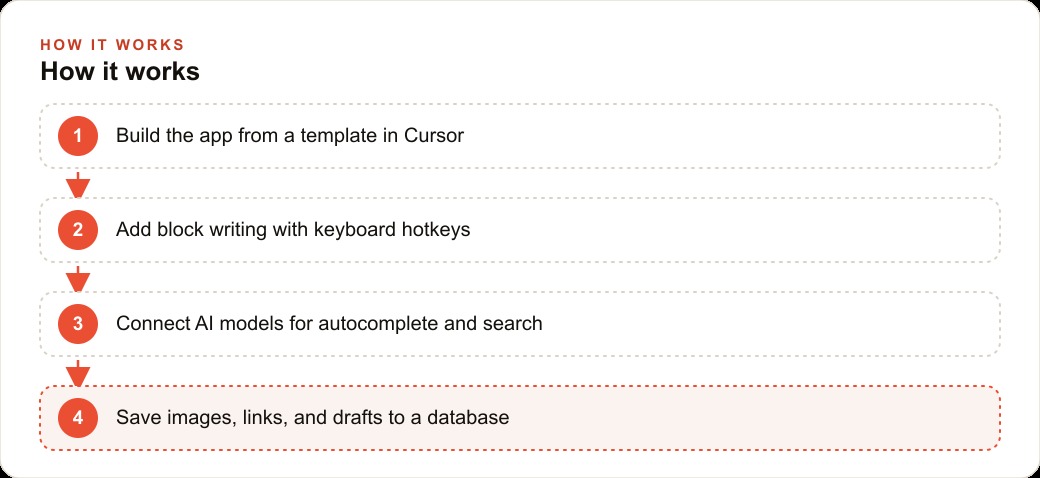
2. Keyboard Shortcuts That Keep Both Hands on the Draft
Every block in the app is accessible by hotkey. One shortcut opens the detail panel. Another moves to the next block. Another collapses back to the writing surface. The mouse never needs to move.
Writing flow is fragile. The moment your hand lifts from the keyboard to click something on screen, working memory splits between the navigation task and the sentence forming in your head. The next sentence loses sharpness. Writers who produce high output under deadline learn this early, which is why keyboard-first tools retain loyal users across decades of alternatives with far glossier interfaces.
Building this in Cursor required precise description of the desired behavior. When the shortcut fires, the cursor should land at the end of the current sentence, not the beginning. The detail panel should open inline beneath the block, not in a sidebar that obscures the surrounding text. Cursor translated those descriptions into working code. The lesson is that precision in describing behavior produces precision in the code generated by the AI. Vague requests produce vague results. Specific ones work on the first try more often than you would expect.
3. One-Keystroke AI Autocomplete That Continues in Your Voice
From inside any block, a single key press drafts the next sentence. The app sends every preceding block as context before asking the model to continue, so the continuation follows the voice, vocabulary, and rhythm of the piece already written rather than reverting to a generic AI register. If the document is written in short, punchy sentences, the autocomplete returns short punchy sentences. If the voice is more discursive, it matches that too.
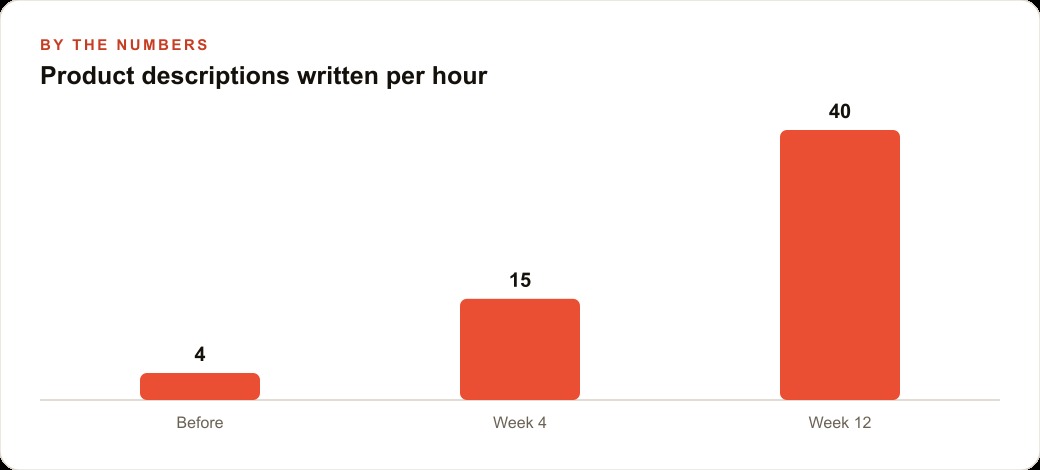
This is the feature that most directly changed the production math for an e-commerce accessories store that sells leather handbags, wallets, and travel gear. Before the app, the team wrote four product descriptions per hour. Each description required reading a product spec, drafting an opening line, identifying two or three features worth highlighting, writing a close, and checking the result for brand voice consistency. Around 15 minutes per product, every time.
With one-keystroke autocomplete, a writer opens a block for a new product, types the product name and two feature notes, presses the key, and receives a full draft in about 20 seconds. Editing that draft takes 60 to 90 seconds. In the first week with the app, the store was producing over 30 descriptions per hour without adding anyone to the team or changing the approval process. That rate held and climbed through the first three months.
The cost of running autocomplete at that frequency is negligible when the model is chosen thoughtfully. More on that in feature six.
4. Context-Aware Image Search That Proposes the Right Query Before You Ask
Opening a block's detail panel triggers an image search suggestion based on the text in that specific block. The app reads the sentence and proposes a query tuned to what you wrote, not a generic topic label. A sentence about a slim carbon fiber cardholder with RFID blocking gets a suggested query specific to those details, not just "wallet." Accept it with one tap and the side panel fills with relevant images. Select one and it attaches to the block.
The standard image workflow requires leaving the writing environment entirely: switch tabs, search a stock photo site, scroll through results, download, switch back, insert. That loop is manageable for one image. Across a document with 20 illustrated points, it becomes significant friction that adds up to 30 or 40 minutes of non-writing time per session.
Collapsing that into two actions inside the writing surface compounds across a content program. For the accessories store, every description arrived in the publishing queue with a matched image already attached at block level. The image-matching step that used to require a separate round of review before publication was already done. When batches of new descriptions moved into the store's content pipeline, the workflow upstream had already handled the asset pairing.
5. Automatic Link Finding That Attaches Sources to the Sentence That Needs Them
A link finder reads the full document and pulls relevant articles, studies, and published pages from around the web, then attaches each result to the specific block it most directly supports rather than dropping everything into a reference list at the bottom.
The practical difference between a block-attached source and a document-level bibliography is revision speed. When you return to edit a specific claim, the source is already beside that claim. No scrolling to a footer, no opening a tab to reread an article, no navigating back. The source and the sentence are one unit from the first moment of writing.
For content used in paid campaigns, this has compliance value. Copy that makes performance claims, the kind that supports a /meta-ads or /google-ads account, needs substantiation available quickly when a platform reviewer or a legal team asks for it. A document where every factual claim carries its source at sentence level makes that review fast rather than a reconstruction exercise conducted under pressure.
For the accessories store, the link finder attached durability test articles, material certifications, and third-party review summaries to the blocks that referenced them. The editor reviewing descriptions before they went live could verify any claim in seconds without leaving the document. Descriptions that might otherwise have required a fact-checking round shipped cleanly on the first pass.
6. Economical Model Routing That Makes AI Assistance Cost-Free at Volume
The app routes different tasks to different models based on what each task actually requires. Autocomplete at sentence level, image query suggestion, and link retrieval all go to the most economical model that handles the job reliably. Heavy synthesis tasks, like generating a structural outline or summarizing a long research document, go to a more capable model.
One-keystroke autocomplete does not need deep reasoning. It needs fluent text continuation in a given voice. Running a frontier model for that task is the equivalent of hiring a senior strategist to write subject lines. The capability exceeds the requirement, and the cost is unnecessary.
With economical routing, a writer can trigger autocomplete 100 times in an afternoon session and the total API cost is comparable to a single complex request to a premium model. That math changes behavior. Writers stop rationing the AI assist and use it as continuously as they use spell check, which is where the genuine speed compound kicks in.
For businesses running content programs across multiple formats, including the kind of copy volume that sustains a /web-crm nurture sequence alongside an active ad account, economical routing is what makes AI-assisted writing sustainable at production scale rather than only for occasional use.
7. Persistent Block Database That Turns Every Session Into a Growing Asset Library
Every block, attached image, saved source, and note goes to a database rather than living only in the browser session. Close the app, come back two weeks later, and the document is exactly where it was, down to the source attached to the third block and the note added to the seventh.
This is the feature that separates a useful tool from a novelty. Any writing environment that loses state on close cannot be trusted with real production work. Persistent block-level storage makes the app infrastructure rather than a session assistant.
The database also enables a pattern that compounds over time. Strong blocks with well-chosen sources become reusable content units. A writer can search for a claim from a project written two months ago and pull that block, with its attached source, into a new document without re-doing the research. For businesses with recurring content themes, like the accessories store writing seasonal copy for the same product categories each year, that library becomes increasingly valuable. Blocks about leather care, travel organization, or RFID protection do not need to be re-researched from scratch every launch cycle.
8. The Cursor Error-and-Fix Loop That Lets Non-Coders Build Real Software
When an error appears during development, the fix is always the same: copy the error message, paste it back into Cursor, let Cursor rewrite the code, accept the change, and continue. The builder never writes code directly. They describe desired behavior in plain language, accept what Cursor generates, and use error messages as the feedback signal when something breaks.
This defines who can build this kind of tool, and the answer is anyone with the precision to describe software behavior in specific language and the discipline to add one feature at a time before adding the next. The skill is not programming. It is being exact about what you want, which is a skill content people already have.
The accessories store built its own version of the app in one afternoon. No development background. The owner described the block layout, the hotkeys, the autocomplete behavior, and the database requirement in plain language. Cursor built each piece in turn. When something broke, the error was pasted back in. When something worked, the next feature was described.
Six months later, the store writes over 30 descriptions per hour, each with an image and source attached, and the tool cost nothing to build beyond an afternoon and an account. A new product launch that used to take three days of content work now takes an afternoon. The compounding effect of a custom tool built for one specific job, in one specific voice, for one specific team is the real argument for building rather than subscribing to a generic platform.
That is the kind of content infrastructure I help businesses design and build for their specific workflows. If you want the same output gains without spending the afternoon in Cursor yourself, you can bring me in to wire the tool for you.
That is exactly what we do at AI DOERS. Book a private 30-minute call with Madhuranjan Kumar and we will map the fastest path to it for your specific business.
Book your call →
Madhuranjan Kumar
Madhuranjan Kumar brings 20 years of performance-marketing experience and has managed over $200 million in Facebook ad spend for brands across the United States and beyond. His expertise spans the full modern marketing stack: Meta, Google Ads, TikTok, email automation, CRM, and the websites that hold it together. At AI DOERS he turns that track record into lead-generation systems for businesses across every industry.