
Build an Autonomous AI Researcher That Writes Content For You
An AI agent can search the web, pick the best sources, summarize them, and draft finished content. Here is how it works and how a moving company could put it to work.

The chore this playbook removes
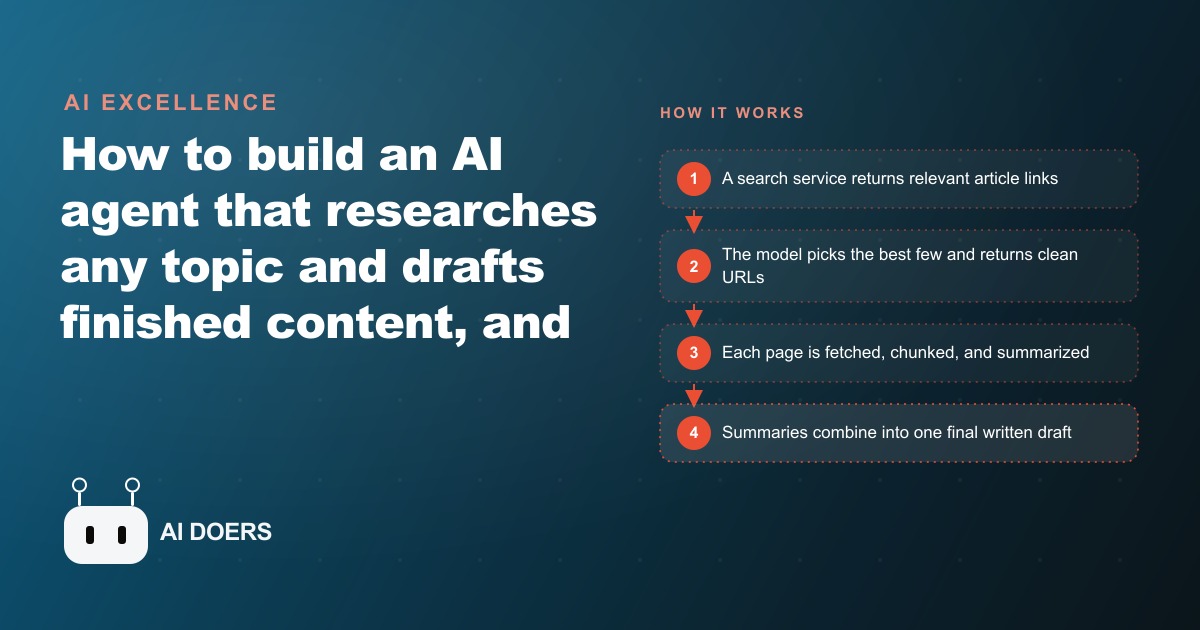
Before any code, be clear about the specific pain you are killing. Opening ten browser tabs, skimming each article, copying notes into a document, and only then starting to write is the tax on every piece of researched content a business publishes. An autonomous AI researcher is a small program that pays that tax for you: you describe a topic once, and it searches the web, picks the strongest sources, reads them, summarizes them, and hands back a finished draft. I am Madhuranjan Kumar, and this is the exact path I follow to build one, laid out as stages you can complete in order.
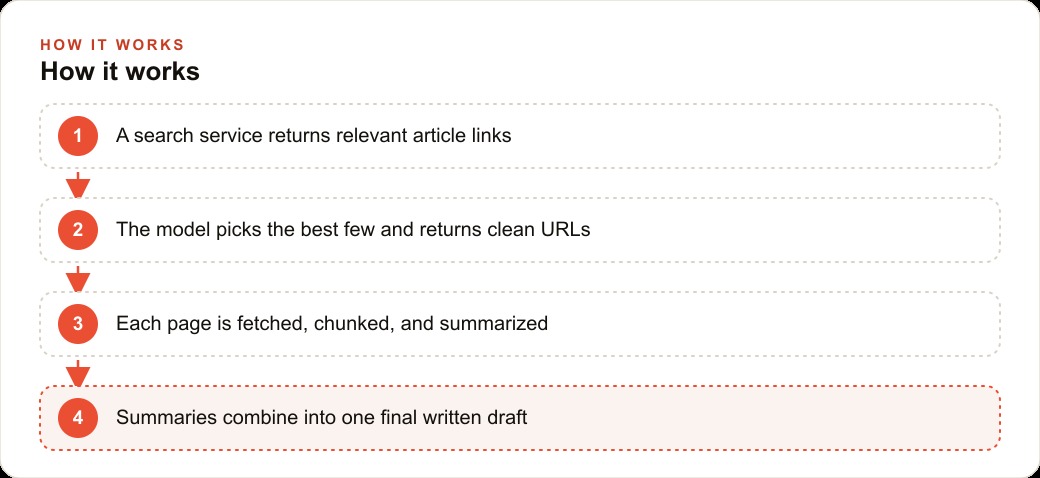
The important promise up front is that the skeleton never changes. Search, select, read, summarize, write. Once you have that pipeline standing, you point it at product research one week and competitor monitoring the next without rebuilding anything. Follow the stages below and you will have a research engine that never sleeps, plus a clear sense of where a human still has to stand.
Stage one: get the two keys and lock them away
The whole system runs on two credentials, so start there. You need an API key from a web search service that returns clean lists of results, and an API key for a language model that will do the selecting, summarizing, and writing. Sign up for both, generate the keys, and immediately put them in an environment file rather than pasting them into your code. This is not a formality. Keys that live in source get committed, shared, and abused, and rotating them later is a headache. An environment file keeps the secrets out of the code and lets you move the project between machines without leaking anything.
Do not skip a quick sanity check here. Make one raw call to each service and confirm you get a sensible response back. Verifying the plumbing before you build on top of it saves you from debugging a broken foundation later, when three moving parts are failing at once and you cannot tell which one is at fault.
Stage two: turn a topic into a list of candidate sources
The first real step in the chain is a function that takes your topic as input and sends it to the search service, returning a list of relevant article links. Keep this piece dumb on purpose. Its only job is to fetch candidates, not to judge them. Ask for more results than you think you need, because the next stage will do the filtering and you want it to have real choices.
The output of this stage is nothing more than a list of URLs and titles. Resist the urge to fetch full page content here. Pulling every page at this point wastes time and money on articles you are about to discard. A clean, cheap list of candidates is exactly what the selection stage needs, and keeping the stages separate is what makes the whole pipeline easy to debug when something misbehaves.
Stage three: let the model choose only the best few
Now hand that candidate list to the language model with a tight instruction: read these titles and links and return only the three best URLs for the topic, nothing else. This selection step is quietly the most important efficiency move in the build. Instead of scraping and summarizing ten pages, you scrape and summarize three good ones, which cuts cost and noise at the same time.
The discipline that makes this work is forcing a clean output. Tell the model to return just the URLs, with no commentary, so the next stage can consume the result without you writing fragile code to parse a paragraph of explanation. When a model returns exactly the shape you asked for, the rest of the chain stays simple. When it returns chatty prose, every downstream step becomes brittle. Spend a little effort here specifying the output format precisely and you save yourself hours later.
Stage four: fetch, chunk, and summarize each page
With three good URLs in hand, use a document loader to fetch the full content of each page. Some of those pages will be long, longer than the model can comfortably read in one pass, so split the text into smaller chunks. Chunking is not optional on real content. It is the difference between a summarizer that works on a short blog post and one that also handles a three thousand word guide without hitting its limit and silently truncating.
Summarize each chunk against a clear, explicit set of rules. This is the stage where quality is won or lost, and it is worth saying plainly: the prompts carry the quality. A vague instruction like summarize this returns vague mush. A precise instruction that says keep it short, keep it useful, and back claims with specific data returns something you can actually build on. Write the summarization prompt as if you were briefing a sharp assistant who takes you literally, because that is exactly what the model does. Spelling out what a good result looks like is where the value comes from, not the code around it.
Stage five: combine the summaries and write the finished draft
The final stage merges all the chunk summaries and passes them to one last prompt that produces the polished output, whether that is a blog draft, a social thread, or a plain client note. Because the raw material is already condensed and accurate, this closing prompt can focus entirely on structure, voice, and flow. Tell it who the piece is for, what tone to use, and what format you want, and it assembles the summaries into a coherent piece rather than a list of bullet points.
Two rules keep this stage honest. First, the draft must be original writing that learns the facts and rewrites them, never a copy paste of the sources, both for quality and to stay clear of lifting anyone's text. Second, the draft is a first draft. It goes to a human before it goes anywhere near a customer. The pipeline's job is to eliminate the gathering and the blank page, not to eliminate judgment.
Stage six: put a human at the approval gate
The last piece of the playbook is a person, and leaving them out is the fastest way to embarrass your brand. The researcher is only as good as your prompts and your review step, so build the workflow so that every finished draft lands somewhere a human reviews and approves before publishing. This is not a bottleneck to resent. It is the point where your team stops being the researcher and becomes the editor, which is faster, more enjoyable, and the place where their judgment actually adds value.
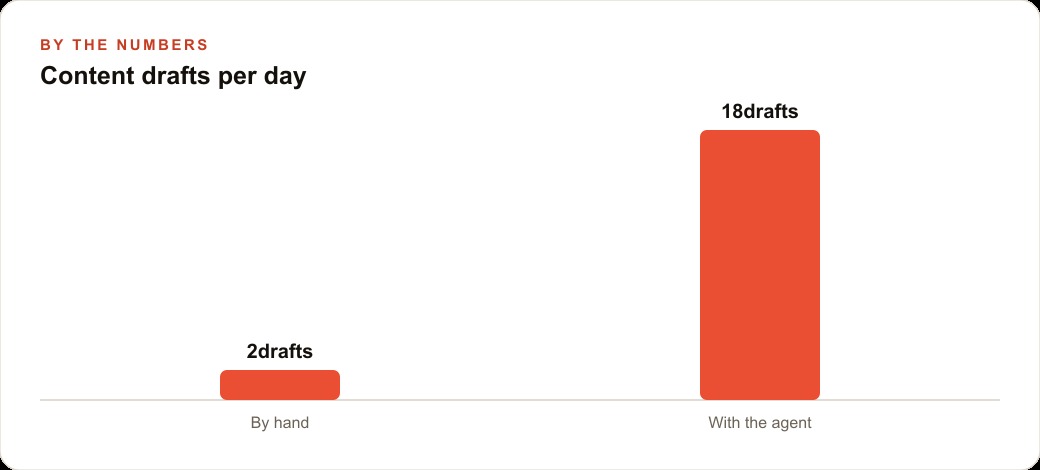
Set the volume expectation correctly too. A person can research and write a couple of solid pieces a day before the work turns into a grind. A tuned pipeline can prepare ten or twenty drafts for that person to polish, which is exactly the leap the illustrative graph in this piece points at: from a couple of hand made drafts a day to roughly eighteen assisted ones. The human count stays flat. The output changes shape.
A worked example: a moving company that publishes while the office is closed
Picture a moving company that wants to publish helpful local guides and keep an eye on what rival movers are promoting. Here is how I would set this up for that client. I would point the researcher at the topics their customers actually search: how to pack a kitchen safely, what to ask before booking interstate movers, how to estimate truck size. For each topic the pipeline searches, selects the strongest existing articles, reads them, and drafts a clear, original guide in the company's voice, learning the facts and rewriting them rather than copying.
I would run a second job aimed at competitor pages and local moving news, so the owner gets a short weekly digest of what other movers are pricing and advertising. If a rival starts pushing flat rate local moves, the digest surfaces it and the owner decides whether to respond. A staff member reviews and approves everything, which keeps human judgment where it belongs and makes sure nothing inaccurate or off brand reaches a customer. Over a few months, that steady stream of local guides quietly builds real SEO and organic search presence that brings in calls without paying for every click, and the same original drafts can be repurposed as posts for Facebook and Instagram ad campaigns when the mover wants to put budget behind the best ones. Each approved lead and enquiry then flows into the CRM and website stack where follow up is handled, so the research engine feeds a system rather than a folder of files nobody opens.
Stage seven: point the same pipeline at more than content
Once the six stages are running, resist the urge to think of this as only a blog machine, because the same search, select, read, summarize, write skeleton solves a dozen problems that have nothing to do with publishing. The reason to see it this way is that you have already paid the hard cost of building the pipeline, and repointing it at a new subject is cheap. That is where the real leverage hides.
A law firm can run the identical pipeline against recent rulings in a practice area and get a plain summary of what changed each week. An e-commerce store can point it at reviews of competing products and learn what buyers keep complaining about. An accounting firm can aim it at a tax rule change and produce a client note within minutes of the rule landing. In every case the only thing that changes is the topic you feed stage two and the format you request in stage five. The plumbing is untouched. This is why I tell owners to build the pipeline once and keep a short list of the questions their business asks over and over, then schedule a job for each. The pipeline that drafts your Monday blog can also brief you on your competitors before the week starts, and it costs almost nothing extra to do both.
The no-code shortcut, and the one rule that still applies
If writing functions is not your thing, the same five stages exist as drag and drop blocks in no code builders. You assemble search, choose, scrape, summarize, and write visually, connect your two API keys, and ship a shareable app in an afternoon. The architecture is identical. Only the assembly changes. Whether you build it in code or on a canvas, the two rules from this playbook still decide the outcome: the prompts carry the quality, and a human approves before anything is published.
One caution before you scale it up, because it is the mistake that turns a useful pipeline into an embarrassing one. Speed is seductive, and the first time you watch the system produce eighteen clean drafts before lunch, the temptation is to loosen the review step and let more of it publish automatically. Resist that. The pipeline's value is that it removes the drudgery of gathering and the paralysis of the blank page, not that it removes the need for a human who knows the business to say yes. A single inaccurate or off brand piece that slips through does more damage than the ten good pieces around it did good, so the approval gate is not the part to optimize away. Keep the human at the gate even when the drafts are excellent, and especially when they are excellent, because that is exactly when your guard drops.
You can build a basic version yourself with the free or low cost parts above, and I would encourage you to try, because doing it once teaches you where the quality actually comes from. If you would rather have a clean, reliable system tuned to your business and your voice, so you only handle the approve button, an expert can build it for you and hand it over working.
That is exactly what we do at AI DOERS. Book a private 30-minute call with Madhuranjan Kumar and we will map the fastest path to it for your specific business.
Book your call →
Madhuranjan Kumar
Madhuranjan Kumar brings 20 years of performance-marketing experience and has managed over $200 million in Facebook ad spend for brands across the United States and beyond. His expertise spans the full modern marketing stack: Meta, Google Ads, TikTok, email automation, CRM, and the websites that hold it together. At AI DOERS he turns that track record into lead-generation systems for businesses across every industry.