
Automate Boring Data Entry With AI: From PDF to Your Software
Invoices and forms arrive in endless layouts, and someone types them in by hand. Here is how AI reads them and files the data for you, with a worked example for a gym.

Every business has a job that nobody wants and nobody can escape, and for most of them it is data entry. Invoices, receipts, intake forms, sign up sheets, all arriving in a hundred different shapes, and a person sitting there reading each one and retyping the numbers into some other screen. I am Madhuranjan Kumar, and I have spent enough time inside small operations to know that this quiet, invisible task eats more hours and causes more errors than almost anything else on the payroll. What follows is the story of why that task resisted automation for so long, why it finally gave way, and what it looks like when a real business stops doing it by hand.
For decades, the thing that protected data entry from software was format. Not difficulty, format. There are millions of ways to lay out an invoice. The vendor name might sit top left on one and bottom right on another. The total might be labeled amount due, or balance, or simply a number in bold with no label at all. Line items might be a clean table or a run of text. Because there was no fixed pattern, there was no fixed rule a program could follow, and every attempt to write one broke the moment a document arrived that did not match the assumptions. So companies did the only thing that worked reliably. They hired a person, because a person can look at any layout and just understand it, the way you understand a handwritten note from a friend without needing a specification.
That is precisely the capability that changed. A language model does not need a rulebook that anticipates every layout, because it reads the way a person reads. It looks at the messy document, understands what it is, finds the fields you asked for wherever they happen to live, and hands them back as clean, structured data. The old blocker, the endless variety of formats, is exactly the thing these models are good at absorbing. A problem that was unautomatable for thirty years became automatable almost overnight, not because documents got simpler, but because the reader got smarter.
The overlooked step that decides whether any of this works
Here is where most people underestimate the work, and it is worth slowing down on, because getting this wrong is why so many homegrown attempts fail. The instinct is to grab the text out of a PDF and hand it straight to the model. That works fine when the PDF is clean digital text. It falls apart the instant a document is a scanned receipt, a photo someone took with their phone, a screenshot, or a two column layout, and in the real world a huge share of documents are exactly those things. The lazy text grab returns garbage or nothing at all, and the whole pipeline quietly produces wrong records that look plausible.
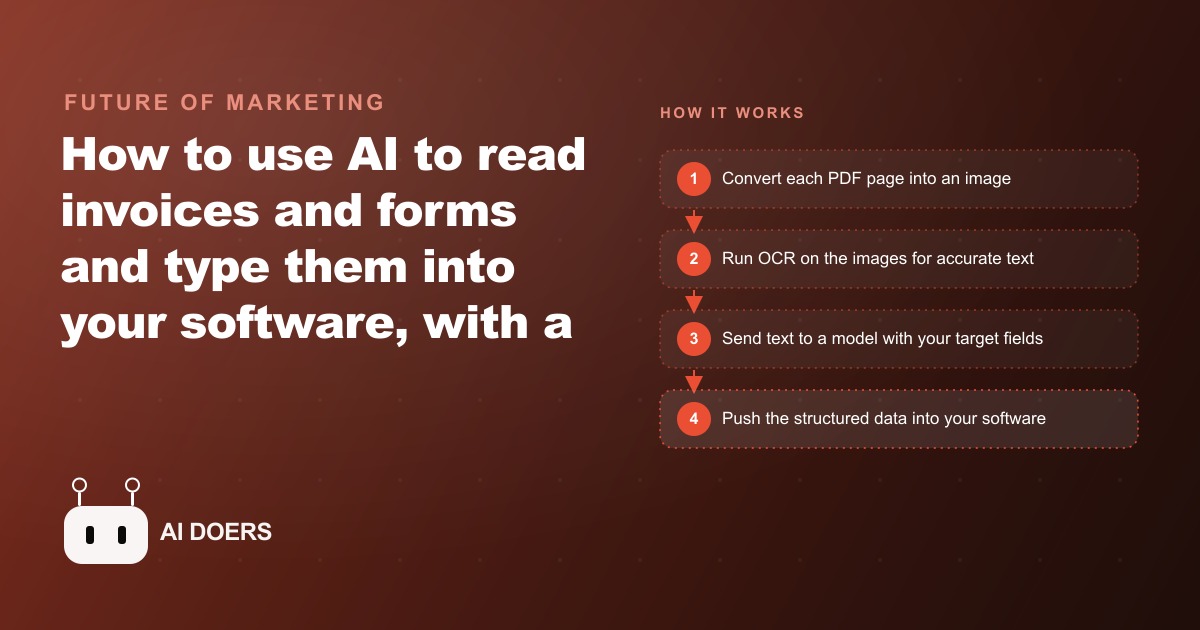
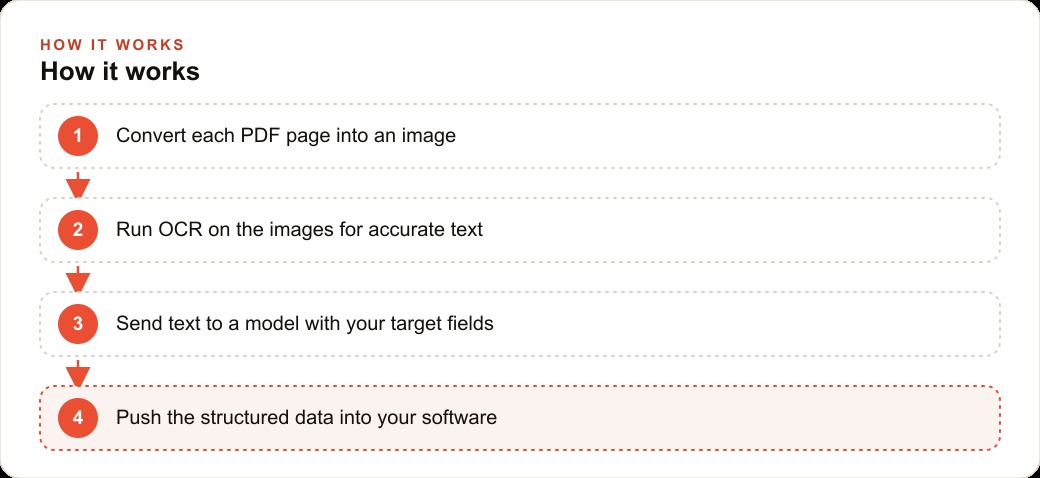
The reliable approach takes one more step that feels like extra effort and is actually the load bearing decision. You turn every page into an image first, then run optical character recognition on that image to pull the text out. Reading the picture rather than trusting the file's hidden text layer captures almost everything, including the scanned and photographed documents that the shortcut misses completely. It is slower by a hair and more robust by a mile. Once you have accurate text out of that step, the rest is genuinely simple: you hand the text to the model along with the exact list of fields you want, such as invoice number, amount, vendor, and date, and you ask for them back as a structured array. The model reads the mess and returns tidy fields, and from there an automation platform carries those fields into your accounting or membership software so a record appears without anyone touching a keyboard. Image to text, text to fields, fields to your system. That is the whole shape of it, and the unglamorous image first step is the part that separates a demo that impresses in a meeting from a system you can actually trust with your books.
The payoff is not only the hours, though the hours are real. A task that used to occupy one or two people for a chunk of every day can run on its own. The subtler win is accuracy. People make typos when they enter the same fields all day. Attention drifts, a digit transposes, a decimal slips, and those small errors surface later as billing disputes and reconciliation headaches that cost far more to chase down than the entry ever cost to do. A model reads the same way every time it looks at a document. It does not get bored on the fortieth invoice. Removing the human keyboard from the loop removes a whole category of mistakes that were never anyone's fault, just the inevitable cost of asking a person to be a machine.
What it looks like inside a gym
Let me ground the argument in one business, because the abstract version never quite lands. Picture an unnamed gym, the kind of place that runs lean with a front desk and a couple of trainers. Every week that gym receives invoices from equipment vendors, cleaning services, and supplement suppliers, plus a stack of signed new member sign up forms. Right now a front desk staffer keys all of it in, the invoices into the accounting tool and the members into the membership system, and it swallows an afternoon that the staffer would rather spend with the people walking through the door.
Here is how I would set this up for that gym. The staffer drops the week's invoices onto a simple upload page. Each page becomes an image, OCR pulls the text, and the model reads out the vendor, the amount, the line items, and the date. An automation then creates the matching record in the accounting software, and if that supplier does not exist yet, it creates the supplier first. For the membership forms, the same flow extracts the member name, the chosen plan, the start date, and the contact details, and adds them straight to the member database. What used to be an afternoon of typing becomes a few minutes of dropping files and a quick glance at the results to confirm nothing looks off.
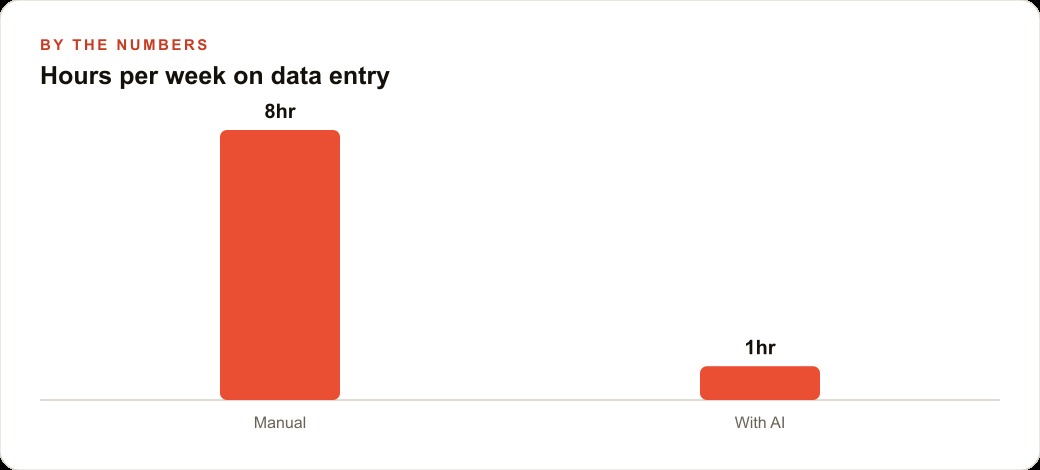
Put some illustrative numbers on it. Say the gym was spending roughly eight hours a week across the team on this entry work. A setup like this does not zero that out, because you still want a human eyeballing the results, but it can realistically pull it down toward an hour of review. That is seven hours a week handed back to the front desk, week after week, plus the quieter savings from fewer miskeyed amounts that would otherwise have turned into supplier disputes or membership billing errors. The owner ends up with cleaner books, faster onboarding of new members, and a front desk that spends its time on members instead of on a keyboard. And because the fields were defined once at the start, a brand new supplier with an invoice layout nobody has ever seen flows through without any reprogramming, because the model was never depending on the layout in the first place. That single property, indifference to format, is what makes the whole thing durable rather than a fragile script that breaks every time a vendor redesigns their invoice.
The gym is just one instance of a pattern that shows up everywhere. A retailer buried in supplier invoices, a clinic pulling patient intake forms into records, a property manager reading rent receipts and lease pages, a restaurant turning delivery invoices into inventory updates. If a human currently reads a document and copies numbers into a screen, that exact step is now automatable, and the reasoning is identical in every case. The variety that used to protect the task from software is the variety the model handles best.
It is worth pausing on what this does to the shape of a small team, because the effect is subtler than a headcount cut and more interesting. When the entry work vanishes, the person who used to do it does not become redundant. They become an editor rather than a typist. Their job shifts from mechanically transcribing figures to reviewing a machine's first pass and catching the rare case where something genuinely does not add up, which is a far better use of a human being's attention. The tedious ninety percent gets handled, and the person spends their time on the ten percent that actually requires judgment. I have watched this change how people feel about their work, because there is a real difference between spending your afternoon retyping the same fields and spending it making sure the books are right. The first is draining and the second is meaningful, and the automation is what moves you from one to the other.
There is also a quieter benefit that only shows up over months: a clean, structured record of everything that passed through your business. When every invoice and every form is being read into tidy fields anyway, you end up with searchable, consistent data instead of a filing cabinet of PDFs nobody can query. That accumulated record is worth something in its own right, because it lets you answer questions you could never answer before, like how spending with a particular supplier trended across the year, without anyone digging through paper. The task you automated to save time quietly hands you better information as a side effect, and that information is often worth more than the hours you set out to reclaim.
Building it yourself is genuinely within reach if you are comfortable wiring tools together. The pipeline is only four honest stages: convert each page to an image so nothing scanned slips through, run OCR to get accurate text, send that text to a model with your list of target fields, and push the clean structured result through an automation into your real software. The advice I always give is to start with your single most common document, usually supplier invoices, get it genuinely reliable before you trust it unattended, and only then add the next document type. You can even begin with a no code extraction tool to prove the value in a day before you commit to a custom build. The point is to earn confidence on one narrow, high volume document rather than trying to boil the whole back office at once.
There is a larger thread worth naming as I close. This kind of automation does not sit off by itself. The clean, structured data it produces is the same data that makes the rest of your operation work, and it plugs naturally into the broader CRM and website stack that holds your customer records and drives your follow up. A gym that captures every new member cleanly at intake is a gym that can actually follow up with the ones who lapse, and that follow up is what turns a signed form into retained revenue. In the same way, the hours you reclaim from typing are hours that can go toward the work that grows the business, whether that is running better Facebook and Instagram ad campaigns to fill classes or simply spending more real minutes with the members you already have. The back office task nobody wanted was quietly stealing the time you needed for the front office work that matters.
So the honest summary is this. Data entry survived automation for a generation because it hid behind the endless variety of documents, and it fell the moment we got a reader that treats variety as normal rather than as an exception. If you are comfortable connecting the pieces, this is well within your reach to build. If you would rather have it wired into your actual accounting and membership systems and running hands free, with the image first step done properly so the scanned and photographed documents do not slip through, that is exactly the kind of automation I build for clients, and you are welcome to bring me in.
That is exactly what we do at AI DOERS. Book a private 30-minute call with Madhuranjan Kumar and we will map the fastest path to it for your specific business.
Book your call →
Madhuranjan Kumar
Madhuranjan Kumar brings 20 years of performance-marketing experience and has managed over $200 million in Facebook ad spend for brands across the United States and beyond. His expertise spans the full modern marketing stack: Meta, Google Ads, TikTok, email automation, CRM, and the websites that hold it together. At AI DOERS he turns that track record into lead-generation systems for businesses across every industry.