
Automate Client Proposals: From Call Transcript to Slide Deck
This system logs a finished sales call, then turns the transcript into a polished proposal deck after a single approval click. It removes hours of manual writing while keeping a human in the loop.

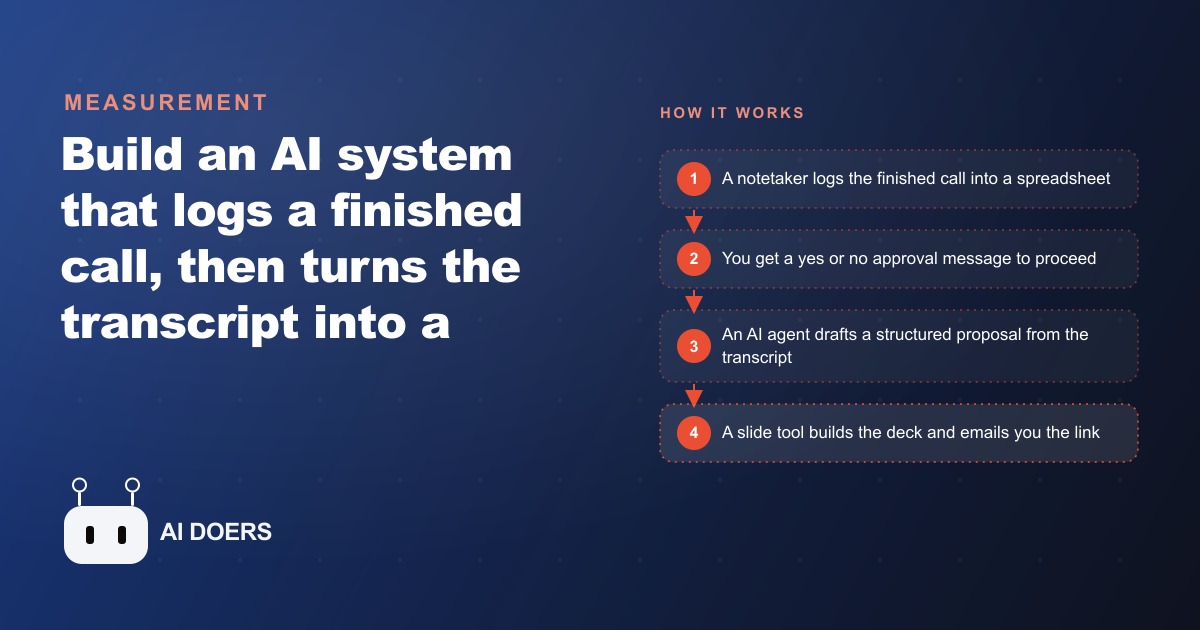
Most proposal processes break at the same point. The sales call ends, the energy is high, the deal feels close, and then someone has to sit down and write a forty-page proposal document from scratch, work that takes ninety minutes on a good day and several hours when the call was complex. By the time the proposal lands in the prospect's inbox, the momentum from the call has cooled. The window that closes between "great conversation" and "you have our attention" is the most expensive gap in most service businesses.
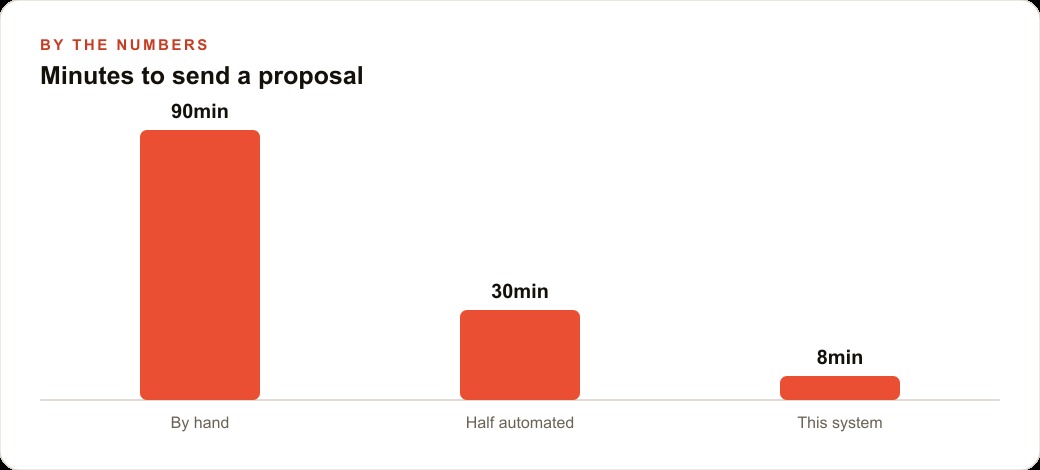
An automated workflow that converts a finished sales call transcript directly into a formatted proposal deck does not fix every part of that problem, but it closes the gap decisively. The system described here, built from two linked automation workflows, gets a draft deck into the seller's hands within minutes of a call ending. The seller reviews, adjusts ten percent of the content, and sends. A roofing company that piloted this approach was spending roughly ninety minutes per proposal and sending about twenty per month. After implementing the system, per-proposal time dropped to around eight minutes, the review-and-send step included. The same volume of proposals went out with less than three total hours of effort instead of thirty.
Getting a system like this to work reliably requires thinking carefully about each component. Most automations of this kind fail not because the AI writes poorly but because the pipeline has a weak link somewhere that silently breaks and nobody notices until a proposal goes out with missing sections, an incomplete summary, or a link that dead-ends. Here are the eight components that make the difference between a system that works occasionally and one that works every time.
The Notetaker That Captures Without Anyone Pressing Record
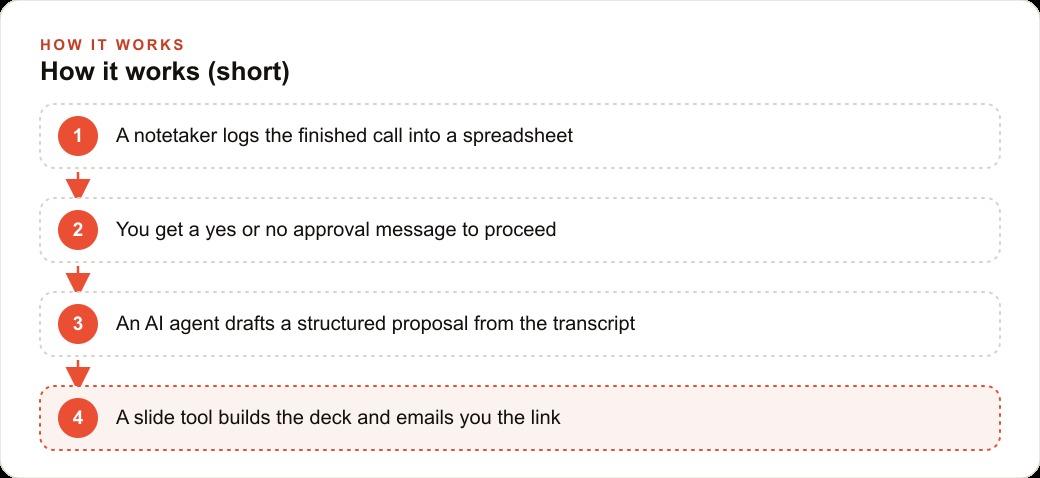
The foundation of the system is a call intelligence tool that joins every sales meeting as a participant, captures the full transcript, and logs it automatically when the call ends. This is not screen recording or manual note-taking. The notetaker joins as its own attendee, records audio, generates a transcript, and in many implementations produces its own AI summary of the conversation, all without any action from the seller.
The critical design principle here is that nothing in the downstream workflow can begin until this step is complete and reliable. If the notetaker fails to join, fails to record, or produces a corrupted transcript, every subsequent step fails silently. Before trusting any of the later components, the notetaker should be validated on a real call, the transcript quality verified, and the automatic logging confirmed. Most call intelligence tools in this category, when configured correctly, join invitations from the calendar, which means any meeting with a video link gets a notetaker automatically. That removal of manual action from the process is what makes the system sustainable across a busy sales team.
The Spreadsheet Row That Becomes the Workflow's Trigger
Once the call ends and the notetaker finishes processing, it writes a new row to a shared spreadsheet. That row contains the meeting metadata: the call ID, the participant names, the date and time, the meeting title, and a link to the full recording and transcript. It may also include the AI summary the notetaker generated.
What makes this row important architecturally is that it is the single point where two different workflows connect. The first workflow, the one that populated the row, is managed by the call intelligence tool. The second workflow, the one that generates the proposal, watches the spreadsheet for new rows and fires when one appears. By using a shared spreadsheet as the handoff point, the two workflows remain independent and debuggable. If something goes wrong with the proposal generation, the row stays in the spreadsheet with a status marker that makes the failure visible without losing any of the underlying data.
The Approval Gate That Keeps a Human in the Loop Without Creating a Bottleneck
The moment a new row appears, the automation does not immediately generate a proposal. It sends a message first, a simple yes or no question to the seller: "Do you want to generate a proposal for this call?" If the answer is yes, the proposal workflow fires. If the answer is no, the row is marked as declined and nothing else happens.
This step exists for a practical reason. Not every sales call should produce a proposal. Discovery calls, renewal conversations, internal syncs that were logged automatically, these do not need a proposal deck. Without the approval gate, the system would generate a proposal for every call the notetaker joined, which wastes resources and clutters the output. The approval gate makes the process opt-in at the decision point where the human has the most context about whether a proposal is actually warranted. It adds about twenty seconds to the process and eliminates the cleanup problem of unwanted proposals.
The Wait Loop That Prevents Drafting from Incomplete Data
This component is the one most implementations forget, and it is the most common source of failed proposals. When a call ends and the notetaker logs the row to the spreadsheet, the AI summary may not be ready yet. Transcription takes time. AI summarization runs after transcription. Depending on the length of the call and the load on the provider's servers, the summary can take anywhere from a few minutes to fifteen or twenty minutes to appear in the row.
If the proposal generation workflow reads the row immediately after the yes approval, it may find the summary field empty. It will then either generate a proposal based on no content, which produces useless output, or it will error out, which produces nothing at all. The fix is a wait loop: a step that checks whether the summary field in the row has content, waits if it does not, and retries on a defined interval until the field populates. Only once the summary is confirmed present does the workflow move to the next step. This one component, often a few lines of conditional logic in an automation builder, is the difference between a system that produces consistent output and one that works about half the time.
The AI Structuring Agent That Writes From What Was Actually Said
With the transcript and summary confirmed and ready, the workflow hands the content to an AI agent with a structured prompt that specifies exactly what the proposal should contain. The structure is the template the agent fills, not an example it loosely follows. A reliable proposal structure for a service business includes an executive summary that restates the prospect's stated problem in their own language, a problem statement that diagnoses the situation with specifics from the call, a proposed solution section that outlines the approach and its rationale, an ROI section that translates the solution into business terms relevant to the client's situation, a roadmap that gives a high-level timeline with phases, and a closing section that names the next step clearly.
The AI agent's job is not to invent. It is to extract, structure, and write fluently from the materials it has been given. A well-prompted agent working from a real transcript will produce output that references the prospect's actual language, their specific objections, and the details they shared about their situation. This is what makes AI-generated proposals feel earned rather than templated. The source material is the differentiator, and the quality of the source material, which comes from the transcript, is the reason the notetaker step cannot be skipped.
The Slide Builder That Formats the Deck Without a Designer in the Room
Once the AI agent has produced the structured proposal text, the workflow passes it to a slide generation tool that converts the sections into a formatted presentation deck. The slide builder receives structured content and outputs a shareable link to a completed deck, with each section of the proposal mapped to a slide or slide group.
The value of this step is not that the slides are beautiful. They are functional and professional, which is the correct target for a first-pass proposal. The goal is not to send a polished creative deck that took a designer three hours. The goal is to send a coherent, well-organized document within minutes of the call ending, when the prospect is still thinking about the conversation. Most of the slide builders that integrate with automation platforms in this category allow some templating, so the deck can be formatted with brand colors, fonts, and a consistent layout. The output will typically need light editing, but the editing takes minutes rather than hours.
The Email Delivery Step That Closes the Loop Without Chasing Anyone
When the slide builder finishes and generates a link to the completed deck, the workflow sends that link to the seller via email. The email contains the deck link, a brief summary of which call it covers, and a note that this is a draft ready for review. At this point the seller's task is straightforward: open the deck, review the content, make any changes, and send to the prospect.
The email delivery step also updates the row in the shared spreadsheet, changing the status from pending to generated. This status marker is what makes the system auditable over time. The spreadsheet becomes a log of every call that came through the system, whether a proposal was generated or declined, and when. If the seller wants to follow up on a call from three weeks ago that they declined at the time, the row is still there with the full metadata, and the on-demand path handles what comes next.
The On-Demand Path for Every Call You Did Not Process the First Time
The eighth component of a reliable proposal system is not part of the main automated flow. It is a side door. A simple form where the seller can enter any historical meeting ID and trigger the full proposal generation workflow on demand, bypassing the yes or no approval step because the decision to generate is implicit in the act of entering the ID.
This matters because the main flow captures calls in real time, but sellers often realize after the fact that a call they skipped the approval on was actually a strong opportunity. Without the on-demand path, those calls require the seller to manually assemble the proposal from notes, which is exactly the situation the whole system was built to avoid. With the on-demand path, any past call that the notetaker logged can be turned into a proposal at any time. The same wait loop, the same AI structuring, the same slide builder, and the same email delivery all run in response to the form submission.
The system, taken together, does not replace the seller's judgment. It handles everything from the end of a call to a reviewable draft deck, which is the part of the process that has always taken the most time for the least leverage. The seller still reads the deck, adjusts the ROI numbers if needed, adds anything the AI missed, and makes the call about when and how to send it. What they are no longer doing is building the structure, writing the sections, and formatting the slides from a blank document. The ninety-minute job has become an eight-minute job, and the eight minutes is mostly reading. ## The Standard the System Is Actually Setting
Automated proposal generation is not a productivity hack. It is a quality standard applied consistently. The seller who reviews a well-structured AI draft and adjusts the ROI numbers is doing the same intellectual work they always did. The system just removed the friction that was causing some of them to skip the proposal entirely on calls they had mentally written off.
The businesses that benefit most from this system are not the ones doing the most deals. They are the ones that were losing closeable opportunities because the proposal was taking too long to feel worth building. For those businesses, eight minutes changes the math on which calls are worth following up on. Every call that generated a transcript is now a candidate for a proposal. That is a different posture toward the pipeline, and the system is what makes it sustainable.
That is exactly what we do at AI DOERS. Book a private 30-minute call with Madhuranjan Kumar and we will map the fastest path to it for your specific business.
Book your call →
Madhuranjan Kumar
Madhuranjan Kumar brings 20 years of performance-marketing experience and has managed over $200 million in Facebook ad spend for brands across the United States and beyond. His expertise spans the full modern marketing stack: Meta, Google Ads, TikTok, email automation, CRM, and the websites that hold it together. At AI DOERS he turns that track record into lead-generation systems for businesses across every industry.