
AutoGen: The Controllable Multi Agent Framework You Can Actually Run
Microsoft's AutoGen lets a small team of AI agents collaborate on real work while you keep a hand on the wheel. Here is how it works and how a med spa would use it.

Multi-agent AI systems failed the practical test for most businesses not because the concept was wrong but because two specific problems made them untrustworthy: there was no way to give feedback mid-process, and the architecture was limited to two agents. Microsoft's AutoGen fixes both in a single framework, and that combination changes what is actually deployable for a small business that cannot afford to let an autonomous system send the wrong reply to a client.
Microsoft Released the Fix for the Two Problems That Made Multi-Agent Systems Impractical
The two problems are worth stating clearly because they explain why multi-agent setups that sounded promising did not survive contact with real business use.
The first problem was terminal opacity. Earlier multi-agent setups started a task and ran until completion before returning anything. If the agent made a wrong assumption at step two, you found out about it at step fifteen, after the mistake had propagated through every subsequent decision. The only correction available was to restart with a revised prompt and hope the same mistake did not recur. For a business owner whose brand name and customer relationships are at stake, that is an unacceptable risk profile.
The second problem was the two-agent ceiling. Most real business tasks do not involve two roles. A customer inquiry response for a med spa involves gathering the relevant treatment facts, drafting a warm reply that reflects the brand voice, and reviewing the draft for any claim that crosses a compliance line. That is three roles. A sales prospecting workflow involves researching the prospect, drafting the outreach, and personalizing it with specific details from the research. That is also three roles, at minimum. The two-agent ceiling forced developers to collapse distinct roles into single agents, producing agents that were either too broad or too inconsistent to be reliable.
AutoGen released both fixes simultaneously. Human feedback can now interrupt the process at any checkpoint rather than only at the end. And the group chat manager architecture removes the two-agent ceiling entirely, allowing as many specialist agents as the task requires. Those two changes together move multi-agent AI from a developer experiment into something a real business can actually run.
The User Proxy Agent Is Not a Middleman, It Is the Human's Seat in the Conversation
The user proxy agent is the mechanism that solves the terminal opacity problem. It acts on behalf of the human in the conversation, executes the actions the other agents produce, and pauses to request human input when a checkpoint is reached.
The distinction between a middleman and a seat matters. A middleman filters and translates, adding latency and potential distortion. A seat at the conversation means the human's judgment can enter at any point with full context and redirect the agents before a mistake compounds. The user proxy agent achieves the second, not the first.
In practice, the user proxy agent running in a med spa inquiry workflow might pause when the intake researcher agent identifies that the incoming question touches a medical condition. The pause surfaces the question and the researcher's assembled facts to the human operator, who can review the facts, add a specific note, and approve or redirect the drafter's approach before a word of the reply is written. The drafter then works with human-verified input rather than making its own assumptions about a sensitive topic.
The user proxy also executes code and actions the other agents produce. If the drafter's reply needs to be formatted, sent through an email API, or logged to a CRM record, the user proxy handles those actions after human approval, or automatically if the workflow is configured to run those steps without a checkpoint. This execution capability is what makes the framework operational rather than advisory.
A Group Chat Manager Removes the Two-Agent Ceiling That Blocked Real Workflows
The group chat manager coordinates any number of specialist agents in a shared conversation. It decides which agent speaks next based on the current state of the task and the defined roles of each agent in the group. The human operator defines the agents, their roles, and the goal at the start. The group chat manager handles the sequencing from there.
Removing the two-agent ceiling changes the quality of the output by allowing cleaner role separation. A researcher agent whose only job is to find and summarize relevant facts is better at that job than an agent that also has to draft the reply based on the facts it found. A reviewer agent whose only job is to check for compliance issues and tone consistency is better at that job than an agent that also wrote the draft it is reviewing. Clean role separation produces more reliable results because each agent operates at the limit of what it is good at rather than trying to do everything adequately.
For a med spa running an inquiry response workflow, the group chat might include an intake researcher, a drafting agent, and a review agent. The group chat manager sends the incoming inquiry to the researcher first, takes the researcher's fact summary and sends it to the drafter, then sends the draft to the reviewer before it reaches the user proxy for human approval or direct send. Each handoff is automatic. The human only touches the conversation at the configured checkpoints, which can be set to all steps, final output only, or none.
The result of this architecture is a workflow that is both more capable and more controllable than any two-agent setup. More capable because each role is held by a specialist rather than a generalist. More controllable because the human's approval gate is a configurable parameter rather than an all-or-nothing constraint.
The Human Approval Dial Is What Separates a Trusted System From an Autonomous Gamble
AutoGen allows the human approval level to be configured per workflow: confirm at every step, confirm only when a finish word appears in the output, or never confirm. The flexibility is what makes the framework usable across different risk levels without requiring separate architectures for each.
A workflow that touches brand voice or customer relationship management should run with human approval at the final output step, at minimum, until the workflow has run enough cycles to build trust in its consistent quality. A workflow that performs internal data aggregation or report generation from structured inputs carries less risk and can run unattended from the start. The key is matching the approval setting to the actual risk of the specific task rather than applying one setting to everything.
The finish word configuration is the middle option between always-on approval and fully autonomous operation. You define a specific word or phrase that signals the workflow is complete and the output is ready for review. When an agent includes that word in its output, the workflow pauses and presents the full output for human approval. For tasks where the agents should run freely through research and drafting but the final output should always be reviewed before it goes anywhere, this is the right configuration.
The dial also means the approval level can be changed over time without restructuring the workflow. A med spa that starts with all-step approval on its inquiry response workflow can loosen to final-output-only approval after 30 days of reviewing the outputs and confirming the agents are producing consistently appropriate drafts. The loosening is one configuration change. The underlying workflow does not change.
The Med Spa Inbox That Proves This Architecture on a Real Workload
A mid-size med spa receives 40 to 80 new inquiries per week through its website, social channels, and voicemail transcriptions. The content of those inquiries clusters around five or six topic areas: treatment options for specific concerns, pricing and package questions, downtime and recovery questions, booking availability, and a smaller proportion of questions about medical eligibility.
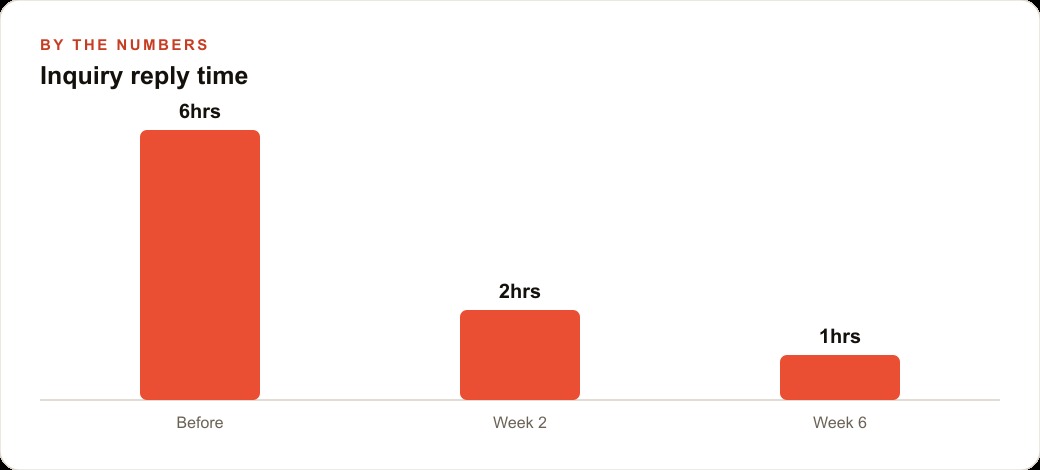
Before a multi-agent inquiry workflow: front desk staff processes inquiries in batches between appointment blocks. The average response time for a new inquiry arriving outside business hours is six to fourteen hours. Staff time spent on inquiry response drafting runs four to six hours per week.
After an AutoGen three-agent inquiry workflow: the intake researcher reads the incoming message and pulls the relevant facts from the spa's treatment descriptions, pricing sheet, and aftercare documentation. The drafter composes a warm, specific reply that addresses the question with the correct facts and includes a clear next step. The reviewer checks the draft for tone, accuracy, and any claim that should not be made about a medical outcome. The user proxy routes the final output to the human operator for approval on medical eligibility questions and sends directly for standard informational inquiries.
Average response time for standard informational inquiries: under five minutes, around the clock including evenings and weekends. Staff hours recovered on inquiry response: three to four hours per week from the four-to-six-hour baseline. That recovered time can be redirected to in-person client interactions, booking follow-up, and service upsell conversations that drive revenue more directly.
Monthly framework cost for this workflow: AutoGen itself is open source and free. The model API cost for running three agents across 40 to 80 weekly inquiries, at lighter model tiers, totals under $20 per month at realistic usage. The full automation stack that a business might otherwise use for this purpose, a CRM with an auto-responder and a customer service chatbot subscription, typically costs $80 to $150 per month in platform fees with less contextual accuracy and no ability to adjust the response based on the spa's specific treatment facts.
Agents That Execute Code and Self-Correct on Errors Are a Different Category of Tool
The agents in an AutoGen workflow are not text generators that produce suggestions for a human to act on. They can execute code, call external tools, read their own error output, and retry with corrections. That makes them a different category of tool from a standard prompt-and-response interface.
The practical difference is reliability on operational tasks. A text-generation interface that produces code produces it once and stops. If the code has an error, the human copies the error, pastes it back, and waits for a correction. In an AutoGen workflow, the agent that produces code can run it, read the error if it fails, and attempt a correction within the same workflow session. The loop between generating and fixing is automated.
For a business workflow, this means the agents can perform genuine operational tasks rather than just drafting content for a human to execute. An agent that pulls data from a structured source, transforms it, and writes it to a report format can run that entire sequence and surface the finished report, not a description of what the report should contain. If the data pull fails on a specific format, the agent reads the error and adjusts the pull logic before trying again.
This self-correction capability has a configurable limit: agents will retry a defined number of times before surfacing the error to the human. For production workflows, setting a small retry budget and routing unresolved errors to a human checkpoint is the right behavior. Unlimited retries on a broken step waste API cost and delay the workflow without producing a better result.
The Configuration Move to Make Before Going Anywhere Near Live Customer Contact
The configuration move that determines whether this is a trusted system or an autonomous gamble is setting the human approval checkpoint correctly before the workflow touches any live customer contact.
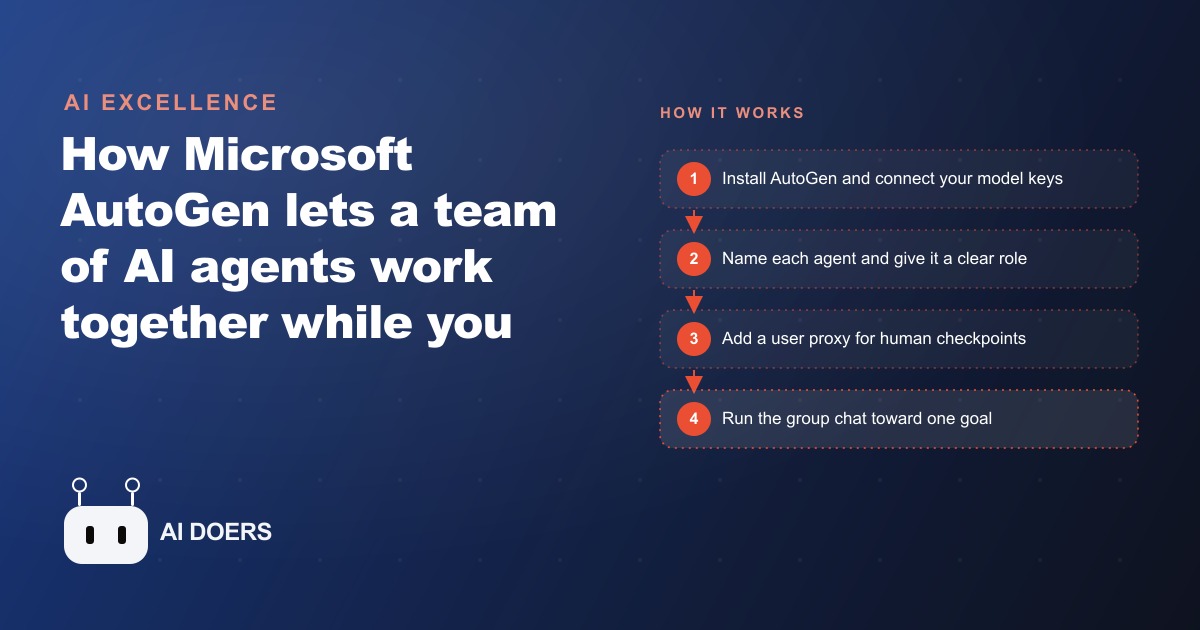
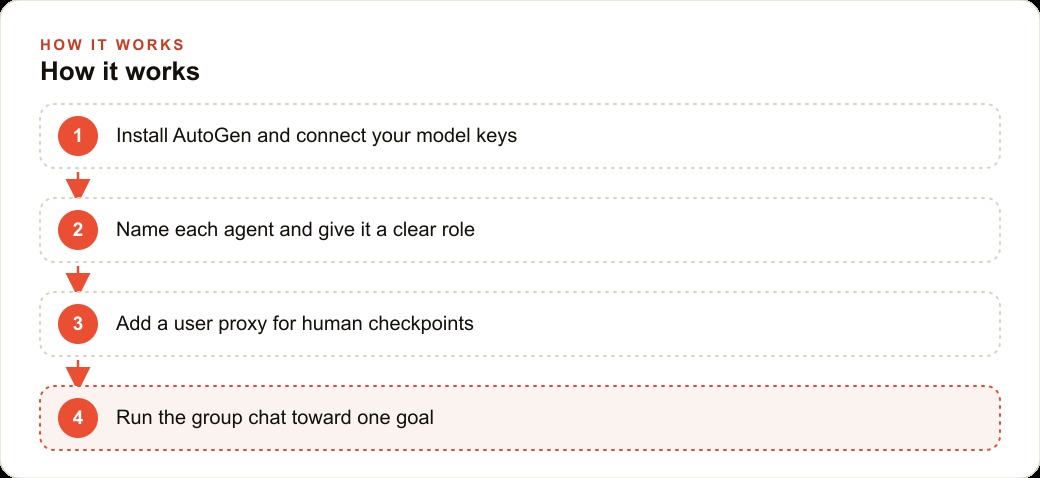
The sequence: install the framework, connect your model keys, define your agent roles with tight and specific job descriptions, configure the user proxy with always-on human approval, and run 20 to 30 real examples from your actual inbox through the workflow in a test environment. Read every output. Note the cases where the drafting agent produced something that would have been wrong, inappropriate, or off-brand if it had gone directly to a customer. Count how many of those cases the review agent caught versus let through.
After 20 to 30 examples, you have a real picture of the workflow's failure modes. You know which inquiry types reliably produce good outputs and which require human review. You know whether the reviewer agent is catching compliance-adjacent claims or letting them through. That picture tells you where to set the approval dial for the live workflow.
Give each agent a tight, specific role description. Vague roles make the conversation wander in ways that are hard to diagnose after the fact. Keep a human approval step on anything that touches money, health, or your brand promise. Log every session output to a simple file so you can audit what went out under your brand name and measure whether output quality improves or drifts over time. Update each agent's source information whenever a meaningful business change happens: new pricing, updated treatment menu, revised aftercare protocols.
The businesses that deploy this architecture well are the ones that treat it as a system to be calibrated over time rather than a tool to be set up once and forgotten. The first version will surprise you in places, and those surprises are more useful as testing data than as live customer interactions. Madhuranjan Kumar sets up workflows like this for clients who need a specific business process handled faster and more consistently than a manual workflow allows. The starting point is always the test run on real examples, and the approval dial is always conservative on the first live deployment. The framework earns autonomy by demonstrating consistent output quality over time, not by being trusted with live customers on day one.
That is exactly what we do at AI DOERS. Book a private 30-minute call with Madhuranjan Kumar and we will map the fastest path to it for your specific business.
Book your call →
Madhuranjan Kumar
Madhuranjan Kumar brings 20 years of performance-marketing experience and has managed over $200 million in Facebook ad spend for brands across the United States and beyond. His expertise spans the full modern marketing stack: Meta, Google Ads, TikTok, email automation, CRM, and the websites that hold it together. At AI DOERS he turns that track record into lead-generation systems for businesses across every industry.