
The AI Image Revolution: How to Create Ad Visuals With Perfect Text
New AI image tools can now write clean, accurate text inside a picture and let you edit it with plain English. Here is how a small business can use that for marketing.

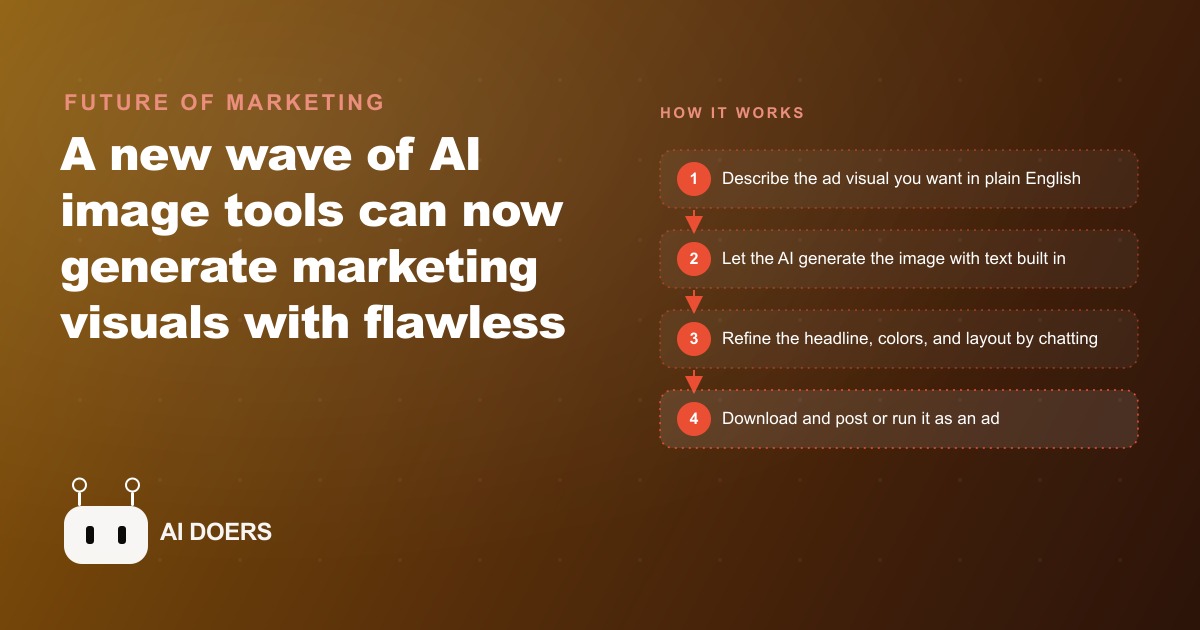
For three years, AI image generators could produce a beautiful background but could not write the word "Saturday" on a chalkboard sign without turning it into something unreadable. That single failure blocked the technology from entering serious marketing workflows, because a promotional graphic without accurate text is not a promotional graphic. The newest generation of image models just closed that gap, and the implications for small business marketing are immediate and practical. I am Madhuranjan Kumar, and this piece covers what changed, why it matters now, and exactly how a local business can use it starting this week.
Text Accuracy in AI Images Was the Last Blocker, and It Just Fell
The rendering failure was not a minor inconvenience. It was structural. A bakery cannot run a promo graphic for its weekend croissant special if the price printed on the image reads as garbled characters. A florist cannot post a Valentine's Day arrangement ad with a headline that contains wrong letters. A gym cannot promote its new-member offer if the terms appear as nonsense. Every business with a promotional calendar depends on readable text inside its visuals, and AI could not reliably produce it.
The newest image models changed this. They can now place long, correct text inside a generated image: a specific price, a specific offer headline, a specific tagline, with the right spelling and the right layout, generated as part of the visual in one pass. The change is not incremental. It is the removal of the constraint that kept these tools out of real marketing workflows for most small businesses.
What makes this release moment more significant than previous image model improvements is the deployment context. The strongest image tool right now does not exist as a standalone generator you access through a separate interface. It lives inside a chat assistant. That means you can describe a promotional visual, generate it, refine it through conversation, and export it without ever leaving the tool you are already using for research and writing. The image generation and the language intelligence are in the same place, and they work together: the assistant can help you write the copy that goes on the image before it generates the image that carries the copy.
The Edit-With-Words Capability Changes the Revision Loop
The old revision loop for a marketing graphic looked like this: brief the designer, receive a first version, mark up changes, wait for revisions, repeat. Even with faster tools, a meaningful graphic with accurate text required multiple rounds of feedback because the text was always the last thing to get right, and fixing it often required reopening the source file.
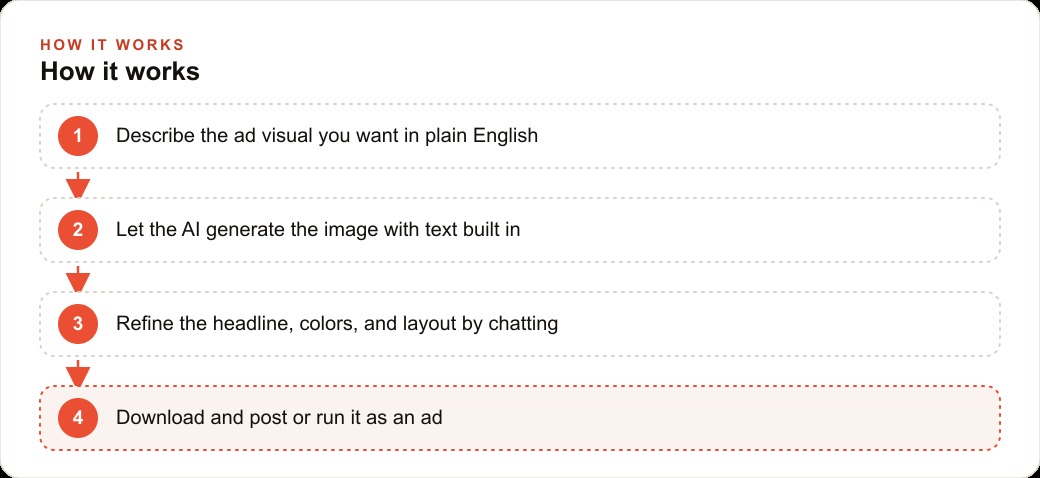
The new revision loop is a conversation. You generate the image. You see that the headline is slightly too long for the available space. You tell the assistant to shorten it to five words. It updates the image. You want the background color shifted to match your brand. You say so. It updates the image. You want to add the business phone number to the lower third. You ask for it. The assistant adds it. No design software opens at any point. No file is exported to an editor and re-imported. The iteration happens in plain English.
Behind this capability is a meaningful improvement in how the models reason through multi-step instructions. Earlier versions struggled to follow several editing instructions at once: change the color, add this text, and remove that element often produced unpredictable results when bundled. The latest models follow multi-part creative briefs reliably, which means you can give a detailed visual brief in one message and receive a result that addressed all the points rather than just the last one.
Multiple strong options exist now, which is worth noting because it means you are not locked into one platform's pricing or quality tier. The competitive pressure between providers has already driven quality up and will continue to. A small business owner has real choices about which tool fits their workflow, and the practical recommendation is to test two and keep the one that handles your specific use case, whether that is signage mockups, social post graphics, product lifestyle images, or promotional banners.
Small Businesses Are the Biggest Winners from This Specific Change
Large brands have had access to professional design resources for decades. The text-in-image capability does not help them proportionally more than it helps a two-person shop, because large brands already had a solution to the text problem. It was called a design team. The businesses this capability benefits most are the ones that previously had no practical path to consistent, professional-looking promotional graphics with accurate text: the independent florist, the local fitness studio, the family-owned restaurant, the small retailer.
For those businesses, the change in what is now possible is substantial. Before accurate AI text rendering, a business needing a promotional graphic for a specific day's special had a few options. Pay a designer for a one-off file, which is expensive and slow for something time-sensitive. Use a template tool like Canva, which requires knowing what you want before you start and offers limited flexibility. Post a photo with the text only in the caption, which performs worse in most social algorithms than a graphic with text on the visual itself. The newest image tools add a fourth option: describe the visual, generate it, refine it in conversation, and post it, all within one session.
For a business running Meta ads, the ability to produce multiple visual variants quickly is not a convenience, it is a strategic input. A/B testing ad creatives requires at least two or three visual options per campaign. Previously, producing three versions of a promotional graphic cost either three rounds of designer fees or three iterations of template editing. Now it is three conversational prompts. The creative testing cadence that was practical only for businesses with design budgets is now accessible to any business with a text-based brief and fifteen minutes.
A Florist Running Seasonal Promotions Now Controls Her Own Creative
A florist running seasonal promotions faces a specific version of the design problem. The promotional calendar is dense: Valentine's Day, Mother's Day, spring graduation season, summer weddings, autumn harvest arrangements, winter holiday orders. Each occasion has its own visual mood and price points. Previously, producing a professional-looking graphic for each occasion meant either commissioning a designer well in advance of each date or relying on generic stock-image templates that looked like every other florist's social posts.
Consider what the current tools make possible for that business. A week before Valentine's Day, the owner describes a rich, romantic visual: deep red roses with greenery arranged in a glass vase, a warm indoor light, with a sign visible in the background that reads the exact offer headline and price. The image generates with the text accurate on the first attempt. The owner asks the assistant to swap the background from indoor to a softly lit studio backdrop. It updates. She asks for a taller crop version optimized for Stories. It produces one. She asks for a square version for the feed. She has three export-ready versions from one conversation in under twenty minutes.
She runs the Valentine's campaign across social media and allocates a small daily budget to Meta ads behind the best-performing organic post, targeting women within fifteen kilometers who have shown interest in gifts. The ad creative cost her twenty minutes of her own time rather than a designer invoice. The next week, she repeats the same process for a spring arrangement promotion. By the third occasion, the workflow is faster because she has learned how to brief the tool for her specific style.
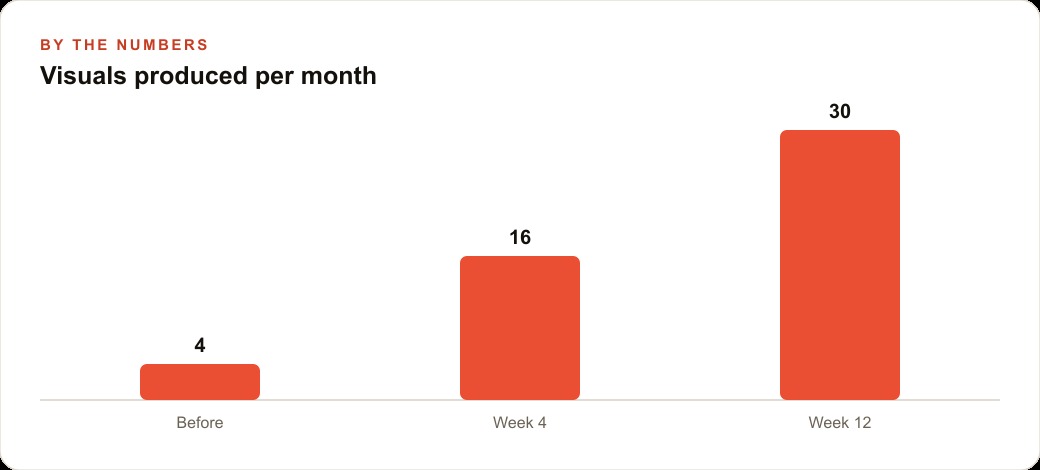
Over a twelve-month promotional calendar, the compounding effect is significant. A business that was producing four to six quality visual assets per year, limited by design budget and turnaround time, can now produce thirty or more, each specific to the occasion, the offer, and the price point. That volume of original promotional content drives both organic social reach and lowers the creative production cost of paid campaigns, which directly improves the cost efficiency of any Google Ads or Meta ads spend running alongside organic.
The same volume effect changes the content and SEO dimension of the business. A florist who is posting weekly seasonal content with accurate, occasion-specific visuals builds a social presence that gets referenced, shared, and indexed in ways that generic template posts do not. The visual specificity signals relevance to both human audiences and the algorithms that decide what content to surface.
Getting Started Without Overthinking the Setup
The practical entry point is a free account on the chat assistant that includes the strongest current image generation capability. You do not need a paid plan to see whether the text accuracy genuinely holds for your use case. Test it with a single promotional brief for a real offer you need to run this week. Describe the scene, include the exact text you want on the image in quotation marks, specify any colors or mood requirements, and generate.
If the first result is close but not exactly right, refine it conversationally. Change one element at a time so you can see the effect of each request clearly. Ask for a color swap, then a text adjustment, then a crop change. Notice that each refinement keeps the overall composition intact rather than regenerating a completely different image.
A few habits make the results consistently better. Providing the exact words you want displayed in quotation marks in your brief prevents the model from improvising on copy. Naming your brand colors specifically, either as hex codes or descriptive color names, reduces the number of refinement rounds needed to get on-brand results. Keeping a folder of your best-performing past promotional graphics as reference examples is useful because you can describe the style you want by referencing what has already worked: "produce something with the same warm, approachable feel as this previous post but updated for the spring menu."
The business that starts this habit now, runs it through one full promotional cycle, and builds a library of successful visual briefs will have a compounding creative advantage. The briefs get more precise with each cycle. The refinement rounds get shorter. The output volume grows without the cost growing with it. And the promotional calendar that previously required either design budget or template compromise can now run on internal creative capacity, freeing both money and time for the things in the business that AI cannot do.
The volume of original visual content also changes what is possible in web and CRM systems that depend on rich visual material. A business that can produce thirty promotional graphics per month has content for email sequences, landing page hero images, seasonal promotion banners, and product spotlight visuals, all at a cost that scales with time rather than with per-asset fees. Email campaigns perform better with original visuals specific to the offer rather than stock photography. Landing pages convert better when the visual reflects the exact promotion rather than a generic stock image of the product category. A web and CRM system fed with original, offer-specific visual content performs at a different level than one running on stock images.
For the florist, this means the email list she has been building through her local customer base finally has content worth sending. A monthly promotional email with an original seasonal arrangement image, accurate pricing text included directly in the visual, and a matching social post series costs her twenty minutes to produce rather than a design invoice. The email platform metrics, open rates and click-through rates, improve because the visuals are specific to the offer and the audience rather than generic. And the data from those emails, which offers and which visual styles perform best, feeds back into the briefing for the next round of AI-generated graphics, making each cycle more informed than the last.
The practical starting point is this: find one promotion you need to run in the next two weeks, open a free account on the chat assistant with the best current image generation capability, and describe the visual you want with the exact offer text in quotation marks. Produce it, refine it once, and post it. That one cycle is enough to calibrate whether the tool fits your promotional workflow. If it does, the rest of the habits described here follow naturally from that first successful brief.
That is exactly what we do at AI DOERS. Book a private 30-minute call with Madhuranjan Kumar and we will map the fastest path to it for your specific business.
Book your call →
Madhuranjan Kumar
Madhuranjan Kumar brings 20 years of performance-marketing experience and has managed over $200 million in Facebook ad spend for brands across the United States and beyond. His expertise spans the full modern marketing stack: Meta, Google Ads, TikTok, email automation, CRM, and the websites that hold it together. At AI DOERS he turns that track record into lead-generation systems for businesses across every industry.