
Why an AI Browser Beats Chrome for Running a Small Business
A new wave of AI browsers folds search, reading, summarizing, and writing into one prompt bar. Here is what that actually changes for a real business and how I would set it up for a client.

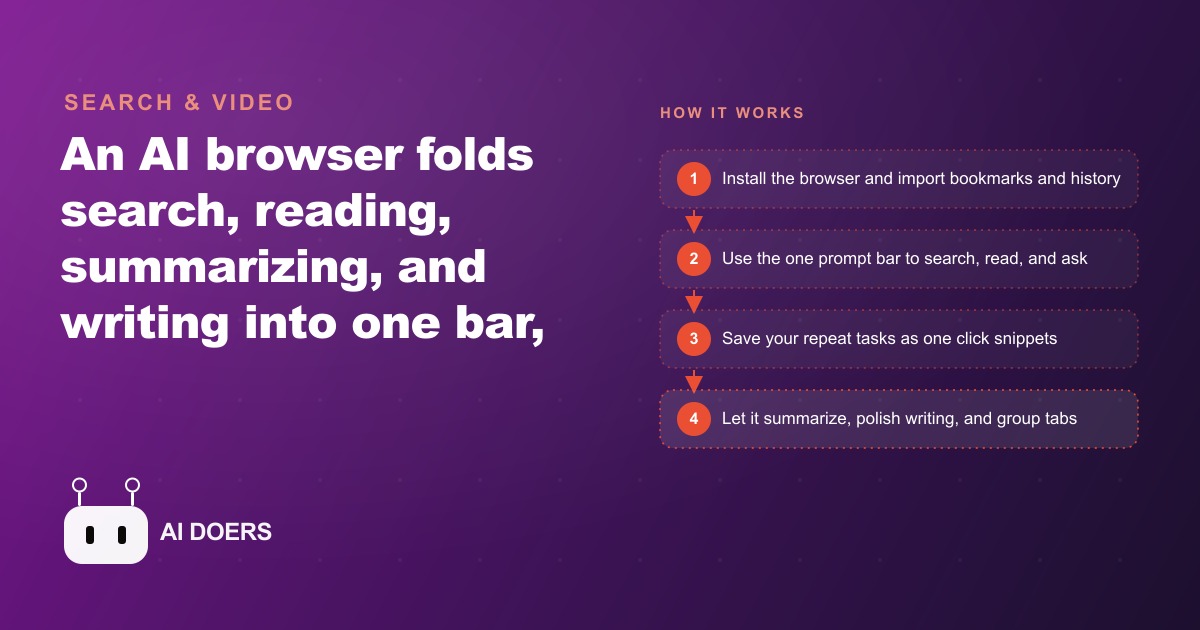
The web browser has not fundamentally changed in twenty years, and that inertia is the single biggest hidden tax on a small business owner's day. I am Madhuranjan Kumar, and I want to take this idea apart carefully, because the pitch for AI browsers is usually framed as a productivity bump when the real story is architectural.
The passive-window problem that nobody names out loud
For two decades a browser has been exactly what the name says: a tool for browsing. You type an address, it loads a page, and everything that follows is manual labor by the person at the desk. Research means opening twelve tabs. Writing a supplier email means copying text from four of them. Summarizing a quote means switching to a separate AI tool, pasting the text in, waiting for the answer, and switching back. The browser orchestrates none of that sequence. It holds the windows open while the person does the work.
That pattern is not just slow. It is cognitively expensive in a way that accumulates invisibly across a full working day. Every time you switch from a browser page to a separate chat tool, copy something, and switch back, you spend a small slice of attention on the context switch rather than the task itself. Psychologists call this attention residue. The cost per switch is small. Multiplied across dozens of switches per day, it becomes the primary reason owners feel scattered by noon despite having started the morning with a clear plan.
The business that adopted a standalone AI tool two years ago and integrated it as a separate tab may actually be generating more switching overhead than a business that used no AI at all. The tool added capability but also added friction, because capability in one place and action in another still requires the human to be the bridge.
What the prompt bar actually collapses
The central feature of an AI browser is not the AI. It is the single prompt bar that replaces the tab-switching bridge. One text input that searches, reads, synthesizes, explains, and drafts without leaving the active page. The browser becomes a participant in the work rather than a container for it.
For a business owner in practice: instead of opening a search engine, clicking through three results, opening a separate AI tool tab, pasting the relevant text, reading the answer, copying it, and switching back to the email draft, you type a single prompt and the answer appears in a side panel on the current page. Research, synthesis, and drafting all happen in one loop.
The peek feature amplifies this. Hovering over a link shows the page in a small preview window without committing to a full tab switch. If the page is useful, expand it. If not, close it and stay on the current page. What used to mean committing to a new tab, reading enough to decide the source was wrong, closing it, and reorienting now costs three seconds instead of forty-five. When a business owner researching a competitor's pricing structure uses the peek view to check twenty pages in the time it would have taken to load four, the efficiency difference is not a rounding error.
The highlight-to-summarize feature handles the reading layer. Select any paragraph on any page, choose summarize from the popup, and a plain-English explanation appears in a side panel. A confusing supplier contract clause becomes a clear sentence. A dense product specification becomes three bullet points the owner can quote in an estimate email without reading the whole document. For any business where keeping up with regulatory or technical information is part of the daily work, this feature alone changes how much of that information actually reaches decisions versus sitting unread in a browser tab.
Snippets as a leverage multiplier the numbers make obvious
A snippet is a saved prompt you trigger with a slash command. Write it once and it runs every time you call it. The leverage comes from the fact that most business owners repeat the same web instructions dozens of times per week without noticing. A pest control owner who spends eight minutes every morning summarizing new product safety data sheets writes one snippet and does it in thirty seconds from then on. An accountant who routinely explains contract terms to clients saves a snippet that converts any highlighted clause into plain English before the next meeting. An agency owner who formats meeting notes into structured briefs the same way each time turns that fifteen-minute task into a slash command.
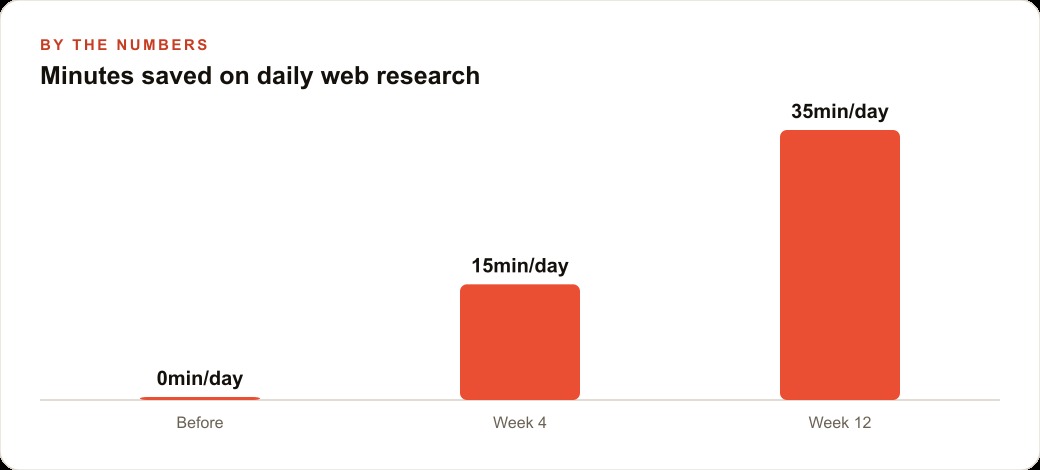
The math on snippets is straightforward. A snippet that saves ten minutes and runs five times a week saves fifty minutes per week. Over a year that is over forty hours recovered, at the cost of under ten minutes to write the snippet. Any task worth doing more than twice a week is worth turning into a snippet, and most owners have a dozen of them within the first week of looking.
The snippets that compound the most are the ones tied to client communication and research, the work on the critical path between a conversation and a closed sale. Drafting a follow-up proposal from meeting notes. Summarizing a competitor's new service page for the sales team. Converting a client inquiry into a structured intake summary. These are exactly the tasks where a consistent, professional output matters and where the eight minutes currently spent on them quietly delays everything downstream. For businesses running Facebook and Instagram ad campaigns as part of their growth model, the same snippet approach applied to ad research and creative briefing compresses what used to be an hour of tab-hopping into a few prompted responses.
Why memory is different from a preferences panel
Most software has a preferences panel where you configure how it behaves. The memory feature in an AI browser is different in kind. Preferences are static rules applied uniformly. Memory is contextual: the browser learns from actual usage and adjusts responses to match established patterns over time.
You tell it once that you prefer short answers, that you usually look for local suppliers rather than national chains, and that summaries should lead with the actionable point rather than the background. From then on every response reflects those preferences automatically. You do not re-explain yourself when you open a new session. The assistant already knows how you work.
For a business owner, the less obvious benefit of this is that the mental effort of translating between how you think and how the AI interprets your requests gradually decreases. Early in any AI adoption, a meaningful fraction of the work is prompt engineering, figuring out how to phrase things so the tool understands. Memory compresses that overhead over time as the assistant learns your patterns. The return on the first two weeks is modest. The return on month four, when the browser already knows your scope, your style, and your typical use cases, is substantially higher because there is almost no re-briefing cost at the start of each task.
The privacy case that the productivity framing misses
The dominant browser in the market was built by an advertising company to serve an advertising ecosystem. That is a business model fact, not a conspiracy. The data collected through the browser feeds the targeting infrastructure that generates ad revenue. For most users this is an acceptable trade-off. For a business owner handling sensitive client information, supplier pricing, or proprietary workflows, it deserves more scrutiny than the productivity pitch typically provides.
Some AI browsers are built by security companies where the design priorities are reversed. No advertising network to feed means the data model can be built around the user. Ad blocking is native, not an extension afterthought. AI features are integrated without the data harvesting that normally accompanies them. For any business with confidentiality obligations, whether legal, clinical, or contractual, the combination of AI capability and privacy architecture is a material business consideration, not a personal preference.
The operational impact is also direct. Fewer tracking scripts mean pages load faster. Blocked ads mean less visual noise competing for attention. Less fingerprinting produces a cleaner environment for research. An owner using an AI browser for competitive research reads a cleaner version of the competitor's page while their browser analytics fire into a void.
Building the habits that make the tool compound
The AI browser returns more value the more deliberately you use it. Owners who see the largest gains are the ones who spend the first two weeks identifying their most repeated web tasks and building habits around specific features: the prompt bar for research, the highlight-and-summarize for reading, snippets for repeated instructions, memory settings for style and scope.
For a concrete example, consider a landscaping company's administrative layer. The owner researches plant availability from four supplier sites per week, prices seasonal jobs against competitor quotes, drafts project summaries for clients, and responds to service inquiry emails. Every one of those tasks happens in a browser. Every one involves copying text between the browser and another tool. Migrated into an AI browser with a set of snippets, the plant availability research becomes a single prompt across the supplier tabs. The competitor quote review becomes a highlight and a snippet key. The project summary drafts in thirty seconds. The inquiry response drafts from a highlight of the client's description.
The total time saving across those four tasks might be forty-five minutes per day. Three hours per week. Over a year, more than a hundred and fifty hours. For businesses where SEO and organic search research and client communication both happen inside the browser, the gains compound further because every research-and-write cycle feeds content output more efficiently too. The browser becomes the lever for the work rather than the container.
Tab grouping handles the organizational side. Tabs sort automatically into colored sections by task. The landscaping owner working on sourcing, client emails, and project tracking simultaneously no longer has eighteen tabs in random order. They have three groups. When sourcing is finished, one click closes the group and the browser returns to the context the next task needs.
For businesses also managing their CRM and website stack alongside browser research, the writing polish feature adds another layer. Drafting emails from a highlight, correcting grammar, improving tone without a tab switch means follow-ups send faster and read more professionally, which has measurable effects on response rates and client trust over a consistent sales process.
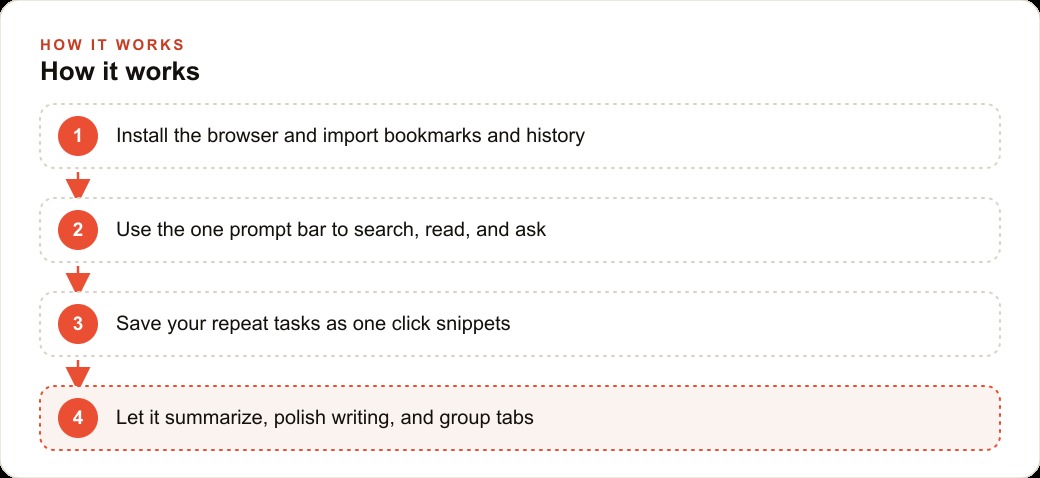
The setup time for all of this is real but short: one afternoon to install and import bookmarks, one week to build the core habits, two to four weeks to identify the snippets worth creating. After that the gains are automatic. If you would rather have the snippets, memory settings, and habits configured for your specific workflow from the start, that is exactly the kind of setup I do for clients in a single session.
The compounding value of getting the positioning layer right first
The reason positioning analysis deserves the depth that AI-assisted research enables is that it compounds differently from other marketing investments. Ad spend produces results while the spend is active and stops when the spend stops. The positioning clarity you achieve through rigorous research and honest competitive analysis continues to improve every message, every offer, and every creative decision made afterward.
A business that enters a competitive market with a clear, distinctive positioning rooted in genuine customer insight starts from a fundamentally different place than one that enters with a generic value proposition refined through gut instinct. The difference shows up in customer acquisition cost, in customer retention, and in referral rates from customers who can articulate clearly why they chose you.
For a business running paid advertising campaigns alongside search campaigns to drive customer acquisition, the positioning clarity feeds directly into the creative and copy quality that drives campaign performance. A team that knows exactly who they are for, what specifically they do better than alternatives, and what emotional jobs their customers are hiring them for produces advertising that converts at meaningfully different rates than a team working from vague differentiation claims. The research investment that produces positioning clarity is the prerequisite for advertising that punches above its budget.
That is exactly what we do at AI DOERS. Book a private 30-minute call with Madhuranjan Kumar and we will map the fastest path to it for your specific business.
Book your call →
Madhuranjan Kumar
Madhuranjan Kumar brings 20 years of performance-marketing experience and has managed over $200 million in Facebook ad spend for brands across the United States and beyond. His expertise spans the full modern marketing stack: Meta, Google Ads, TikTok, email automation, CRM, and the websites that hold it together. At AI DOERS he turns that track record into lead-generation systems for businesses across every industry.