
Your Browser Is the AI Tool You Are Ignoring
Everyone is chasing the next model release. The highest-return AI upgrade most professionals can make right now is switching to an AI-native browser, not because the model is better, but because it eliminates the friction that kills the habit.

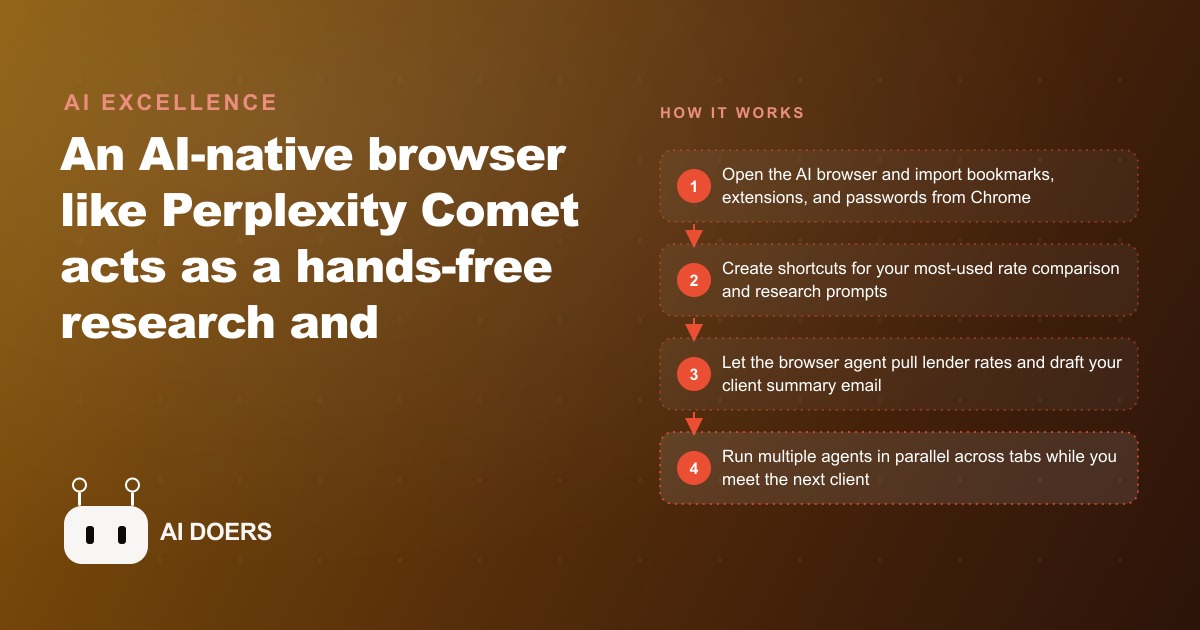
Everyone paying attention to AI right now is waiting for the next model release. Claude 4, GPT-6, Gemini Ultra 2, whichever model announcement is next on the calendar. Meanwhile, the highest-return AI upgrade most professionals can make right now has nothing to do with which model is technically superior. It is switching the browser they already spend eight hours a day inside.
This is the argument I want to make clearly: an AI-native browser is not a better chatbot. It is an elimination of the friction layer that makes AI tools feel like extra work rather than less work. That friction is the real reason most people use AI sporadically instead of constantly, and fixing it produces more output improvement than any model upgrade available today.
The Copy-Paste Tax No One Talks About
Every AI interaction that follows the standard pattern costs more time than it appears to. You read something on a web page. You decide you want AI help with it. You open a separate tab or window. You copy the relevant text. You paste it into the AI chat. You write a sentence or two explaining the context. You receive an answer. You copy that answer. You switch back to whatever you were doing. You paste the answer in.
Each step takes only a few seconds, but the whole sequence costs thirty to sixty seconds per interaction, requires you to break your attention from the primary task, and introduces a context-switching cost that does not show up in the seconds themselves. The research on interrupted tasks consistently shows that returning to a focused state after a context switch takes significantly longer than the switch itself.
Most people use AI sporadically because this friction makes it feel like a tool you have to go to rather than one that is already there. They open a chat window for the big decisions and write everything else manually because the switching overhead does not feel worth it for smaller tasks. The result is that AI saves time on a handful of high-effort moments and misses all the small repeated tasks where the aggregate time savings would be substantial.
This is the copy-paste tax. It is invisible because no one line item looks costly. But across a professional workday with dozens of small research and writing tasks, the tax is real and it compounds.
The Browser Already Knows What You Are Looking At
An AI-native browser dissolves the copy-paste tax by moving the AI inside the same window where the work is happening. The assistant reads whatever tab is active and uses it as context automatically. You do not copy anything. You do not explain what you are looking at. You open the assistant panel and ask your question, and the AI is already working from the page in front of you.
For a mortgage broker checking a wholesale lender's rate sheet, this means opening the rate page and asking the assistant to pull the 30-year fixed rates for a 760 credit score borrower at 20 percent down, formatted as a table, without any copying. The assistant reads the page, extracts the relevant rows, and formats the comparison in the panel. The broker never leaves the rate page and never explains what the numbers mean.
For a broker reading a client's financial summary before a consultation, this means asking the assistant to flag any elements that might create qualification complications, while the browser reads the document that is already open. The assistant reads what the broker is reading, applies its analysis, and returns specific flags. No copy, no paste, no context explanation.
The reduction in friction is not cosmetic. It is the difference between a tool that professionals reach for automatically when they have a question and one that they reach for only when the task feels important enough to justify the switching overhead. The AI-native browser makes AI the default first move on any question because the cost of asking is nearly zero.
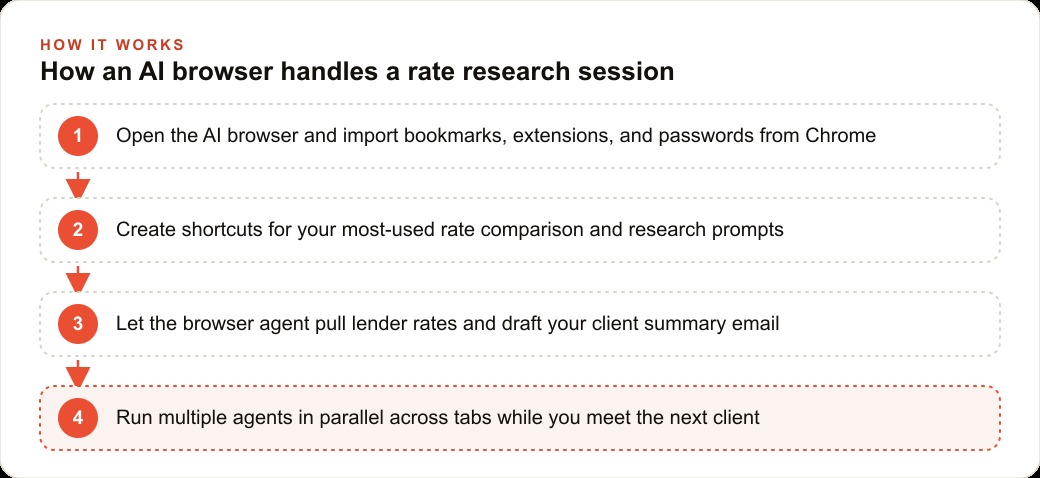
Perplexity's Comet is built on Chromium, the same foundation as Google Chrome, so Chrome extensions continue to work without any changes. Bookmarks, saved passwords, and existing logins import in a single step at first launch. The switch from Chrome takes under five minutes and breaks nothing in an existing workflow.
Shortcuts Turn Repetition Into One Keystroke
The copy-paste tax is the most obvious friction problem that an AI browser solves. The shortcut system is the one that makes it powerful for professionals with repeating daily workflows.
A shortcut is a custom command you create once that encodes a specific prompt and its instructions. You name it with a slash prefix and write the instructions that define exactly what the assistant should do when you trigger it. From that point forward, one command replaces a multi-sentence prompt you would otherwise type fresh every time you landed on a relevant page.
For a mortgage broker, the most valuable shortcuts map to the research categories they run every single day. A rate summary shortcut might instruct the assistant to pull all available rate options from the current page, present them as a three-column table sorted from lowest to highest rate, flag any significant changes from the standard qualifying conditions, and note the minimum credit score and LTV requirements. Every time the broker opens a lender's rate page, one command runs that entire structured extraction in seconds.
A client communication shortcut might instruct the assistant to draft a follow-up email to the client whose name is in the current tab's subject line, using the rate data from the most recent research tab, written in plain language suitable for a first-time buyer, under 150 words. One command drafts a customized email incorporating specific current numbers without the broker writing a single sentence manually.
Shortcuts encode the broker's expertise into the AI's behavior. The instructions reflect how an experienced broker thinks about rate presentations and client communication, which means every output produced by the shortcut reflects that expertise rather than a generic AI interpretation of the task. Spend thirty minutes building five shortcuts on the first day and those thirty minutes pay back across every working day that follows.
Four Agents Running While You Take the Next Call
Shortcuts eliminate repeated typing. Agent mode eliminates the need to be present at all.
Agent mode means the AI takes control of the browser and executes multi-step tasks while the broker does something else. The broker gives the instruction and walks away. The agent navigates pages, clicks relevant links, reads what it finds, compares information across sites, and compiles a formatted result. The broker comes back to completed research.
For a mortgage broker with five wholesale lenders they check regularly, the morning rate sweep previously required opening five tabs, reading each page carefully, and building a mental comparison before the first client call. With agent mode, the broker types one instruction covering the five lenders, the borrower profile they care about, and the output format they want. The agent visits each portal, extracts the relevant data, and formats the comparison. The broker opens the document before the first call without having read a single rate page manually.
The parallel capability multiplies this further. The broker can set a rate comparison agent running on five lender portals, a second agent drafting follow-up emails to three clients from yesterday's consultations using the data in the open tabs, and a third agent finding available time slots on the calendar for a client who requested a second meeting. All three run simultaneously. The broker picks up the phone to handle inbound calls while the agents work.
This is genuinely new behavior. Running concurrent research and communication tasks that do not require human presence between steps was not possible with a standard browser and a separate AI chat window. The AI-native browser makes it the default operating mode for a day's routine work.
For a broker who runs Facebook and Instagram ad campaigns for their own lead generation, the same agent capability applies. The agent can pull campaign performance data from the ad platform's reporting tab, summarize which audiences produced the lowest cost per lead this week, and draft a brief for adjusting the budget allocation toward the top performers, all while the broker handles client calls.
The Same Frontier Models, a Fraction of the Friction
Here is the counter-argument I want to address directly, because it comes up immediately when this topic is raised. The objection is: why switch browsers for the AI feature when you can just keep the AI chat tab open alongside your regular browser?
The answer is that the models inside an AI-native browser are the same frontier models available in any chat interface. Typing /claude inside the AI browser routes to Claude. Typing /gpt routes to GPT. Typing /gemini routes to Gemini. The capability available in the AI browser is not lower than the capability available in a standalone chat subscription. You are not trading model quality for browser convenience.
What you are trading is the friction structure. In a standard browser with a separate AI chat tab, every AI interaction starts with a context switch: leave the working tab, open the AI tab, explain the context, get the answer, switch back. In an AI-native browser, every AI interaction starts from the page you are already reading, with the context already loaded. The model quality is the same. The friction cost is different by a factor that changes how often the tool actually gets used.
The compounding effect of higher usage frequency is where the productivity gap grows. A broker who uses AI on every rate comparison, every client email draft, and every market report summary recovers dramatically more time than a broker who uses it only on the big tasks. The barrier between those two patterns is almost entirely friction, and the AI browser removes that barrier.
An Honest Answer to the Specialized Tool Objection
The second objection worth addressing honestly is the specialized tools question. A mortgage broker uses specific loan origination software, a specific CRM, specific lender portals that require logged-in sessions with two-factor authentication. An AI browser does not replace any of those.
The correct framing is not replacement. It is the research and communication layer that surrounds every specialized tool. The LOS platform handles the loan file. The AI browser handles the research that informs the loan decision and the communication that surrounds the client relationship. Both exist. The AI browser fills the layer between them that was previously handled through manual searching, manual typing, and manual context switching.
A broker who uses their CRM and website stack for contact management and follow-up sequencing still benefits from an AI browser when pulling the market data, competitor rate comparisons, and program eligibility research that informs the conversations that happen inside the CRM. The specialized tool handles the structured data. The AI browser handles the unstructured research and writing that wraps around it.
The friction that kills AI tool habits lives in the research and communication layer, not inside the specialized systems. Removing friction from that layer changes how consistently the tools get used and how much time the broker spends on work that does not require their expertise.
What the Numbers Look Like for a Mortgage Broker
Madhuranjan Kumar maps this calculation for service professionals regularly, and the mortgage broker version has specific numbers that illustrate the pattern.
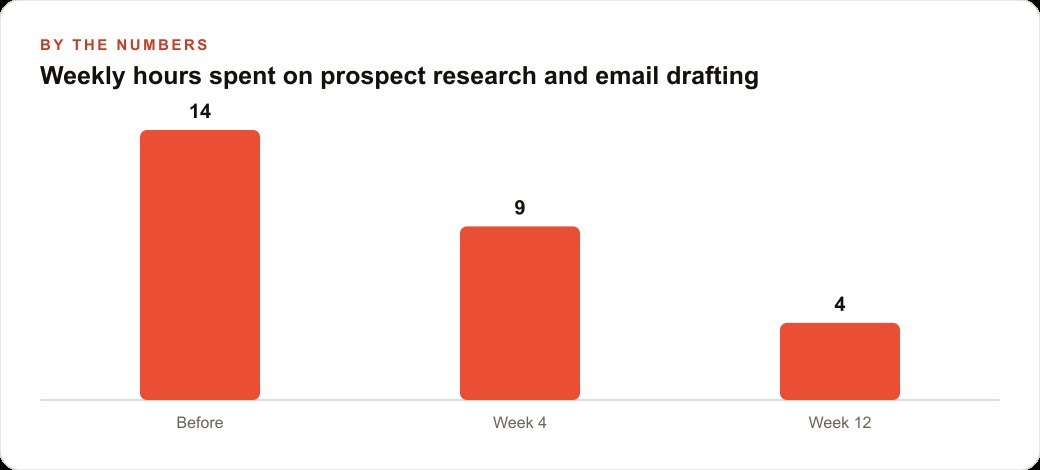
Before the AI browser, a broker spending fourteen hours per week on research and email drafting is working within a typical range for an active practice. Rate sheet research across five lenders before each consultation: roughly an hour per morning. Follow-up email drafting for the previous day's consultations: ninety minutes. Market summary preparation for a weekly client newsletter: two hours. Status update emails to clients at different loan stages: another hour. Client comparison documents prepared before new consultations: scattered across the week.
After the AI browser, the morning rate sweep across five lenders using agent mode: twenty minutes. Follow-up email drafting using the page-context assistant and the communication shortcut: thirty minutes for three emails rather than ninety. Market summary: forty minutes using agent research mode to pull current data and the shortcut to draft the summary. Status updates: five minutes per client using the shortcut that reads the file tab and drafts the update.
Fourteen hours per week drops toward four hours per week on the same work. The broker does not eliminate any of these tasks. They eliminate the manual research gathering, the context switching, and the from-scratch writing that filled most of the time inside each task.
The ten hours recovered per week do not automatically convert to ten hours of new closings. What they convert to is ten hours available for the relationship-building and consultation work that actually produces closings. A broker who can take an additional consultation per day because the research preparation is handled by agents is a broker who can close more volume with the same number of working hours.
Installing an AI-native browser is a five-minute setup and a morning of shortcut building. That investment pays back in the first week and compounds across every subsequent day. Madhuranjan Kumar works with service professionals on exactly this kind of workflow modernization, mapping which specific tasks in their current process are the best candidates for browser agent automation and building the shortcut library that produces consistent daily value from the first day forward.
That is exactly what we do at AI DOERS. Book a private 30-minute call with Madhuranjan Kumar and we will map the fastest path to it for your specific business.
Book your call →
Madhuranjan Kumar
Madhuranjan Kumar brings 20 years of performance-marketing experience and has managed over $200 million in Facebook ad spend for brands across the United States and beyond. His expertise spans the full modern marketing stack: Meta, Google Ads, TikTok, email automation, CRM, and the websites that hold it together. At AI DOERS he turns that track record into lead-generation systems for businesses across every industry.