
When AI Agents Get Eyes: What GPT-4 Vision Is Genuinely Good At
A clear breakdown of what image understanding actually does well, how agents use vision to inspect and improve their own work, and a worked example for a roofing company.

Vision does not add a new capability to AI; it adds a new category of data that was previously invisible to software. I am Madhuranjan Kumar, and this distinction matters more than it might initially appear. Most of the conversation around multimodal AI focuses on what the model can do with images, as if vision is a feature being added to an existing system. The more precise framing is that images carry information that already existed in the world and was always relevant to business decisions, but that software could not read. The model did not gain a new power. It gained access to a data source that was always there.
This framing changes the questions you ask when planning AI projects. Instead of "what can vision AI do?", the productive question is "where in my operation does information live in image format?" The answer to that question is almost always: everywhere. Photographs. Scanned documents. PDFs converted from images. Floor plans. Equipment photos. Inspection images. Medical images. Charts printed from other systems. Financial statements converted to PDF at some point in a bureaucratic chain. Every industry has significant information stores that exist as images because that is how humans produced them.
The practical question is how to extract that information reliably, at what cost, and with what limitations. I am going to take those questions apart carefully, because the distance between a useful vision workflow and an expensive exercise in false confidence is mostly determined by how well you understand where the tool holds and where it falls away.
The tokenization insight that makes vision fundamentally different from optical character recognition
Optical character recognition reads characters from images. It is a pattern-matching system that identifies visual shapes and maps them to the text they represent. It does not understand context. It does not know that the "18 months" it read from an insurance document is a warranty period rather than an age or a loan term. It extracts characters and returns them as strings.
A multimodal model tokenizes images the way text models tokenize words. Both get mapped into the same representational space, which means the model can reason about an image using the same mechanisms it uses to reason about text. When the model processes an image of an insurance policy, it does not extract characters and then reason about them separately. It processes the image and the text of the policy in the same embedding space, building a joint representation where the visual structure and the semantic meaning reinforce each other.
This is why a multimodal model can read "18 months" from a document and correctly identify it as a warranty duration without being told explicitly. The document's layout, the section heading above the figure, the surrounding text about coverage periods, and the specific number are all processed together. The model reaches the correct interpretation through context, not through a separate reasoning step applied to extracted text.
The practical difference is substantial. OCR gives you strings that require further processing to become useful data. A vision model gives you interpreted data directly, provided the prompting guides the extraction correctly. The gap in usefulness is large enough that replacing OCR pipelines with vision-model pipelines is one of the highest-value near-term applications for businesses that process large volumes of documents.
What the joint embedding space means for understanding a scene rather than extracting text from it
The joint embedding space enables something that goes well beyond document reading. A scene contains objects, relationships, spatial arrangement, implied context, and meaning that cannot be fully expressed in any text description. When an image is embedded in the same space as text, the model can reason about all of those dimensions simultaneously.
This is what allows a multimodal model to recognize a product being used in a specific context rather than just identifying the product in isolation. It knows that a person standing near a product and looking at it with their hand extended is different from a person standing near the same product with their back turned. It can identify that an image of a kitchen is showing a high-end appliance package assembled after renovation rather than a standard builder-grade kitchen, based on the combination of product visible, cabinet style, lighting fixtures, and countertop material.
It can read text that is distorted, at an angle, partially obscured, embedded in a complex background, or stylized in a way that would defeat a pattern-matching OCR system. Handwritten text in good lighting. Printed text photographed at an oblique angle. Text overlaid on a gradient background. Signage photographed from a moving vehicle. These are all readable by a vision model in ways that would require specialized preprocessing for an OCR system.
It also handles tables, diagrams, formulas, and multi-page documents from scanned images, not by extracting them as images but by understanding their semantic structure. A table in a scanned PDF is read as a table with column headers and data relationships, not as a grid of characters. A formula in a textbook image is understood as a mathematical expression, not as a sequence of symbols.
The categories of visual input where accuracy holds and where it falls away under real conditions
Accuracy is not uniform across all image types and all tasks. Understanding where the model performs reliably and where it does not is essential for designing workflows that can be trusted.
High accuracy territories include: tables in documents where the structure is clear and the text is legible, labeled diagrams where the labels are attached visibly to the components they describe, printed text in good lighting at standard angles, standard photographs of common objects in recognizable contexts, and multi-page documents from scanned images where each page is a readable scan of a printed page.
Lower accuracy territories include: low-resolution images where fine text is blurred, photographs taken in poor lighting or with significant motion blur, images with very small text relative to the image dimensions, complex technical diagrams without visible labels, and images that contain multiple overlapping elements where the relevant information is partially hidden.
Image quality is a production consideration, not just a quality-of-life consideration. A field inspection workflow that relies on vision models to read photographs will produce accurate output when photos are taken in good lighting with the subject in frame. It will produce unreliable output when photos are taken at night, from awkward angles, or with a camera that has condensation on the lens. The model's accuracy is a function of the image quality as much as it is a function of the model itself. Building this into your quality assurance process before you depend on it in production is not optional.
The self-improving loop that changes the ceiling of what vision-based workflows can reach
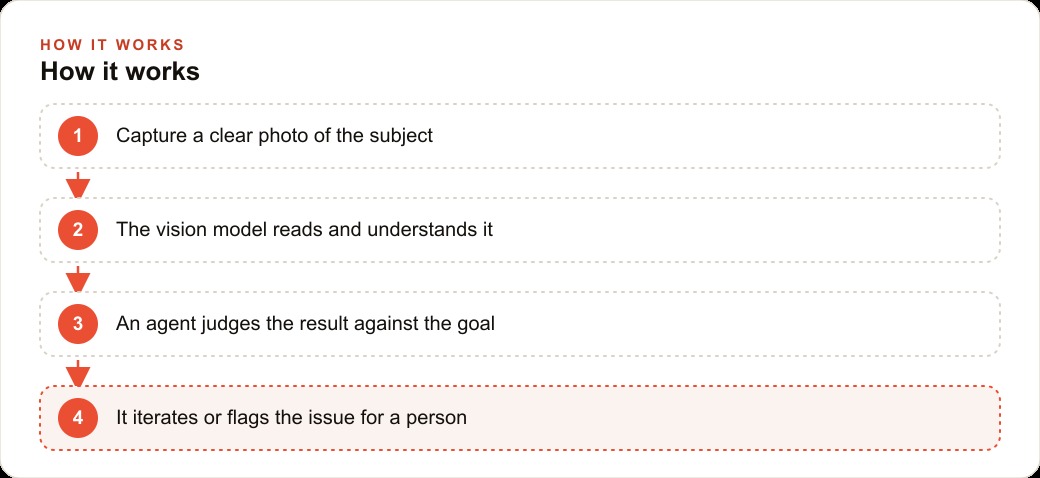
The capability that makes vision much more than a single-pass extraction tool is the self-improving loop. An agent with vision can inspect its own output, identify what is wrong, correct it, and repeat. This changes the error model from a fixed accuracy rate to a converging accuracy rate.
The mechanism is straightforward. The agent generates output, processes that output through the vision model as a new image, receives a critique that identifies the specific errors, and uses that critique to generate corrected output. For image generation tasks this means: generate an image, look at it, identify what is wrong relative to the specification, regenerate with those corrections. For document processing tasks this means: extract structured data from a document, render the structured data back into a readable format, inspect the rendering, identify discrepancies between the rendering and the source image, correct the extraction.
Single-pass extraction has a fixed error rate for any given model and image quality. The self-improving loop reduces that error rate with each iteration. The number of iterations required to reach acceptable accuracy depends on the complexity of the task and the quality of the critique step. Most practical workflows reach acceptable accuracy within two to three iterations.
The limit of the loop is the accuracy of the critique step. If the model cannot identify that something is wrong in the output, it cannot correct it. This is why prompting the critique is as important as prompting the generation. A critique prompt that asks "what specific differences do you see between this output and the source document?" produces more actionable corrections than a prompt that asks "is this output correct?"
The prompting gap that separates a useful vision workflow from a gimmick that produces impressive demos and unreliable production results
Structured observation prompts perform dramatically better than open-ended description prompts on every practical extraction task. This is not a subtle difference. It is the difference between a workflow you can trust and one that produces variable output requiring extensive human review.
Compare two prompts applied to a photograph of a roof after a storm. The first prompt: "Describe the roof in this photo." The output is a narrative paragraph that might mention shingles, might mention some damage, and will vary significantly in what it emphasizes from photo to photo. The second prompt: "For this photograph of a roof, evaluate each of the following and provide your answer in the exact format shown: Shingle condition (good / fair / poor): [answer]. Visible granule loss (yes / no): [answer]. Cracked or missing flashing (yes / no): [answer]. Signs of standing water (yes / no): [answer]. Estimated percentage of visible surface with visible damage (0-100%): [answer]."
The second prompt produces structured output that can be compared against an inspection checklist, aggregated across multiple photos, flagged against threshold criteria, and formatted into a customer-facing document. The first prompt produces a paragraph that requires a human to read and interpret before it becomes useful data.
Every field you define explicitly in the prompt performs better than every field left to the model's discretion. This is not a limitation of the model; it is a feature of how extraction tasks work. The model performs better when you tell it exactly what you are looking for than when you ask it to decide what matters.
A roofing inspection workflow that turns field photographs into customer-ready reports with structured severity levels
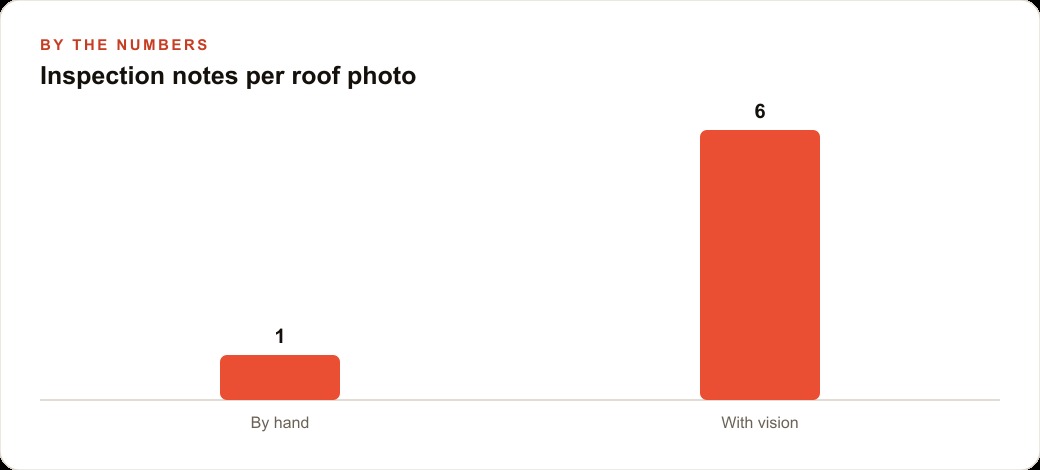
A roofing contractor conducting a post-storm inspection takes thirty to fifty photographs per property. Each photograph documents a section of the roof. Reviewing those photographs, documenting findings, comparing findings against an inspection checklist, calculating affected area estimates, and writing a customer report takes two to three hours per inspection in the manual workflow.
The vision workflow changes the structure of that labor. Each photograph runs through a structured extraction prompt that asks for: shingle condition across the visible surface, presence of granule loss, condition of any visible flashing or boot seals, signs of standing water or ponding, presence of missing tabs, and estimated percentage of the visible surface showing damage in each category. The output per photograph is a structured record with severity classifications: minor means visible cosmetic wear, moderate means accelerated deterioration expected within two years, severe means immediate water intrusion risk.
Those structured records aggregate across all photographs from the same inspection into a summary. The summary includes total affected area estimates by severity tier, a priority list sorted by immediate water intrusion risk, and a count of each damage type across the full roof. From that summary, a customer document is generated that attaches each photograph to the relevant section of the report and presents findings by severity in plain language.
One human review step at the end confirms that the model's severity classifications match the inspector's professional judgment. In the majority of cases, the model's classifications are correct and the review takes five to ten minutes. In cases where the model's classification differs from the inspector's assessment, the inspector corrects it before the document is sent to the customer.
The total time reduction is significant: two to three hours of report writing per inspection becomes twenty to forty minutes of photograph review, data confirmation, and customer document approval. The output quality is also higher than the manual report because the structured format is consistent across every inspection, every field is always addressed, and no finding is inadvertently omitted because the inspector was tired at the end of a long day.
What changes when you stop treating images as content and start treating them as a data source
The 'previously invisible to software' framing has practical implications that go beyond the specific use case of photos. Floor plans contain spatial data that was locked in image format. Equipment photographs contain maintenance status data that was locked in image format. Medical images contain diagnostic data that was locked in image format. Financial statements converted to PDF contain numerical data that was locked in image format at some point in the document chain.
Every industry has information stores in image format. The common thread is that these stores were produced as images because that was the output format of the system or the human that created them, not because images were the best format for the information they contain. A scanned invoice is an image because someone printed an invoice and scanned it. The relevant information is the line items, amounts, and vendor details, not the image itself.
Vision AI makes it practical to extract the information from those image stores at scale without building specialized OCR pipelines for each document type. The model generalizes across document formats in a way that a pattern-matching system cannot. A structured prompt applied to a scanned invoice, a handwritten maintenance log, a photographed whiteboard, and a screenshot of a web form will produce useful structured output from all four, without separate preprocessing steps for each format.
The practical question for any organization is not "should we use vision AI?" It is "where in our operation does information currently exist in image format that we are not using at all, or that we are using at high labor cost because extraction is manual?" The answer to that question determines where to start. Start there, build one clean workflow with structured prompting, measure the accuracy carefully, and expand from a foundation of demonstrated reliability rather than theoretical capability.
That is exactly what we do at AI DOERS. Book a private 30-minute call with Madhuranjan Kumar and we will map the fastest path to it for your specific business.
Book your call →
Madhuranjan Kumar
Madhuranjan Kumar brings 20 years of performance-marketing experience and has managed over $200 million in Facebook ad spend for brands across the United States and beyond. His expertise spans the full modern marketing stack: Meta, Google Ads, TikTok, email automation, CRM, and the websites that hold it together. At AI DOERS he turns that track record into lead-generation systems for businesses across every industry.