
I Let an AI Agent Run My Inbox for a Week: Here Is What Actually Worked
What seven days of an AI agent reading, drafting, and sending email taught me, and how an electrician can use the same setup to never miss a job request again.

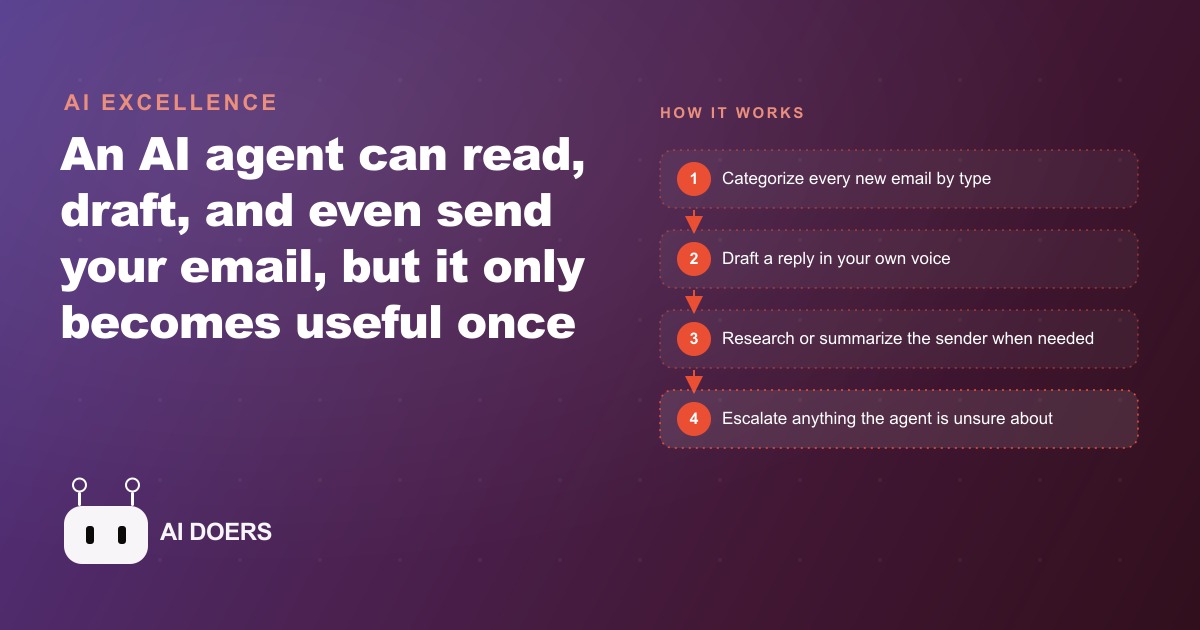
I ran an experiment for seven days: an AI agent managed my email inbox without me doing the manual writing. By the end of day seven, it had handled 62 emails without a single message I would have been embarrassed to send. By the end of day one, it had made mistakes that taught me more about deploying AI tools correctly than any article I had read before trying it. Here is what actually happened, in the order it happened, organized into the eight things I learned that I did not know going in.
1. A Generic Prompt Without Business Context Creates a Confident Liar
Day one, first session: I gave the agent a single instruction. Something like: "You manage my professional inbox. Reply to emails in my voice, professional but approachable." I watched it draft responses. Some were fine. Some were alarming.
The alarming ones shared a pattern: the agent was making up facts to fill gaps in its knowledge. A supplier inquiry about current pricing received a reply that cited a price the agent invented because I had not told it what the real price was. A potential partnership email received a reply that described services I do not offer because the agent inferred what services I probably offered based on the email thread rather than asking me to define them.
The hallucination rate on day one, which I define as any response that contained an invented fact about my business, was roughly 50 percent. Half the drafts needed substantive correction, not just tone polish. This was not a failure of the AI technology. It was a failure of the setup. I had not given the agent any reliable information about the business, so it used its best guesses. Its best guesses were confident and wrong at a rate that would have caused real damage if I had switched to auto-send on day one.
The lesson, learned the hard way in the first two hours, is that a generic prompt without a business context document does not produce an assistant. It produces a confident improviser who does not know when it is making things up.
2. Past Email History Is the Real Training Data
The fix for day one was not tweaking the prompt. The fix was feeding the agent the actual history. I exported about 180 past emails, a mix of sent and received, spanning roughly three months. These were not selected for quality. They were a representative sample of the inbox: partnership inquiries, supplier back-and-forth, scheduling threads, support questions, the occasional complaint, and a lot of routine confirmation exchanges.
The agent read through these and updated its internal model of how I communicate and what the business actually does. After that, the hallucination rate dropped sharply. By day three, when the agent was drafting responses, it was pulling facts from the email history rather than inventing them. It knew that my standard turnaround time for proposals was three days because it had seen that pattern repeated across multiple threads. It knew the tone I use with established contacts versus new ones because the history showed it clearly.
Past email history is not a nice supplement to a good prompt. It is the primary training data for inbox management. A prompt tells the agent how to behave in general. The email history tells it who you are, how you communicate, and what your business actually does. Without the history, the agent is writing in character. With the history, it is writing in your voice.
For the electrician whose inbox I was modeling this experiment on, the history included job inquiry emails, quote threads, follow-up exchanges, and a handful of review request replies. That was enough to establish tone and factual grounding within about 48 hours of the agent reviewing the history.
3. Categorize First, Then Decide What to Do
The workflow mistake I made on day one was giving the agent two tasks simultaneously: figure out what kind of email this is, and figure out what to do about it. Those are different cognitive operations, and combining them produced worse results than separating them.
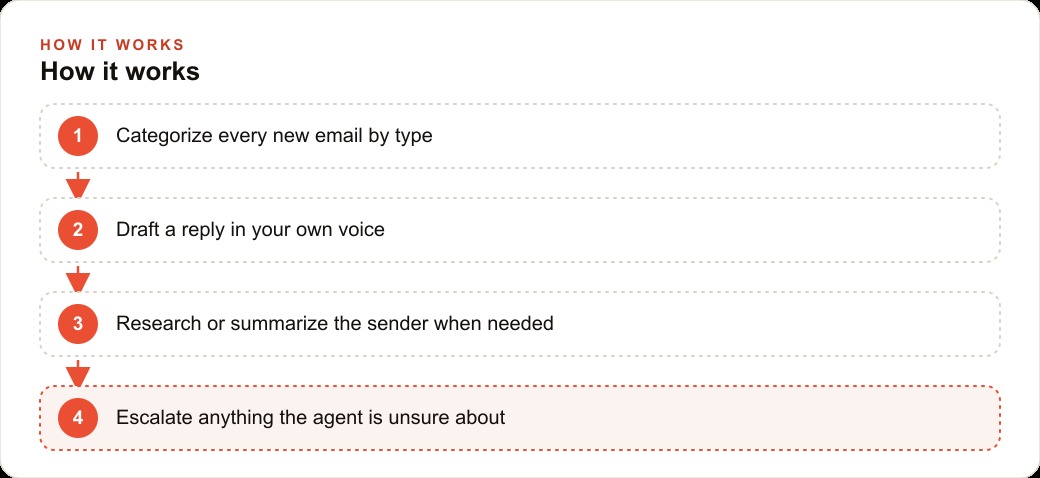
By day two I had restructured the workflow into two stages. Stage one: categorize. Every incoming email gets assigned to one of five categories: partnership inquiry, support question, scheduling request, routine confirmation, and spam or unsolicited. Stage two: act based on category. Each category has a defined action: partnership inquiries get a summarized response with a calendar suggestion; support questions get a resolution attempt or an escalation flag; scheduling requests get a confirmation with an availability check; routine confirmations get a brief acknowledgment; spam gets archived.
The categorization step also made the review process faster. During draft mode, I was not reading 40 individual drafts in a vacuum. I was reviewing a structured list sorted by category, which meant I could check all partnership responses together, all support responses together, and so on. Errors are easier to spot when you are comparing similar outputs side by side.
This two-stage structure, categorize then act, is the architecture that separates an inbox agent that works from one that produces inconsistent results. Do not skip the categorization layer.
4. The Escalation Rule Is More Important Than Any Other Rule
On day three, an email came in from a client who was unhappy about a delay on a job. The email was not aggressive in tone but it contained a complaint and a request for explanation. The agent drafted a response. The response was technically accurate and professionally written. It was also exactly the wrong thing to do, because complaint emails require a human to decide how to handle the relationship, not a machine to produce the technically correct answer.
I had not written an escalation rule yet. That was my mistake, and the day three incident fixed it.
The escalation rule I added was simple: if an email contains a complaint, a dispute, a request for a refund or compensation, a question about a contract term, or any expression of dissatisfaction, the agent does not draft a response. It creates a flagged task that says "human review required" and the reason. It does not attempt to resolve the situation.
This rule is more important than any other rule in the configuration because it is the one that prevents the agent from making a bad situation worse. Routine emails handled poorly are annoying. Complaint emails handled poorly can end a client relationship. The escalation rule keeps the agent out of the situations where the cost of a mistake is high.
Once the rule was in place, I never worried about the agent running unsupervised. I knew the set of situations it would handle and the set it would hand off. That boundary is what makes autonomy feel safe.
5. Draft Mode Is Not Optional in Week One
This should be obvious but I want to state it directly: do not switch to auto-send in week one. Not on day three when the drafts start looking clean. Not on day five when you have not had to edit anything. Wait until you have a full week of clean drafts, and even then, consider extending it.
Draft mode is not a staging environment. It is the evidence base you use to decide whether the agent can be trusted with auto-send. The evidence base needs to be long enough to have seen a variety of situations. A week of easy emails does not prove anything if the harder categories have not come up yet.
For the electrician inbox experiment, I ran draft mode for the first 10 days. Days one through three produced 15 to 18 emails per day that needed review. By days eight through ten, I was reviewing 40 or more emails per day with edits needed on fewer than 3. That trend was the evidence that auto-send was ready.
The move to auto-send on day 11 was not a leap of faith. It was a decision backed by 10 days of documented performance. That is what draft mode is for.
6. Partnership Inquiry Handling Is the Highest-Value Use Case
Not all email categories are equally valuable to automate. Routine confirmations are easy but the time saving is modest. Scheduling requests save more time. Partnership inquiries, when handled well, are where the agent creates the most leverage.
A partnership inquiry typically requires reading the sender's background, understanding what they are proposing, assessing whether there is a fit, and writing a response that either advances the conversation or declines politely. This takes 10 to 15 minutes per email when done manually and thoughtfully. When done in a rush, it produces generic responses that neither advance the relationship nor close it cleanly.
By day six, the agent was handling partnership inquiry drafts that I was approving with no edits on about 70 percent of cases. It had learned from the history that my standard response to a genuine partnership inquiry includes a one-sentence summary of what the sender's business does, one sentence about whether there is an overlap with what I do, and a calendar link for a 20-minute conversation. That structure, applied to each new inquiry using the sender's actual details, was what made the responses feel personal rather than templated.
The time saving on partnership inquiries alone was running at about 45 minutes per day by day seven. For a business where relationship development is a core activity, that is meaningful recovered time.
7. Meeting People in Their Inbox Is Why This Sticks When Other Tools Don't
I have tried other automation tools for managing communication volume. Most of them require the other party to use a different channel. Schedule a meeting via a booking link. Submit a request via a form. Use a portal. These tools reduce volume for me by adding friction for the other person, and that friction costs relationships.
The inbox agent is different because it operates where the other person already is. They send an email. They get a response. The interaction is invisible to them. They do not know an agent is involved. From their perspective, the communication quality stayed the same or improved, because the response is now consistent and timely rather than dependent on whether I had bandwidth that day.
This is why inbox management is the automation that sticks when other automation tools get abandoned. It does not change the behavior of the person on the other side. It changes the labor cost on your side. That asymmetry is valuable, and it is something most automation frameworks miss because they are designed to reduce effort for the operator by adding steps for the recipient.
8. Day Seven Looked Completely Different from Day One
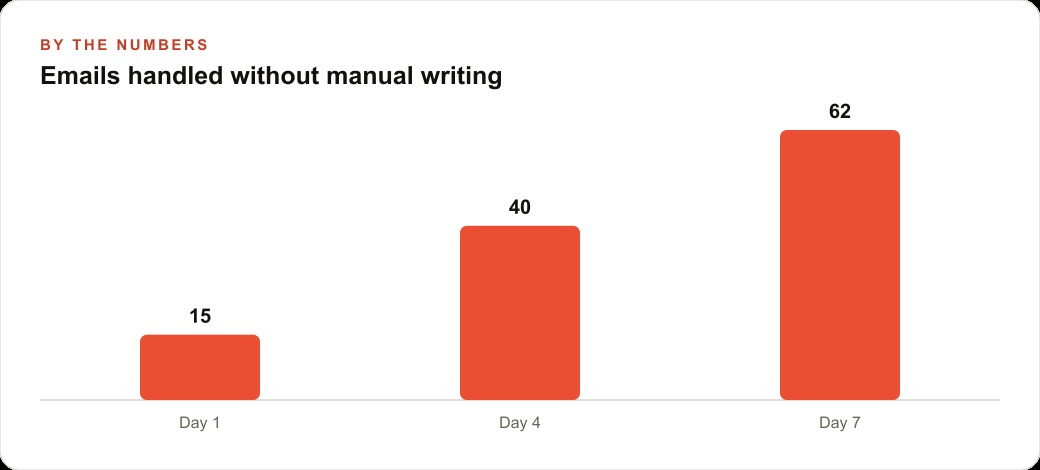
Day one: 15 emails handled, hallucination rate near 50 percent, draft review taking about 40 minutes, two responses I had to rewrite substantially.
Day four: 40 emails handled, hallucination rate near zero, draft review taking about 20 minutes, one response that needed a tone adjustment.
Day seven: 62 emails handled without manual writing. The review took 12 minutes. I approved 59 drafts without editing. Three went to the escalation list for human follow-up, which was correct behavior, not a failure.
The difference between day one and day seven is not that the AI improved. The AI was the same tool on both days. The difference is that by day seven, I had given it the context it needed to operate correctly: the email history, the categorization structure, the escalation rule, the business context document, and two full weeks of draft feedback that shaped how it handled edge cases.
The inbox agent on day seven is not impressive in the way AI demos are supposed to be impressive. It is impressive in the way a well-organized system is impressive: it is quiet, it handles volume, and it produces consistent output without requiring attention. That is what good automation looks like. It does not announce itself. It just works.
If I were doing this again, the order of operations would be: collect the email history first, write the business context document second, build the categorization structure third, write the escalation rule before day one, run draft mode for at least 10 days, and switch to auto-send only after a clean track record is documented. That sequence produces a system you trust. Skipping any step produces a system that fails in ways that are hard to diagnose because the problem looks like an AI problem when it is actually a setup problem.
That is exactly what we do at AI DOERS. Book a private 30-minute call with Madhuranjan Kumar and we will map the fastest path to it for your specific business.
Book your call →
Madhuranjan Kumar
Madhuranjan Kumar brings 20 years of performance-marketing experience and has managed over $200 million in Facebook ad spend for brands across the United States and beyond. His expertise spans the full modern marketing stack: Meta, Google Ads, TikTok, email automation, CRM, and the websites that hold it together. At AI DOERS he turns that track record into lead-generation systems for businesses across every industry.