
Agentic Development Environments: Build Real Apps With AI and Stay in Control
A new category of tool merges the power of a command line agent with the clarity of a code editor, so humans and AI build applications together in one workspace with built-in versioning and visible, editable code.

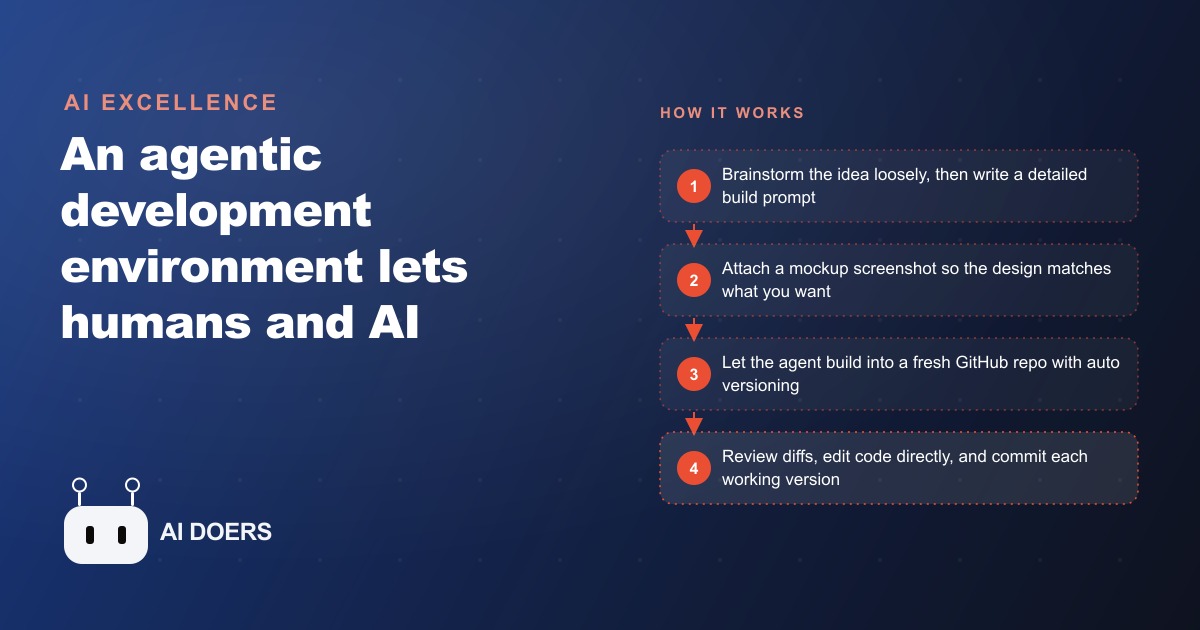
The HVAC Company That Needed a Quoting Tool but Not a Developer Contract
A six-technician HVAC company in its fourth year of the same quoting friction does not need another spreadsheet. It needs a tool its crew will actually open on a tablet mid-job and hand to a customer without apology.
The friction ran like this. A technician finishes a service call and finds a coil that needs replacing. The call to the office follows, then the wait for a callback, then the technician reads numbers off a printed rate sheet that gets updated twice a year and is sometimes already out of date. Maintenance plan upgrade quotes ran worse: the technician described the system verbally over the phone, the office looked up the tier, and the quote arrived as a handwritten note photographed and texted to the customer. Booking rate on those quotes was poor. The combination of delay and informal presentation cost the company jobs it should have been closing.
What the owner wanted was specific: a simple quoting app the technician opens on a tablet at the end of a service call, fills in system details and the work found, and turns to show the customer a clean, formatted quote on screen. Not a complicated CRM. Not a scheduling platform. One focused tool that replaced a phone call and a blurry photo.
Software vendors quoted the job between $8,000 and $15,000 upfront, with timelines of eight to twelve weeks. For a tool that saves roughly fifteen minutes per job, that math did not work. The owner could not justify a developer contract for a narrowly scoped internal utility.
This is the story of how he built it anyway, in four sessions spread across six weeks, without spending anything close to what the vendors quoted. The path ran through an agentic development environment, and the detail of how that went is worth understanding because the shape of the problem and the shape of the solution are both replicable.
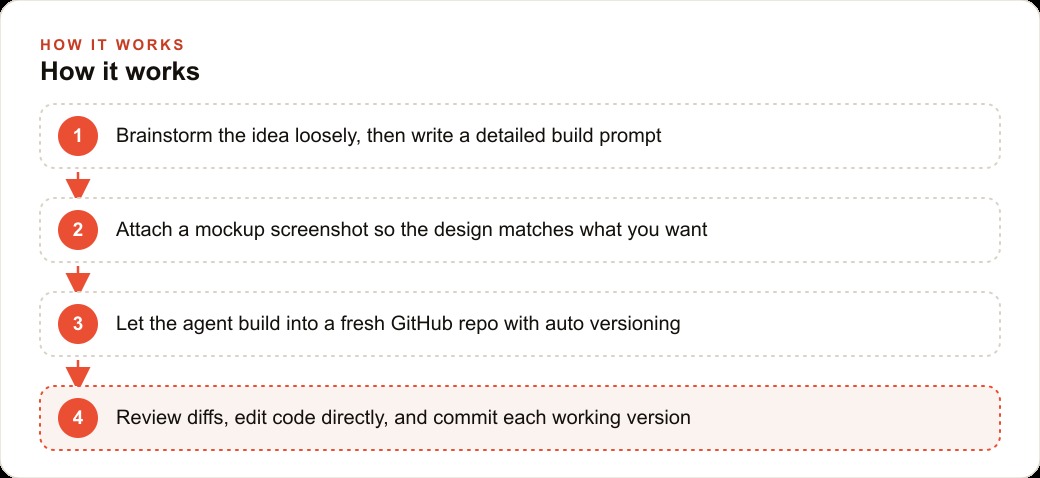
What an Agentic Development Environment Actually Is, and Why the Name Matters
The name carries two distinct ideas and the combination is the point. Agentic means the AI does technical execution on its own, not one line at a time with you prompting every keystroke, but in blocks: building a file structure, writing functions, wiring together components. Development environment means the workspace itself has the full apparatus of professional software building inside it: a file tree, a diff viewer, a preview pane, a terminal, and a connection to a version control repository.
Put those two together and you get something that did not exist three years ago. It is not a bare command-line agent that quietly builds things for you in a black box. It is not a code editor with an autocomplete plugin that fills in your next line. It is a single integrated environment where planning, building, previewing, and version control all happen in one place, and where the agent and the human share one consistent picture of the project at every moment.
The key differentiator is the control surface. When the agent makes a change, it surfaces a before-and-after diff of exactly what it modified before anything is saved. You see the change before it takes effect. You approve or reject it. If something breaks, version control captures every working state and rollback is one click. The agent is connected to a real code repository, so logging in with a version control account means every accepted change commits automatically to a fresh project repository.
For a business owner with no programming background, this changes the risk calculation completely. Experimentation is genuinely low-risk. Trying something that goes wrong is a one-button fix. The environment does not hide what happened or force you to start over. It shows you the exact two lines that broke the total calculation and offers a clean rollback to the version from twenty minutes ago when everything worked.
Madhuranjan Kumar describes the shift this way: the tool you are working in is no longer neutral about your success. The environment itself is designed to keep a non-technical builder oriented, informed, and in control at every step. That is what the name is trying to communicate and why distinguishing it from both plain agents and plain editors matters.
Starting Loose: How a Brainstorm Prompt Beats a Detailed Spec on the First Build
The owner's first instinct in the opening session was to write a detailed prompt listing every field the quoting app should include. System type, unit age, work found, parts needed, labor rate, tax rate, subtotal, total, technician name, job address. Sensible on the surface. But Madhuranjan Kumar advised against leading with that.
On a first build, a detailed specification written before seeing the agent's interpretation frequently produces an app that technically matches the spec but misses the actual workflow. The owner describes fields but does not yet know how the form should flow, what order feels natural to a technician under time pressure, or where the design needs breathing room versus density. Writing the spec before the first prototype is building a blueprint before measuring the room.
A brainstorm prompt describes the problem, the users, and the outcome without prescribing the form. The version used in this first session ran: "I run an HVAC company. My technicians need a way to generate a formatted quote on site when they find something that needs repair or replacement. The quote should look professional and be ready to show the customer on a tablet. Help me think through what this should include and how it should work." The agent responded with three approaches: a single-page form with inline totals, a wizard stepping through job type and system details before showing the quote, and a hybrid with a short header form and a line-item table below. The owner recognized the hybrid immediately as matching the way his crew actually thought about a job. From that point the detail prompt came easily, because the shape was already visible.
By the end of that first session, ninety minutes in, the team had a clear specification and two quick prototypes. Neither was usable in the field. Both were deliberately rough. But the owner understood what he was building and why each decision mattered. That clarity is worth more than a finished but misdirected tool.
The Moment the Screenshot Changed Everything About How the Design Came Out
The second session began with a screenshot. The owner had found a quote form on a competitor's website that looked exactly the way he wanted: clean, single-column, company name at the top, a brief job description field, a line-item table with quantity and unit price columns, a subtotal and tax line, and the total in larger print at the bottom. He attached that screenshot to the build prompt.
The difference was immediate and visible.
Without a visual reference, the agent had produced functional but generically styled forms: standard web styling with gray borders, left-aligned text labels, a plain submit button at the bottom. The design was fine from an engineering standpoint and wrong from a presentation standpoint. A technician turning that screen toward a customer gets no implicit signal that the business is professional and organized.
With the screenshot attached, the first draft matched the single-column layout, placed the company name correctly at the top, used a table structure for line items, and made the total figure prominent. The owner asked for two adjustments: company colors applied throughout and a slightly larger font on the total line. Both appeared in the next diff, reviewed and approved.
This pattern holds across every kind of build. Attaching a visual reference communicates layout preference that would take hundreds of words to describe in text and still come out ambiguous. A screenshot of "something like this" eliminates interpretation. The agent is not copying someone else's finished design. It is reading the layout as a communication of intent: how many columns, where the important figure goes, how much white space between sections, what size relationship establishes hierarchy. All of that is in the image. None of it has to be translated into words first.
For a business owner working without a design background, this is the highest-leverage single habit in the whole process. Find one example of a document or screen that looks the way you want the finished thing to look. Attach it. The distance between concept and result collapses.
Why Every Change Being a Reviewable Diff Changed What the Owner Was Willing to Try
By the third session the owner was making requests he would not have made if each one felt risky.
He asked the agent to add a conditional field that appeared only when "replacement" was selected as the job type. He asked it to auto-calculate the line-item total as entries were added, rather than requiring a submit action to see the running number. He asked it to change the color scheme when the form was used for a maintenance plan upgrade instead of a repair, so the technician and the customer would both see at a glance which type of quote they were looking at.
None of those requests is particularly complex from an engineering standpoint. But each one requires the agent to touch existing code, and without visibility into what changed, every such request carries an implicit fear: what else did it modify while it was in there?
Each request produced a diff. Each diff showed which lines changed, the previous version on the left and the new version on the right. The owner could not read code fluently, but he could follow the structure well enough to see which part of the form had been touched and roughly what had changed. If the preview looked right, he approved. If the preview looked wrong, he rejected the diff and described what was off.
The approval loop created earned trust. Fifteen diffs in, the owner knew the agent's pattern: targeted changes, a clear explanation of what it did and why, the preview almost always correct on the first attempt. That track record is what made him willing to try the conditional field, because trying something and having it fail is a diff rejection and a two-sentence correction, not a broken app and a debugging session.
There is a second effect worth naming. The process of reviewing diffs is also how a non-technical owner learns to read code. Not by studying deliberately, but by seeing patterns appear and change across dozens of small edits. By the fourth session the owner was opening specific files directly and changing single values himself, because he had seen those values appear in enough diffs to know what they controlled.
The First Useful Tool: A Working Quoting App After Four Building Sessions
The fourth session produced the first version the crew actually used on real service calls.
It was not perfect. There was a rounding error in the tax calculation that appeared only on quotes above $2,000. The line-item table did not scroll gracefully on one older tablet the technicians used. The font on the printed version came out slightly smaller than on screen. Three specific, findable problems with known fixes.
But the core worked. The technician opens the app on the tablet, selects the job type, enters the system details, and adds line items with quantities and rates. Within ninety seconds of filling in the form, a formatted quote is ready to show the customer. The customer sees a clean total with a clear breakdown of what the work involves and what it costs. The technician taps confirm, and the quote is logged with a timestamp and the customer name.
The phone call to the office is gone. The follow-up text with the blurry photo of handwritten numbers is gone. The delay between finding the problem and presenting the cost is gone. In its place is a self-contained flow that the technician controls from start to finish.
The rounding error was fixed in a ten-minute session the next day: one diff, one approved change. The scroll issue was addressed in the same short session. The print font was tuned by adjusting one value in the print stylesheet, which the agent identified and changed after the owner described seeing smaller text on the printed copy. Each fix was one diff, reviewed and approved, and the version history captured every working state along the way.
What the HVAC Owner Has Six Weeks Later and What It Took to Build It
Six weeks after the first session, the quoting app is running on four tablets and has been used on over sixty service calls.
The booking rate on app-generated quotes has improved measurably compared with the previous text-photo process. Customers receive a professional formatted document immediately at the end of the service call rather than a blurry photograph of handwritten numbers arriving hours later. The gap between finding the problem and presenting the cost is now measured in seconds. The gap between presenting the cost and getting a yes is shorter because the format communicates competence.
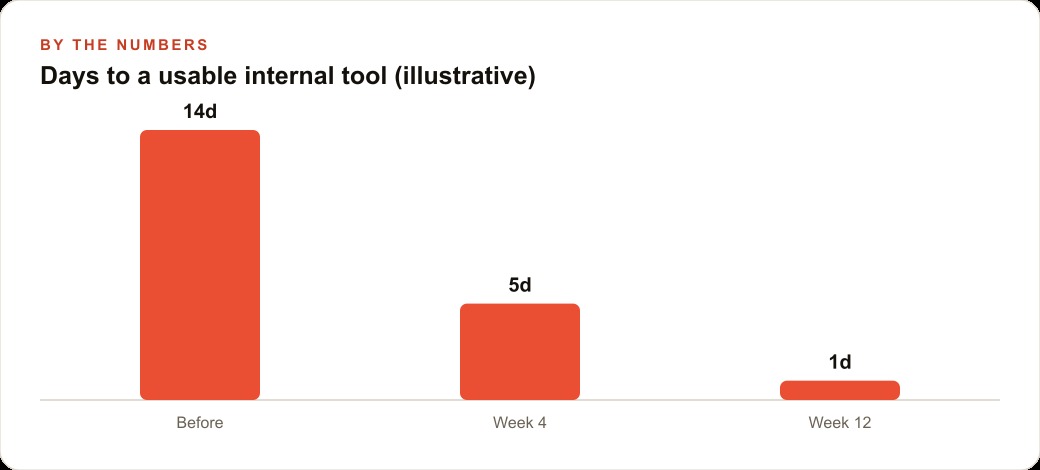
The numbers on the investment tell the real story. Total time spent across four sessions was roughly twelve hours: one brainstorm session, two build sessions, one polish-and-fix session. The cost was a monthly subscription to the development environment, under $30 for the six-week period. The alternative the vendors had quoted was a minimum of $8,000 upfront and eight to twelve weeks of wait time.
Since the initial build the owner has added two features, both in single sessions under an hour each. A phone number field that populates a follow-up reminder in the office calendar. A toggle that marks a quote as an estimate rather than a firm price when parts availability is uncertain. Each addition was one session, one or two diffs, reviewed and approved.
Version history was used once after the initial build. A change that broke the line-item total calculation was rolled back to the last working commit in eight minutes. The broken version never reached a customer because the preview had shown the error before the change was approved.
The lesson the owner draws from the experience is about where the decision threshold sits. The question used to be: is this worth $8,000 and three months of waiting? For a narrowly scoped internal tool saving fifteen minutes per job, the answer was almost always no. That threshold made building specific, useful internal tools prohibitive for most of the daily friction a small service business actually faces.
The question now is: is this worth twelve hours spread over six weeks? For a tool the crew uses sixty times in the first month, the answer is clearly yes. The threshold moved, and the decision calculus changed completely. That shift is the real consequence of what an agentic development environment makes possible. Not that building has gotten faster in the abstract, but that the specific category of small, useful, internal tools that used to require a developer contract now requires a motivated owner and a clear description of the problem.
That is exactly what we do at AI DOERS. Book a private 30-minute call with Madhuranjan Kumar and we will map the fastest path to it for your specific business.
Book your call →
Madhuranjan Kumar
Madhuranjan Kumar brings 20 years of performance-marketing experience and has managed over $200 million in Facebook ad spend for brands across the United States and beyond. His expertise spans the full modern marketing stack: Meta, Google Ads, TikTok, email automation, CRM, and the websites that hold it together. At AI DOERS he turns that track record into lead-generation systems for businesses across every industry.