
A Week With Claude Cowork: What Actually Worked and What Failed
Claude Cowork reliably organizes folders, renames images by content, compiles multi-step reports, builds slide decks from a single page, and turns screenshots into spreadsheets, but its app connectors stay flaky, so it wins only when you point it at something specific.

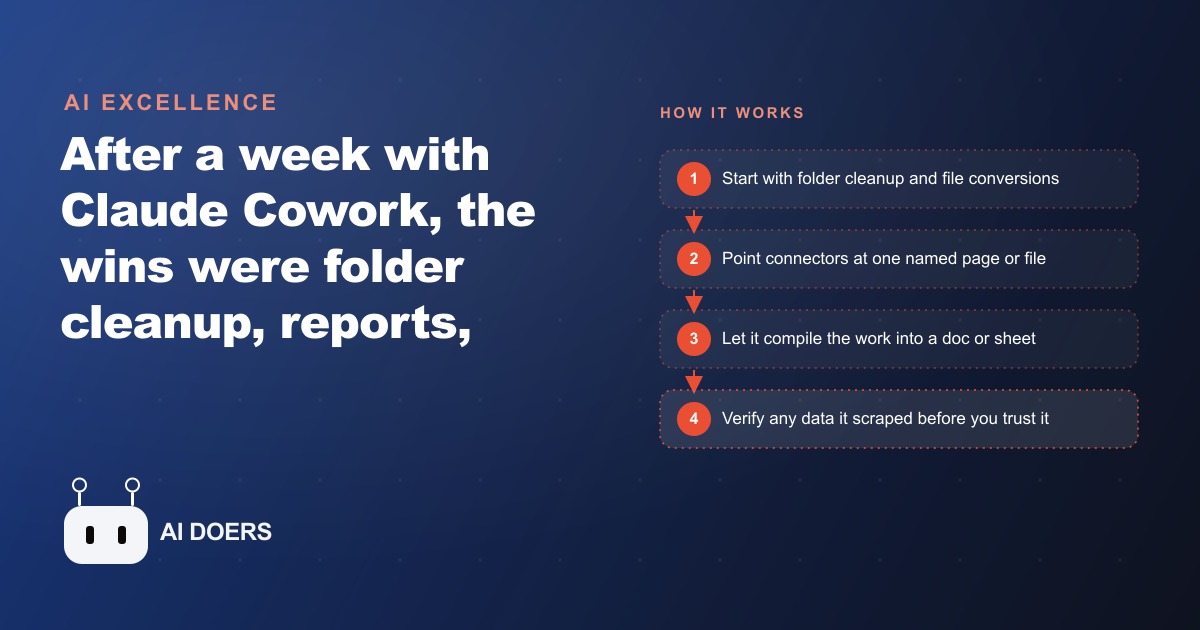
In a week of hands-on testing with Claude Cowork, a version of Claude with full computer and browser control, the most useful sessions involved documents and folders rather than live web browsing, and the most consistent predictor of a good outcome was whether the starting point was one specific named thing rather than a vague category of things. That pattern held across every task type tested, and understanding why it holds tells you most of what you need to know before you start using this kind of tool.
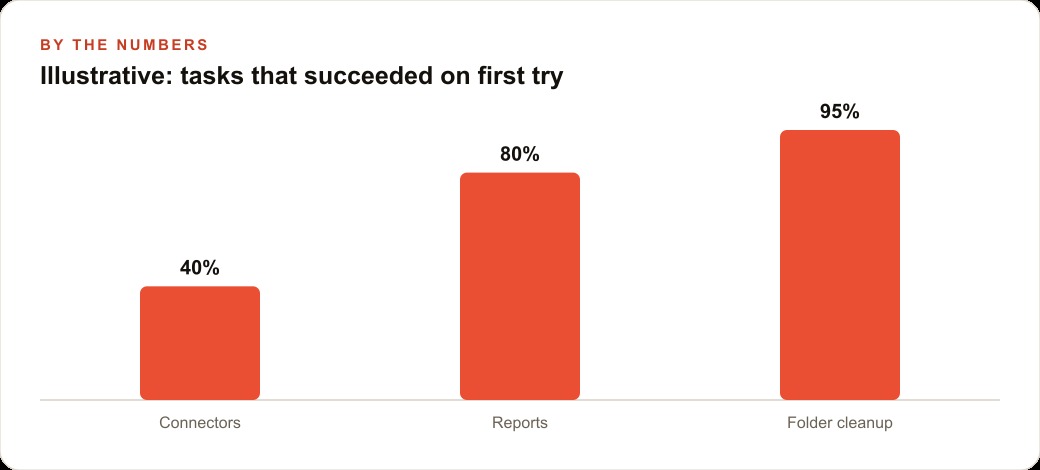
The wins were real: folders organized from a messy state to a logical structure in minutes, images renamed by content in a batch that would have taken hours manually, a multi-source report compiled from error logs and chat history into a polished document, slide decks built from a single specific Notion page, video files located and converted to GIF format, and comparison spreadsheets built from screenshot folders. The failures were also consistent: browser and application connectors behaved unpredictably, and anything that required navigating a live web interface without a stable API produced errors that required human intervention.
The planning advantage that makes messy input work
The feature of Cowork that makes it useful with disorganized input is that it reasons and plans before it acts. Most automation tools require structured input to produce reliable output. If the input format varies, the automation breaks. Cowork handles varied input because it does not treat the task as a pattern match. It treats it as a problem to be understood first.
When given a folder of images with inconsistent naming, Cowork does not attempt to apply a renaming rule it was programmed with. It examines the images, infers what each one shows, decides what naming convention makes the content most findable, and applies that convention across the set. The plan exists before any file is renamed. If an image's content is ambiguous, the plan accounts for that by flagging it for review rather than guessing and producing a wrong answer that blends invisibly into the correctly renamed set.
That planning approach is why vague prompts work better than you might expect. A folder cleanup task described as "organize this so I can find things" produces a reasonable organization scheme because the tool interprets the goal, assesses the current state, identifies the structural logic that would serve the goal, and acts accordingly. The output is not random. It reflects a coherent strategy that was formed before the first file was moved.
The same planning behavior produces reliable report compilation. When given error logs, a conversation thread, and a request to produce a polished summary document, Cowork does not concatenate the inputs. It reads them, identifies the relevant information in each, determines how the pieces relate to each other, chooses a structure for the output that reflects those relationships, and then writes the document. The output is a coherent synthesis, not a paste job.
This matters for business use because the tasks where planning-before-acting produces the most value are exactly the tasks that currently consume the most skilled human time: synthesizing information from multiple sources, identifying what matters in a large set of inputs, producing a structured output from unstructured material. These are the tasks that are hard to delegate to a junior team member and hard to automate with rule-based tools because they require interpretation, not just pattern matching.
The planning capability also means the tool handles errors more gracefully than simpler automation. When an action does not produce the expected result, Cowork notices and adjusts. A browser session that redirects unexpectedly, a file that is in a format the tool did not anticipate, a folder structure that differs from the description: these produce a revised plan rather than a crash. The tool continues rather than stops, though it will surface the unexpected situation if it affects the output in a meaningful way.
Where the connector problem comes from and why it persists
The most consistent failure mode in testing was browser and application control. Sessions that required navigating live web interfaces, logging into services, finding specific elements on a dynamically loaded page, and completing multi-step actions through a browser produced unreliable results. Some sessions completed successfully. Others encountered errors at a specific step and could not recover. The inconsistency was not random. It traced back to a structural fact about how the web is built.
The web is built for human eyes and human hands. Every interface element, every navigation flow, every input field is designed to be seen by a person and operated with a mouse or keyboard. The names of elements, their positions on the screen, their behavior when interacted with: all of these are built around the assumption that a human who can see the whole page and understand context is operating the interface.
An AI controlling a browser is operating in an environment that was not designed for it. It can see what a screenshot shows, but it cannot always identify which element is the one it needs from a cluttered interface. It can simulate mouse clicks and keyboard input, but it cannot always predict how a dynamically rendered page will respond to those inputs. Login flows with two-factor authentication, CAPTCHA challenges, or session timeouts create interruptions the tool cannot resolve without human help.
This is not a failure of the AI model. It is a structural property of the target environment. The web was not designed to be machine-operated except through designated APIs, and the parts of the web that have clean APIs are the parts where automation works reliably. The parts that only have browser interfaces are the parts where automation encounters the friction that was baked in by design for human users.
The implication is that browser-based automation with a computer-control AI should be understood as best-effort rather than reliable. For tasks where the browser interface is the only available path and the task is high-stakes, a human should monitor the session and be ready to intervene. For tasks where the browser interface has a known stable structure, such as a proprietary internal tool that the business controls and that does not change frequently, the reliability improves because the environment is more predictable.
The connector problem will improve as more applications build clean interfaces for AI interaction, similar to how APIs replaced scraping for data access once the value of machine-readable interfaces became clear. For now, the most reliable use of computer-control AI is on local files and applications rather than live web browsing.
The compilation strength: turning chaos into shareable documents
The most reliable category of Cowork tasks across all testing was document compilation: taking multiple sources of information, synthesizing them, and producing a coherent output document. This category worked well because it plays to the planning strength without encountering the connector problem. The inputs are files. The output is a file. The environment is the local filesystem, which is predictable and well-understood.
The test case that illustrated this most clearly involved error logs from a software deployment and a chat thread discussing the issues the errors had caused. The task was to produce a polished incident summary that could be shared with stakeholders. The input was genuinely unstructured: the logs contained technical information in a format built for machines, and the chat thread contained partial information, tangential discussion, and informal shorthand.
Cowork read both sources, identified the sequence of events the combined sources described, extracted the relevant technical details from the logs, matched them to the discussion points in the chat, identified what had been resolved and what remained open, and produced a document with a clear narrative structure: what happened, when, what the impact was, what was done to address it, and what the current status was. The document required light editing for formatting and one factual correction where the tool had drawn an inference that did not match what had actually happened.
That final point matters. The compilation strength is real, but the outputs require review before sharing, especially when the inputs include data that the tool had to interpret rather than directly quote. A number that appears in an error log and a number that appears in a chat message may refer to the same event, or they may not. The tool makes a judgment about whether they match. That judgment is usually right, but "usually right" is not acceptable for a document that will influence stakeholder decisions. Review the inferences before the document leaves your desk.
Slide decks built from a specific Notion page worked on the same principle. The key qualifier is "specific." A request to build a slide deck from a Notion page produced a good result. A request to build a slide deck from "my Notion notes on this project" would have produced something much harder to assess, because the tool would have needed to decide what "my Notion notes on this project" included, and that decision is one the human is better positioned to make.
The CRM and website stack use case that fits this compilation pattern is customer reporting: taking data from multiple sources such as ad performance, CRM records, and support ticket logs and compiling them into a client-facing or executive-facing summary. The inputs are files or structured data exports. The output is a document or presentation. The task suits this tool's strengths almost perfectly.
The specificity rule that determines almost every outcome
If there is a single principle that separates successful Cowork sessions from unsuccessful ones, it is specificity of input. One named page, one named file, one named folder with a clear description of its current state: these starting points produce reliable results. "My whole drive," "my recent documents," "the files from the project": these starting points produce results that range from inconsistent to wrong, because the first step of the task requires a judgment call that only the human can make correctly.
The reason specificity matters so much is that the tool's planning approach is only as good as the scope it is given to plan within. When the scope is one named file, the plan is concrete from the first step. When the scope is "my documents," the tool must first decide what falls within that scope, and different reasonable interpretations of that scope produce very different plans. The tool will make a choice, and it will commit to it, and the result will depend on whether its choice matched what the human meant.
Specificity also matters for verifying outputs. If you give the tool one named file and it produces a summary of that file, you can check the summary against the file directly. If you give it a vague category of files and it produces a summary, you cannot easily verify whether the summary reflects all the relevant content or only the content the tool happened to include. The verification problem compounds when the input scope is vague.
The practical habit that follows from this is to spend a moment at the start of each session deciding exactly what the input is before describing the task. Not "organize my notes" but "organize the files in this specific folder." Not "compile a report from my project files" but "compile a report from these three specific files." That extra moment of precision at the start saves significant time recovering from outputs that were shaped by a different interpretation than you intended.
Dashboard data and scraped web data deserve a specific warning. In sessions that involved pulling numeric data from a web interface, some numbers in the output were wrong. Not dramatically wrong, not random, but subtly wrong in ways that reflected the tool misreading a formatted number, miscounting a row in a table, or confusing two adjacent fields. These errors did not announce themselves. The output looked like accurate data. Only comparison against the source confirmed where the errors were.
Verify any numeric data that came from a screen-scraped source before using it in a decision or a document. This is not a failure mode unique to AI tools. It is a general property of any system that reads data from an interface designed for human display rather than machine parsing. The rule is the same as it would be for any data extraction process: check the outputs against the source before trusting them.
A real estate agency that used this correctly
A small real estate agency with three agents used Cowork across a single week for three categories of work: organizing a shared drive that had accumulated three years of property files and correspondence without consistent naming conventions, building comparison documents from screenshot folders of competing listings, and compiling client-facing market summaries from a mix of MLS export files and notes from agent meetings.
The drive organization task worked well because the starting scope was specific: one folder, clearly described. Cowork assessed the contents, proposed a naming and folder structure based on the property address, transaction type, and year, applied it across the folder, and flagged three files whose content it could not confidently categorize without input. The result was a folder the agents could actually navigate. The three flagged files were the only ones requiring agent review. The rest were correct.
The listing comparison documents were built from screenshot folders, one folder per competing property. Cowork read each screenshot set, extracted the relevant attributes visible in the images such as price, square footage, listed features, and condition, organized them into a comparison table, and produced a document the agency could share with buyers. The verification step was essential: several extracted numbers required cross-checking against the original listing source, and two were wrong. After correction, the documents were accurate and saved the agents two to three hours each of manual comparison work.
The market summaries combined MLS export files with meeting notes from individual sessions. The meeting notes were informal, typed fast, inconsistently formatted. The MLS exports were structured data in a clean format. Cowork combined them into narrative summaries that led with the market context from the MLS data and incorporated the agent's specific observations about client preferences and neighborhood dynamics from the meeting notes. The SEO and organic search framing of those summaries, shaping the language to match how buyers were searching for properties in the area, was added in a second pass after the initial document was reviewed.
The agency's consistent practice was to specify the exact input files at the start of each session, review numeric data before any document left the building, and keep browser-dependent tasks outside the scope of what they asked Cowork to handle autonomously. Within those boundaries, the tool delivered reliable results and recovered hours from tasks that had previously required agent time to handle manually.
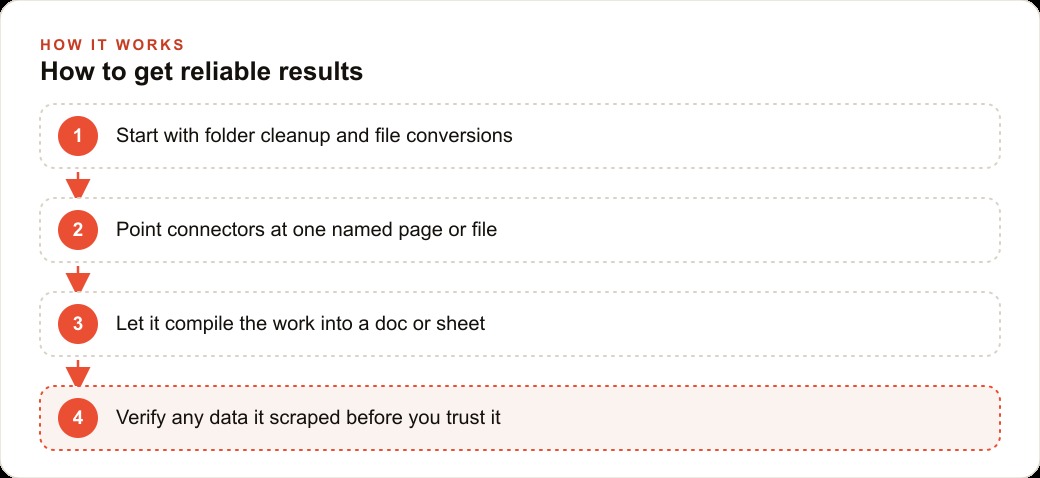
That practice generalizes. Specific inputs, local file operations over browser automation, verification of extracted numbers, and human review before external sharing: four constraints that define the boundary inside which this tool reliably earns its place in a business workflow.
That is exactly what we do at AI DOERS. Book a private 30-minute call with Madhuranjan Kumar and we will map the fastest path to it for your specific business.
Book your call →
Madhuranjan Kumar
Madhuranjan Kumar brings 20 years of performance-marketing experience and has managed over $200 million in Facebook ad spend for brands across the United States and beyond. His expertise spans the full modern marketing stack: Meta, Google Ads, TikTok, email automation, CRM, and the websites that hold it together. At AI DOERS he turns that track record into lead-generation systems for businesses across every industry.