
A 100% Private AI Agent That Runs On Your Own Machine
Agent Zero is a free, open source AI agent that runs inside a sandbox on your own computer. It can process files, do accounting, edit media, and analyze private documents without sending your data anywhere. Here is how I would put it to work for a real business.

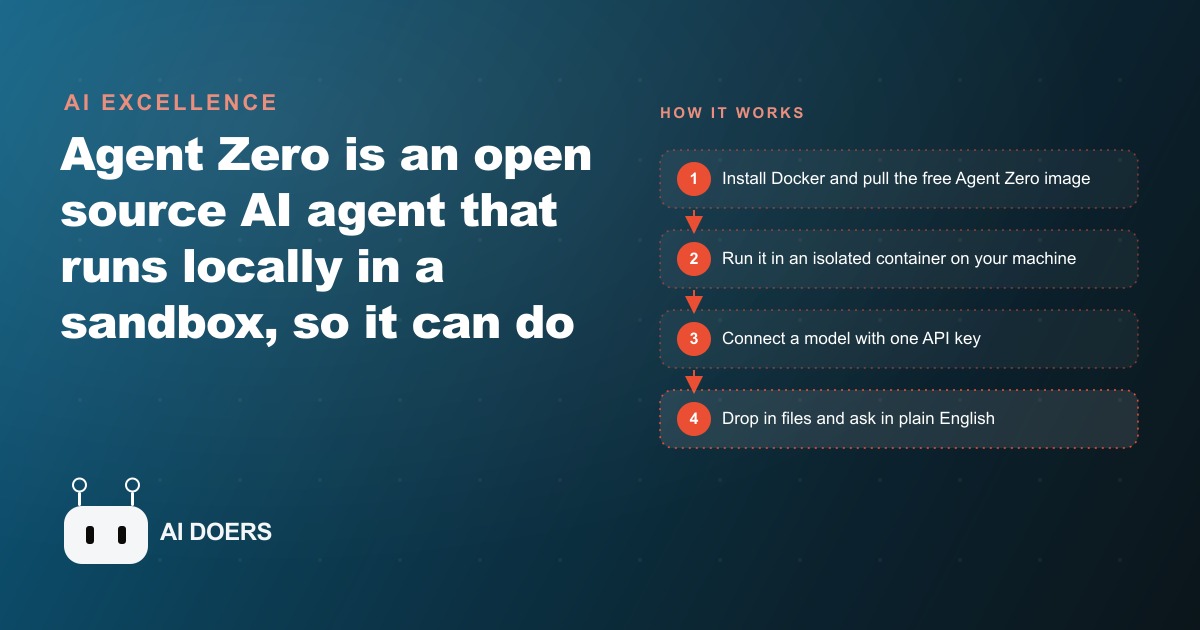
The AI agent that never phones home
Every file you drop into a public AI tool leaves your building the moment you hit send. Agent Zero is the first genuinely capable tool I have seen that reverses that deal entirely: it runs on your own computer, inside a free Docker container, and your data stays exactly where you left it. I am Madhuranjan Kumar, and this is the setup I would use for any business that handles files it cannot afford to leak.
Agent Zero is open source and free. Docker is free. The model you connect to it can be cloud-hosted through a private API key, or it can run fully on your own hardware with nothing ever leaving the machine at all. The result is a capable AI assistant that can reconcile invoices, split PDFs, clean up photos, and analyze sensitive documents in plain English. The whole stack costs almost nothing to run and takes one afternoon to set up.
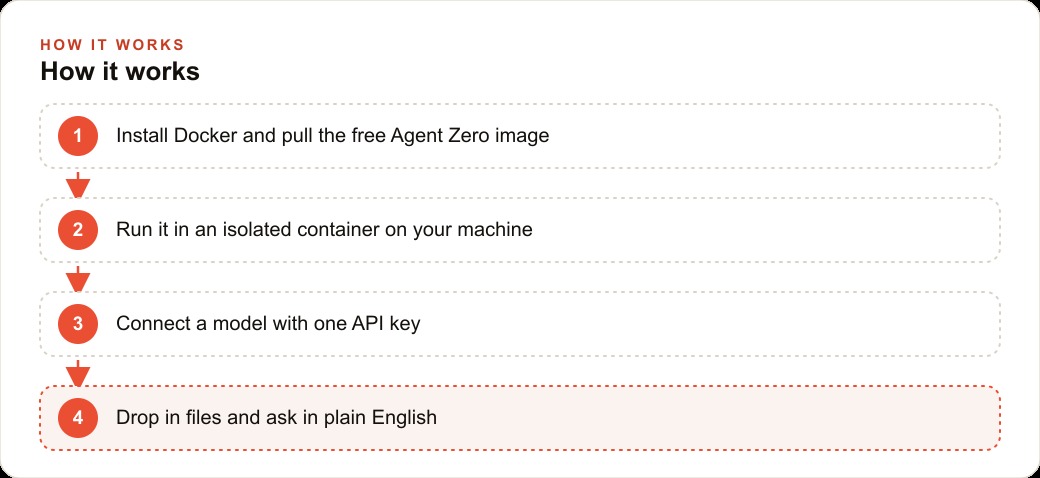
Install Docker and pull the Agent Zero container in four minutes
The first step is installing Docker Desktop on your computer. Docker creates an isolated mini-computer, called a container, that runs independently from the rest of your system. The Agent Zero container runs inside that space, which means it can install tools, run commands, and do real work without ever touching your files, settings, or operating system. If something goes wrong inside the container, it stays inside the container.
Go to docker.com, download Docker Desktop for your operating system, and run the installer. When it finishes, open a terminal and run the pull command for Agent Zero. The image is a few gigabytes so the first pull takes a couple of minutes on a normal connection. Once it lands, start the container with the run command from the Agent Zero documentation. You will see the Agent Zero interface in your browser at localhost, and the container is live.
The reason the setup takes four minutes rather than forty is that all the complexity is already packaged inside the image. You are not installing Python environments, configuring system libraries, or troubleshooting dependency conflicts. You pull one image and run it. That simplicity is the whole point. The hard infrastructure work was done once by the people who built Agent Zero, and you benefit from it every time a new person sets this up.
Connect your model with a single API key
With the container running, open the Agent Zero settings panel in your browser. You will see a field for a model provider and an API key. This is where you decide how much privacy you want and how much capability you need.
The most private option is a local model. Tools like Ollama let you run a capable open-source language model entirely on your own hardware. If you choose this path, set the Agent Zero model endpoint to your local Ollama address and no API key is needed. Nothing leaves your machine at any point, including the text you type and the files you drop in. The trade-off is that local models require a reasonably powerful computer and the quality is lower than the best hosted models, though the gap has narrowed significantly.
The high-capability option is a cloud model accessed through a private API key from Anthropic, OpenAI, or another provider. With a private API key, your requests go directly to the model provider under your own account. You are not using a shared consumer product. The provider has their own data handling policies, and you control the key. For most business document tasks, the cost is small, usually well under a dollar per complex job. Start with a modest spending cap on the key so you can experiment without surprises.
Either way, the connection is one field in the settings panel. Enter the key, select the model, save, and the agent is ready.
Drop files in and ask for invoice reconciliation in plain English
The interface is a chat window. You drag a file onto it or use the upload button, then type what you want. There is no special syntax to learn. You describe the outcome and the agent figures out the steps.
For invoice reconciliation, the workflow looks like this. Drag in a folder of supplier invoices, PDF or image format, and type something like: total these by supplier, flag any duplicate amounts, and give me a category breakdown. The agent reads every document, extracts the line items, groups them, checks for duplicates, and returns a clean table. What used to be an hour of copy-paste work in a spreadsheet comes back in a few minutes.
The same approach works for bank statements. Drop in the PDF of a merchant or bank statement and ask for a spending breakdown by category. The agent parses every transaction line, groups the entries, and returns a summary you can review. If you want it formatted as a specific layout, describe the layout. If you want the output as a CSV you can open in a spreadsheet, ask for that. The agent adapts to the output format you need rather than forcing you to reshape its default output.
This is the kind of task that currently falls on the most expensive person in a small office, the owner or the bookkeeper, precisely because it requires careful attention to detail. Handing it to a local agent does not replace the review step. You still check the output. But the agent does the extraction, grouping, and formatting, which is the part that takes the most time and is the most tedious. The human review of a clean organized table takes a fraction of the time that producing the table took.
Split PDFs, clean up photos, and process documents at scale
Because Agent Zero has full access to a Linux terminal inside its container, it can install whatever tool a task requires and run it. You do not need to install anything on your own computer. The agent handles the tooling.
For PDF work, tell it to split a large document at a specific page number, or extract specific pages into a new file, or merge several PDFs into one. It installs the right PDF tool inside the container, performs the operation, and hands you the result. For a business that produces contracts, consent forms, intake packets, or multi-page reports, this kind of batch document work is genuinely valuable.
For image processing, ask it to remove the background from a photo, resize it to specific dimensions, convert it to a different format, or apply a simple crop. Again, the agent installs the right tool, runs the operation, and returns the processed file. This matters for any business that manages product photos, promotional images, or before-and-after documentation where formatting consistency is important.
For private document analysis, point the agent at a folder of internal files and ask questions about them. Summarize every supplier agreement in this folder. Find every document that mentions a specific term. Pull out the renewal dates from these contracts. The agent reads the documents, extracts the information, and returns a structured answer. Because everything runs locally, sensitive internal files never touch an external server. This is the use case that makes local AI genuinely different from cloud AI for businesses with real data-handling obligations.
Businesses that run serious meta ads campaigns accumulate a substantial amount of internal documentation around creative performance, audience notes, and spend records. The ability to analyze that documentation privately, without uploading it to a third party, is exactly the kind of competitive advantage that compounds over time as the document library grows.
Run private document analysis for a med spa without a single file leaving the building
Here is how I would set this up for a med spa, working through every step concretely.
The med spa handles three categories of sensitive information: supplier invoices and product costs, patient documents and consent forms, and marketing materials including before-and-after photos. All three categories benefit from the local agent, and none of them should be uploaded to a consumer AI tool.
Start with the financial side. The owner exports the month's supplier invoices as PDFs from the purchasing inbox, drops the whole folder into Agent Zero, and asks for a category breakdown: injectables, skincare products, equipment leases, and consumables. The agent reads every invoice, extracts the line items, groups them by category, and returns a clean table with totals. The owner reviews it in five minutes instead of spending an hour building it. The agent also flags any invoice that appears twice, which catches double-billing errors that would otherwise slip through.
The same workflow handles the bank statement. The front desk drops in the merchant processing statement at the end of the month and asks the agent to pull out every transaction over five hundred dollars and sort them by date. The result is a focused review list rather than a wall of transactions. A front desk coordinator with no accounting background can do this task reliably because the output format is clear and the review is simple.
For the media side, the med spa produces before-and-after photos regularly. These photos need backgrounds removed, consistent sizing applied, and sometimes a format conversion before they go on the website or into social posts. The owner drops a batch of photos into the agent and asks it to remove the background from each one and resize to a standard dimension. The agent processes the whole batch and returns the cleaned files. The before-and-after documentation that usually requires a design subscription and several hours of editing becomes a ten-minute batch job.
For documents, the agent holds a private knowledge base of supplier agreements, equipment leases, and service contracts. When the owner wants to know whether a supplier agreement has a volume discount clause, or what the notice period is on an equipment lease, they ask the agent. It searches the local documents and returns the relevant excerpt with the answer. No document leaves the building. No account is needed with a cloud document service. The answers come from the owner's own files, searched privately on their own machine.
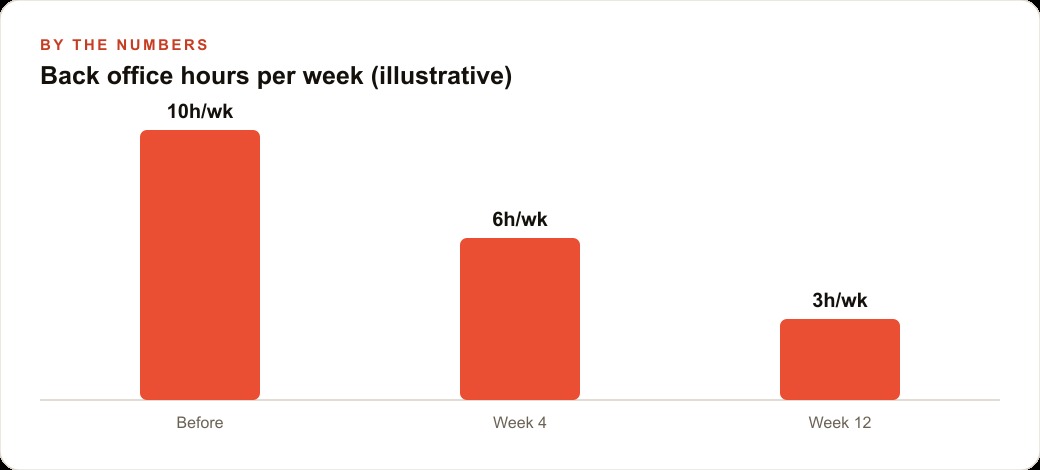
Here is a concrete picture of the time involved. Before this setup, the med spa's back office work, reconciliation, document filing, photo editing, and contract review, took roughly ten hours a week split across the owner and the front desk. After three months with the local agent handling the repetitive parts, that number dropped to around three hours. The remaining three hours is human review of agent output plus the tasks that genuinely require judgment. The agent did not replace anyone. It removed the part of the work that required time but not expertise, which freed the owner to spend more time with clients and the front desk to focus on scheduling and follow-up.
That kind of operational efficiency is exactly what allows a small clinic to scale its web and CRM systems intelligently, because the time that used to go into manual data work is now available for higher-leverage activity.
Avoid these four mistakes when you first set it up
The first mistake is putting live sensitive data into the agent before you have run even one test task. Start with a batch of dummy files, receipts with no real amounts, photos with no identifying content, documents you would not mind if the agent misread. Run the agent through the full workflow for each task type and confirm the output is what you expected. Only after you trust the setup should you bring in real client records or financial documents.
The second mistake is choosing a cloud model with no spending cap. The agent makes multiple calls to the model when it is working through a complex task, and the cost adds up faster than it does in a simple chat session. Set a monthly cap on the API key before you start. A few dollars a month is the right ballpark for typical business document work, but unexpected configurations can run higher. The cap protects you while you learn the system.
The third mistake is trying to automate every task at once. Pick one workflow that currently costs the most time, get it working reliably, and then add the next one. The businesses that set up the agent and immediately build a five-step automation pipeline hit the first error and abandon the whole thing. The businesses that automate one task this week and one more next week build a system they actually use.
The fourth mistake is skipping the review step. The agent handles the execution but the output is not always correct on the first pass. A reconciliation may miss a category. A document summary may paraphrase a clause in a way that loses important nuance. Treat the agent's output the way you would treat output from a capable new employee: check it thoroughly at first, verify it against the source, and extend more trust as the track record builds. The review step gets faster over time because the agent gets more consistent as you refine how you describe tasks.
Businesses running Google ads alongside their organic content know this pattern well: you run the campaign, you check the output, you adjust the targeting, and the efficiency improves over time. The local agent follows the same loop. Better task descriptions produce better results, and the system gets more useful the more you use it.
Build the first working workflow this afternoon
The setup path is straightforward. Install Docker Desktop, pull the Agent Zero image, run the container, connect one model with a capped API key, and pick one real task to run end to end today. Make it something concrete: reconcile last month's invoices, split a long document, clean up a batch of photos. Run the full workflow, check the output against the source, and confirm it works the way you need it to.
Once that first task works reliably, add a second one. The agent's value is additive. Every workflow you build on top of the first one is additional capacity for your week at essentially zero marginal cost. The whole system runs on the computer you already own, using tools that are already free, powered by a model that costs a small fraction of what manual labor costs for the same work.
For businesses managing content and local visibility through SEO content strategies, the document processing side of this setup is particularly valuable. Research notes, drafts, competitor analysis, and performance records can all be organized and searched privately. The agent becomes a private research assistant that knows your own business better than any external tool can.
The core insight is this: AI leverage and data privacy are not a trade-off anymore. You do not have to choose between a capable tool and keeping your files off external servers. Agent Zero gives you both, for free, on the machine you are already sitting in front of. The only thing left is to run the first task.
That is exactly what we do at AI DOERS. Book a private 30-minute call with Madhuranjan Kumar and we will map the fastest path to it for your specific business.
Book your call →
Madhuranjan Kumar
Madhuranjan Kumar brings 20 years of performance-marketing experience and has managed over $200 million in Facebook ad spend for brands across the United States and beyond. His expertise spans the full modern marketing stack: Meta, Google Ads, TikTok, email automation, CRM, and the websites that hold it together. At AI DOERS he turns that track record into lead-generation systems for businesses across every industry.