
101 AI Apps You Can Vibe Code, And The Framework That Makes Them Buildable
You can build most useful AI apps without traditional coding by following one simple framework: write a meta prompt to clarify the idea, turn it into a Product Requirements Prompt, then loop through implement and debug. Here is the framework and a worked example for a real business.

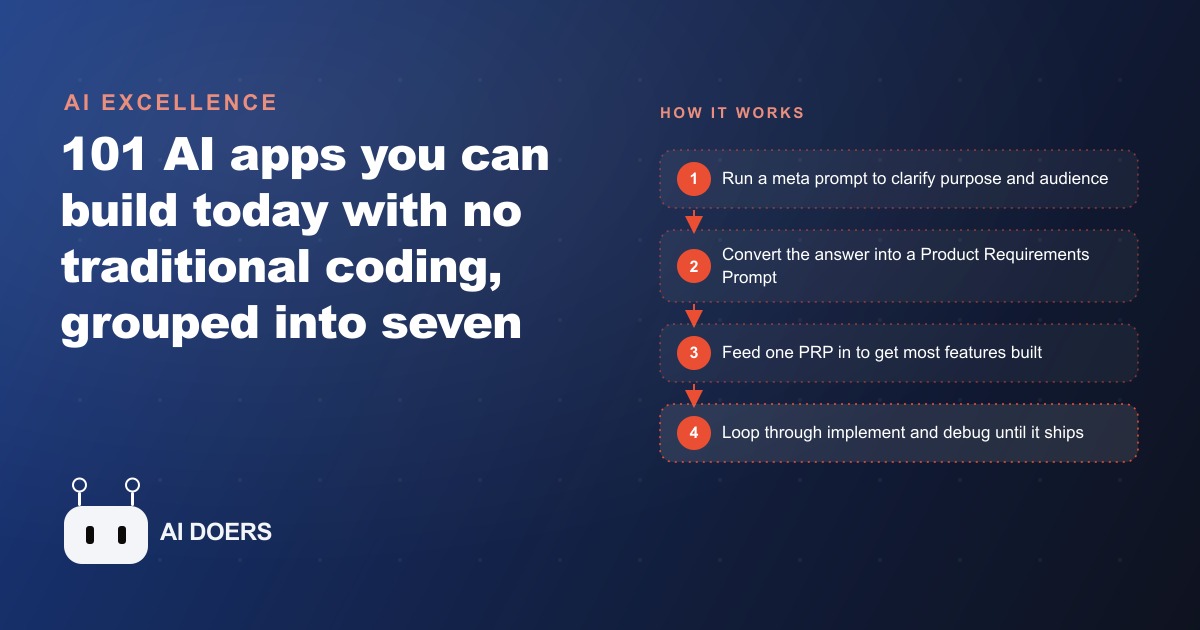
There is no shortage of AI app ideas, and someone recently catalogued a hundred and one of them you can build without traditional coding. What stops most people is not imagination. It is the absence of a repeatable way to get from a vague concept to a working product. Vibe coding, building software by describing what you want and letting an AI write and fix the code, closes that gap for a huge range of apps. Below are the seven categories those hundred and one ideas fall into, plus the framework that makes any of them buildable. Pick one category, build one app, and ship it before you over plan.
I am Madhuranjan Kumar, and I want to be honest up front. Coding is not obsolete, because custom and genuinely complex features still need real engineering. But for the categories below, it is no longer the entry barrier it used to be, and the framework is the same every time.
The framework that makes all seven categories buildable
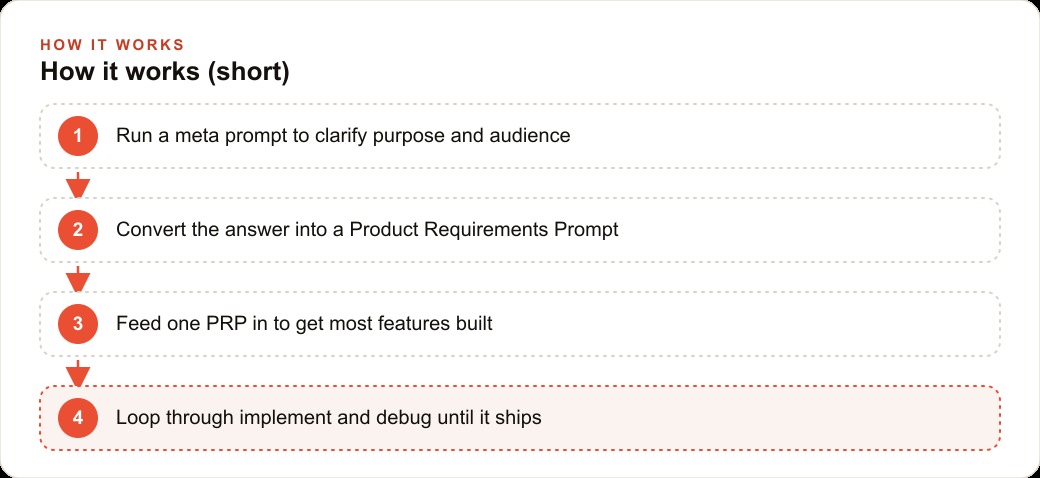
Before the list, the method, because it applies to every category equally. The whole approach rests on one idea: if you cannot describe exactly what you are building, it is unfair to expect the AI to figure it out. So the work starts in a prompt, not a code editor. First you run a meta prompt, a prompt whose only job is to interrogate your idea and pin down its purpose, its target audience, and its core features. The output becomes a Product Requirements Prompt, or PRP, the same kind of clear specification a product manager writes. Feed that single PRP into your AI coding tool and one prompt will often deliver 80 to 90 percent of the core features in a single pass. The remaining 10 to 20 percent comes from looping: implement, debug, implement, debug. When errors appear, you screenshot them, point at the broken element, or click the auto fix option and let the AI repair itself. That loop is the entire rhythm, and it separates people who ship from people who collect ideas.
1. Database and data apps
The first category turns messy data into something searchable. You ingest disorganized information, index it, and let users query it in plain language. The classic examples are a video lecture search that pulls one relevant clip out of hours of footage, an Excel data cleaner that fixes formatting at scale, or a cross tool search that looks across Notion, Slack, and Drive at once. If your business drowns in scattered documents, this is where the fastest relief lives, because the value is immediate and the build is well within reach.
2. Hardware and real time apps
The second category is the most overlooked, and it is full of practical wins. AI can read sensors, cameras, and wearables in a real time loop and react to what it sees. Think traffic incident detectors, a smart fridge that tracks its own inventory, energy anomaly alerts that flag a spike the moment it happens, or a wearables aggregator that unifies data from a Whoop band and Apple Health into one picture. Anything with a live signal and a decision to make fits here, and most businesses never consider it.
3. AI enhanced dashboards
The third category pulls near real time sources, cleans them, and visualizes what matters at a glance, with the important stuff highlighted rather than buried. A personal finance dashboard that warns you the moment you blow 30 percent of your budget and then pings you on WhatsApp is the canonical example, but the pattern applies to any business metric. The point of a good dashboard is not more numbers. It is the one number that needs attention, surfaced before you have to go looking for it.
4. Chatbots and assistant agents
The fourth category reads a user's intent, fetches data or takes an action, then logs what it did. This is where a lot of operational time gets recovered. An accounting assistant can generate an invoice from a single sentence. A subscription manager can track and cancel recurring charges. A utility bill negotiator can handle a tedious back and forth nobody wants to do. The defining trait is that these apps do not just answer, they act, which is what makes them feel like a real assistant rather than a search box.
5. Personalized coaches
The fifth category evaluates your input, scores it, and tracks your progress over time. Upload a golf swing or a sketch and get specific feedback. Hold a real time conversation with a language learning coach that adapts to your level. The mechanism is always the same: assess, score, remember, and show improvement. For any business built on skill development or client progress, this category is a natural fit, because the tracking over time is what keeps users coming back.
6. Multimodality apps
The sixth category generates and remixes across text, audio, images, and video. A slide deck generator turns a topic into an editable presentation. Converters move freely between video, text, and image formats. This is the category that turns one piece of content into many, which is why it pairs so naturally with marketing: a single idea becomes a post, a graphic, and a short video without three separate tools and three separate skills.
7. Automations and macros
The seventh category runs on a trigger. Something fires, the AI performs a task, and it logs the result autonomously. On the cloud side, a workflow can classify incoming customer feedback and file it as Jira tickets. On the local side, a macro can auto sort and rename your chaotic Downloads folder. Like hardware apps, automations are underrated and quietly remove busywork from a team every single day. If a human is doing the same small task on repeat, an automation in this category can usually take it.
A worked example: shipping tools for a dental practice
Let me run the framework across a single business so the categories stop being abstract. A dental practice lives on small, repetitive operational tasks nobody has time to systematize, and several categories map straight onto them.
I would start with an assistant app from category four, because the front desk loses real hours to the same jobs every day. A recall assistant reads which patients are overdue for a cleaning, drafts a personalized reminder, and logs that it was sent. An intake assistant turns a new patient's form into a clean summary the hygienist reads in seconds. Next, a dashboard from category three that pulls the day's schedule, no show rate, and outstanding balances into one view and highlights what needs attention before the doors open. Then an automation from category seven that classifies incoming patient messages, routing a billing question to the office manager and an appointment request to the scheduler without anyone sorting an inbox by hand.
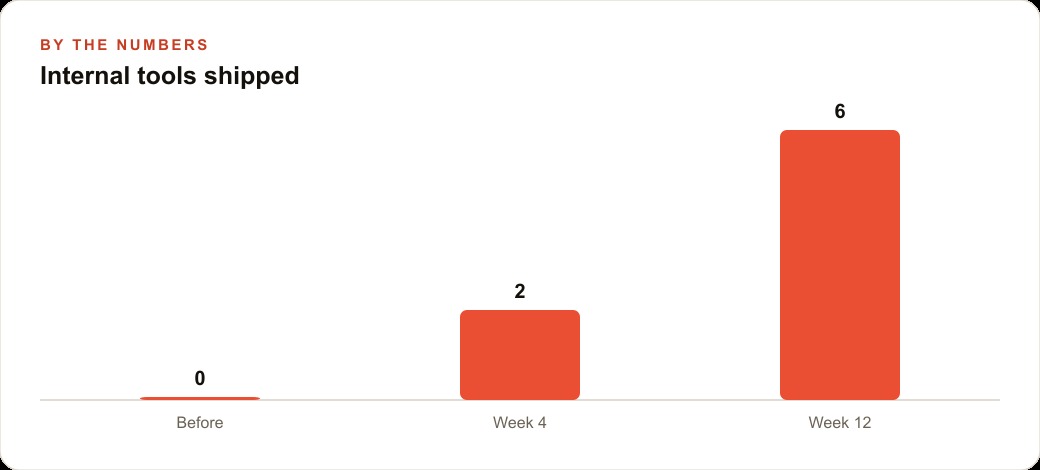
Each of these is a single PRP away from a working first version. Put an illustrative number on it: a practice that ships zero internal tools today could realistically have two live within a month and half a dozen within a quarter, each one handing the team back time. That reclaimed capacity matters beyond the front desk. The recall assistant keeps the schedule full, which protects the return on the practice's Google Ads and Facebook and Instagram ad campaigns, because filling a chair you already paid to acquire is where the profit actually is. The intake summaries and message logs can flow into the CRM and website stack so follow up never depends on someone remembering. The point is not to build everything. It is to pick the one task that hurts most and ship an app for it this week.
How to start without over planning
Why the meta prompt does the heavy lifting
It is tempting to treat the meta prompt as a formality and rush to the build, and that is exactly why most first attempts produce something disappointing. The meta prompt is not paperwork. It is the step that forces you to actually know what you want, and everything downstream inherits the clarity or the confusion of that moment. If you cannot answer what the app is for, who uses it, and which few features matter most, the AI is being asked to invent your intentions, and it will invent them badly.
This is why the framework starts in a prompt rather than a code editor. The Product Requirements Prompt that comes out of the meta prompt is the same specification a product manager would hand a development team, and it does the same job: it removes ambiguity before anyone builds. Feed a clear PRP in and one pass gets you most of the way, because the model is implementing a decided thing rather than guessing at an undecided one. Feed a vague idea in and you spend the whole debug loop discovering what you actually wanted, which is slower and more frustrating than thinking it through up front. The discipline of the meta prompt is what makes the 80 to 90 percent first pass possible.
Hardware and automations are where the overlooked wins hide
Of the seven categories, two consistently get ignored, and they happen to be where the quietest, most durable value sits. Hardware and real time apps feel intimidating because they touch sensors and cameras, so most people skip them, yet a huge amount of operational pain lives exactly there: inventory that goes stale because nobody tracks it live, anomalies that get noticed hours too late, signals from devices that never get unified into a decision. An app that watches a live feed and acts the moment something happens removes a category of problem that dashboards reviewed once a day never catch.
Automations and macros get ignored for the opposite reason: they feel too small to bother with. But a trigger based task that fires, does its job, and logs itself is precisely the kind of thing that eats a team's hours in tiny, invisible slices. Sorting an inbox, filing feedback, renaming and organizing files, moving a record from one place to another: none of it is impressive, and all of it adds up. The businesses that win with vibe coding are usually not the ones building the flashiest coach or the slickest multimodal generator. They are the ones who quietly automated the boring, repetitive tasks nobody wanted, one small app at a time, until the team stopped doing busywork entirely.
Ship one thing this week, then repeat
The single behavior that separates people who build from people who only collect ideas is finishing one small app and putting it to use. Not the best app, not the most ambitious one, just the one that solves a task that hurts and can ship this week. Deploy it, use it for seven days, and let what you learn shape the next build. The framework compounds precisely because you run it repeatedly on real problems, and the only way to start that compounding is to finish something small right now.
The mistake that kills most vibe coding attempts is over planning, so refuse to do it. Pick exactly one category and one painful task. Write the meta prompt and answer its questions honestly about purpose, audience, and core features. Turn that into a PRP and feed it into your AI coding tool in a single prompt. Expect the first build to be 80 to 90 percent there, not perfect, then settle into the implement and debug loop: tweak the interface, add a feature, screenshot any error and let the tool fix itself, repeat until it works. Deploy it, use it for a week, and only then move to the next idea.
The framework is what compounds, because every app teaches you the same loop, and the loop is what scales from a weekend project to tools your whole team relies on. Custom or genuinely complex features, especially anything that handles money or sensitive records, still need real engineering, so know where that line is and get a professional to review anything past it. You can absolutely build your first app yourself this week, and I would encourage you to. If you want the higher value tools designed properly, wired into your existing systems, and built to be secure and reliable rather than a fragile prototype, that is the kind of work my team does, and a short call is the quickest way to scope what is worth building for your business.
That is exactly what we do at AI DOERS. Book a private 30-minute call with Madhuranjan Kumar and we will map the fastest path to it for your specific business.
Book your call →
Madhuranjan Kumar
Madhuranjan Kumar brings 20 years of performance-marketing experience and has managed over $200 million in Facebook ad spend for brands across the United States and beyond. His expertise spans the full modern marketing stack: Meta, Google Ads, TikTok, email automation, CRM, and the websites that hold it together. At AI DOERS he turns that track record into lead-generation systems for businesses across every industry.